As Amazon Associates, we earn from qualifying purchases. This means we may receive a small commission at no extra cost to you if you click through and make a purchase.
ASUS has established a formidable reputation in portable computing through its engineering focus on structural reliability, precision ErgoSense keyboard ergonomics, and efficient thermal dissipation designs like IceCool technology. In the secondary market, a refurbished asus laptop provides an analytical shopper with high hardware utility, pairing modern multi-core microarchitectures with high-definition NanoEdge displays at lower entry points. Across the Vivobook family, the manufacturer focuses on balancing chassis rigidity, port versatility, and display clarity to support mobile computing workflows without superfluous hardware overhead.
While each unit in this lineup utilizes a distinct silicon configuration spanning AMD Ryzen and Intel multi-core platforms, they differ substantially in memory channel allocation, internal storage drive interfaces, thermal profiles, and display footprint dimensions.
ASUS Laptops Compared
| Model | Processor Architecture | System Memory | Solid-State Storage | Display and Form Factor |
|---|---|---|---|---|
| ASUS 2023 Vivobook Go 15 Laptop | AMD Ryzen 5 7520U | 8GB | 512GB SSD | 15.6-inch FHD (3.60 lbs) |
| ASUS Vivobook Go 14″ FHD Business | Intel Celeron N4500 | 4GB DDR4 | 128GB SSD | 14.0-inch FHD LED |
| ASUS Vivobook Go 15.6” FHD Slim | AMD Ryzen 3 7320U | 8GB DDR5 | 128GB SSD | 15.6-inch FHD NanoEdge (3.59 lbs) |
| ASUS VivoBook Laptop 2026 Edition | Intel Core i3-1315U (6-Core) | 16GB DDR4 | 256GB PCIe SSD | 14.0-inch FHD Anti-Glare (3.09 lbs) |
Table from this guide — scroll sideways for the remaining columns.
ASUS 2023 Vivobook Go 15 Laptop for Everyday Multitasking


ASUS 2023 Vivobook Go 15 Laptop 4 photos from the Amazon listing
Best for: Everyday multitasking and large local storage
Pros
- Spacious 512GB solid-state drive
- AMD Ryzen 5 quad-core architecture
- Wi-Fi 6E and fast-charging battery
- Military-grade chassis durability
Cons
- Fixed 8GB memory boundary
- Heavier 3.6-pound form factor
The ASUS 2023 Vivobook Go 15 Laptop is a 15.6-inch portable computer built on AMD mobile architecture and wrapped in a durable Mixed Black chassis (model E1504FA-AS52). Under the hood, it features the AMD Ryzen 5 7520U processor paired with integrated AMD Radeon Graphics, supported by an allocated 6 GB graphics memory reserve. The system includes 8GB of onboard RAM and a generous 512GB solid-state drive, running the standard 64-bit release of Windows 11 Home. The visual workspace is anchored by an expansive 15.6-inch Full HD display framed by slender NanoEdge bezels to maximize screen-to-body surface area.
Thermal regulation is sustained through ASUS IceCool technology, allowing the Zen-based microarchitecture to maintain stable operating clocks during intensive productivity sessions. Durability is a principal engineering metric here; the chassis satisfies rigorous US military-grade structural standards, complemented by a 180-degree lay-flat hinge assembly that facilitates benchtop collaboration. Interface options include USB Type-C, legacy USB Type-A, and a dedicated HDMI video port. Wireless protocols are cutting-edge, featuring built-in Wi-Fi 6E alongside Bluetooth 5. Fast-charging circuitry can elevate the internal cell to 50% capacity in 30 minutes, while an ErgoSense keyboard and AI Noise-Canceling array microphone enhance input accuracy and remote meetings.
This configuration suits general business professionals, technical students, and home office administrators who require a full-sized 15.6-inch screen paired with substantial local storage for software libraries and document archives. The 512GB solid-state drive offers four times the capacity of entry-level configurations, avoiding early external storage workarounds. However, users whose compute workloads involve heavy memory-mapped datasets or dense local virtualization will find the fixed 8GB memory footprint a limiting factor, leading them to consider the higher-capacity memory architecture found in the 16GB Core i3 edition.
ASUS Vivobook Go 14″ FHD Business for Light Office Tasks

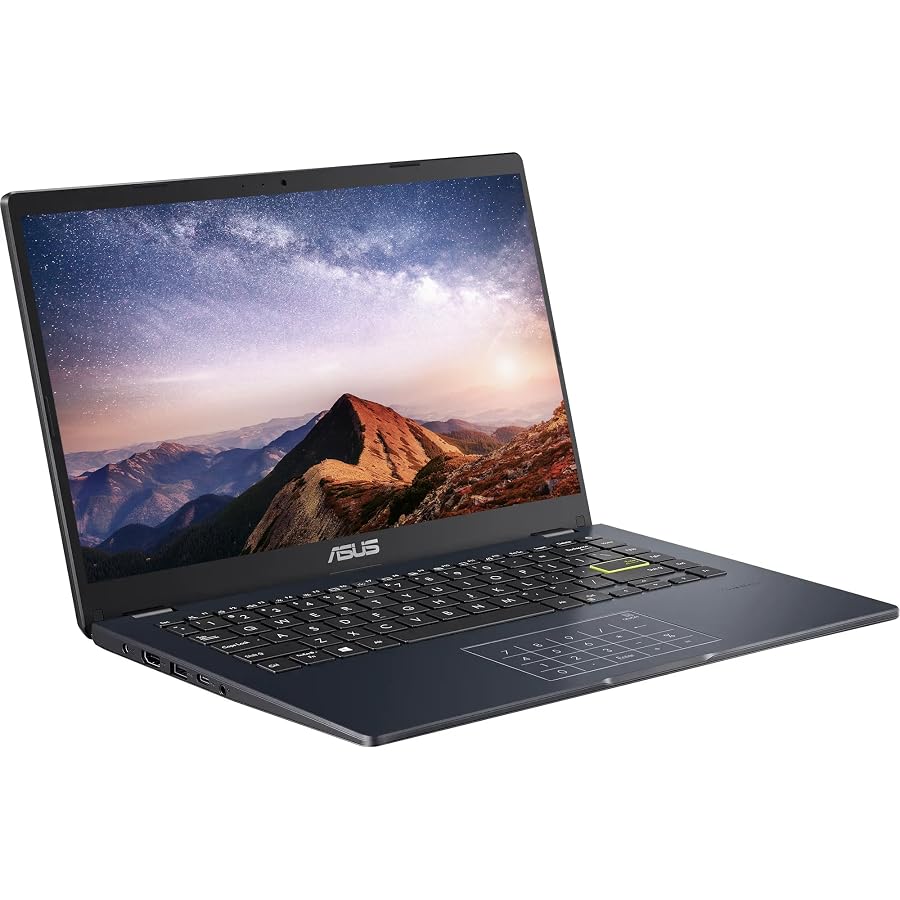


ASUS Vivobook Go 14" FHD Business 4 photos from the Amazon listing

Best for: Modern everyday workflows on fast DDR5 memory
Pros
- High-bandwidth 8GB DDR5 memory
- Quad-core AMD Ryzen 3 7320U
- Versatile USB-C display and power
- SonicMaster audio system
Cons
- Modest 128GB solid-state drive
- Pre-installed Windows 11 in S mode
Best for: Basic administrative tasks and extended travel
Pros
- Up to 12 hours battery runtime
- Included NLY docking station hub
- Full HD 1080p LED display
- Compact 14-inch chassis
Cons
- Entry-level Celeron dual-core CPU
- Restricted 4GB RAM capacity
The ASUS Vivobook Go 14″ FHD Business is an ultra-portable clamshell laptop focused on low-draw mobile computation, finished in Star Black. At its core is the Intel Celeron N4500 processor, an efficient dual-core, dual-thread chip operating with a 4MB cache and a burst frequency reaching up to 2.80GHz. Graphics are processed by integrated Intel UHD Graphics. For primary system resources, it incorporates 4GB of DDR4 SDRAM and a dual-structure storage configuration totaling 256GB (comprising a 128GB eMMC module alongside a 128GB solid-state drive). The system arrives with Windows 11 Home and an external NLY Docking Station bundle.
Designed for basic administrative functionality, this 14-inch platform provides a 1920 x 1080 Full HD LED display with an integrated front-facing HD camera. The physical I/O interface includes one USB-C 3.2 port, one USB-A 3.2 port, a legacy USB-A 2.0 port, an HDMI 1.4 output, and an analog 3.5mm combo audio jack. Wireless traffic is routed across Wi-Fi 5 and Bluetooth 5.0 controllers. The listing notes that to achieve these hardware specifications, the original factory seal is opened by professional engineers for component upgrades, backed by a 1-year warranty provided by NLY Electronics. Operational battery endurance is rated for up to 12 hours between charges.
This model is optimal for budget-focused office staff, data entry operators, and students who engage primarily with cloud document suites, web portals, and terminal-based tasks. The up to 12-hour operational window makes it an endurance champion for mobile field assignments. Those planning a broader asus laptop computer deployment should recognize that its dual-core Celeron engine and 4GB memory barrier will exhibit latency under heavy multitasking, making the quad-core Ryzen or 6-core Intel models superior options for heavier computational loads.
ASUS Vivobook Go 15.6” FHD Slim for Balanced Productivity


ASUS Vivobook Go 15.6” FHD Slim Laptop, AMD Ryzen 4 photos from the Amazon listing
The ASUS Vivobook Go 15.6” FHD Slim (model E1504FA-AS33) presents a contemporary AMD hardware build in a sleek 3.59-pound form factor measuring 14.19 by 9.15 by 0.70 inches. The processing engine is the AMD Ryzen 3 7320U, a modern quad-core architecture with multi-threading capabilities, integrated AMD Radeon Graphics, and a streamlined thermal footprint. Memory performance receives a notable upgrade through 8GB of high-speed DDR5 RAM, paired with a 128GB solid-state drive. Operating environment responsibilities are handled by Windows 11 Home in S mode, delivering streamlined security and fast app execution.
The display panel utilizes ASUS NanoEdge thin-bezel construction across a 15.6-inch diagonal canvas, delivering a 1920 x 1080 resolution at a standard 60Hz refresh rate, 250 nits of sustained luminance, and a 45% NTSC color gamut. Physical user touchpoints include the precision ErgoSense keyboard, a spacious touchpad, a 180-degree lay-flat hinge, and a 720p HD webcam equipped with an integrated physical privacy shutter. Audio rendering and voice capture are driven by SonicMaster technology utilizing built-in speakers and an array microphone. System I/O is comprehensive, hosting a USB 3.2 Gen 1 Type-C port (configured for power and display), a USB 3.2 Gen 1 Type-A port, a USB 2.0 Type-A port, HDMI 1.4, a 3.5mm audio jack, and a dedicated DC-in port.
This machine is engineered for students and remote workers who require the memory bandwidth benefits of DDR5 alongside a reliable quad-core processor for modern productivity suites, video conferencing, and multi-tab browser workloads. When executing an asus laptop comparison against higher-tier models such as an asus vivobook s, this Vivobook Go model maintains strong essential performance, though users working with massive local media collections will find the 128GB internal drive constricting compared to the 512GB capacity on the Ryzen 5 build.
ASUS VivoBook Laptop 2026 Edition for Intensive Applications


ASUS VivoBook Laptop 2026 Edition 4 photos from the Amazon listing
Best for: Heavy multitasking and intensive spreadsheet analysis
Pros
- Generous 16GB DDR4 system memory
- 6-core Intel Core i3-1315U processor
- Fast PCIe x4 solid-state drive
- Lightweight 3.09-pound blue chassis
Cons
- Moderate 256GB storage capacity
- Battery life rated up to 8 hours
The ASUS VivoBook Laptop 2026 Edition is an agile 14-inch computing terminal executed in a Quiet Blue finish, weighing just 3.09 pounds with dimensions of 12.79 by 8.42 by 0.70 inches. It is driven by Intel’s 13th Gen Core i3-1315U processor, which leverages a 6-core hybrid architecture (comprising 2 Performance cores and 4 Efficient cores managing 8 threads) with a 10MB Intel Smart Cache and Turbo Boost frequencies up to 4.50GHz. Graphics are powered by integrated Intel UHD Graphics. Memory capacity is substantial, utilizing 16GB of DDR4 SDRAM alongside a fast 256GB PCIe solid-state drive operating over a high-bandwidth PCIe x4 bus interface.
The 14-inch Full HD (1920 x 1080) thin-bezel panel features an anti-glare coating, 250 nits brightness, a 16:9 aspect ratio, a 60Hz refresh rate, and 45% NTSC color space coverage. Network connectivity is handled by MediaTek Wi-Fi 6E (2×2) and Bluetooth 5.3, providing optimal wireless transmission bandwidth and peripheral stability. The chassis houses a spill-resistant keyboard, SonicMaster audio drivers, an integrated 720p HD camera with a mechanical privacy shutter, and an 8-hour battery pack. External connectivity is rounded out by a dedicated USB Type-C interface, multiple USB Type-A ports, and an HDMI display output.
This unit is the definitive selection for power business users, programming students, and heavy analytical spreadsheet editors who need the massive headroom of a 16GB memory footprint to prevent out-of-memory caching. While it does not deliver the dedicated graphical rendering engines of an asus rog laptop, its 6-core Intel hybrid computing architecture outpaces conventional quad-core configurations in complex multi-application environments. It yields to the Vivobook Go 15.6-inch variants strictly when a customer prioritizes a wider display canvas or dedicated numpad area over memory volume and compact chassis weight.
How to Choose the Right ASUS Laptop
Deciding which asus laptop to buy requires an objective evaluation of your computing workloads against processor architecture, memory bandwidth, storage drive throughput, and chassis portability. When comparing an asus ryzen vs intel laptop within the refurbished Vivobook catalog, computational topology plays a decisive role. The Intel Core i3-1315U implements a hybrid layout with 2 Performance cores and 4 Efficient cores, delivering high single-threaded burst capability up to 4.5GHz and superior multitasking under heavy resource contention. In contrast, the AMD Ryzen 5 7520U and Ryzen 3 7320U deliver steady multi-core execution profiles with integrated Radeon graphics that efficiently process everyday productivity and media consumption.
Memory capacity directly governs your multitasking boundaries and long-term hardware satisfaction. The ASUS VivoBook Laptop 2026 Edition leads this segment with 16GB of DDR4 RAM, allowing intensive browser environments and simultaneous enterprise suites to execute without relying on virtual swap files. The ASUS Vivobook Go 15.6″ FHD Slim utilizes 8GB of modern DDR5 memory, offering faster transfer rates that enhance integrated GPU efficiency. Meanwhile, the entry-level Celeron model carries 4GB of DDR4 RAM, which suffices for targeted single-purpose administrative work but cannot sustain heavy application stacking. Because memory is frequently soldered on thin-and-light chassis, planning around an asus vivobook ram upgrade post-purchase can be challenging; buyers should secure their required memory ceiling at the time of purchase.
Storage interface configurations also dictate file transfer latency and operating system responsiveness. When reviewing refurbished asus vivobook specs, verify whether the system deploys high-speed NVMe PCIe protocols or hybrid solid-state and eMMC allocations. The ASUS 2023 Vivobook Go 15 Laptop provides a spacious 512GB SSD, giving users ample local storage for operating system updates, offline databases, and heavy application files. The ASUS VivoBook Laptop 2026 Edition deploys a dedicated PCIe x4 solid-state drive, ensuring rapid boot sequences and near-instantaneous file transfers across its 256GB pool. Entry models utilizing 128GB drives require disciplined cloud utilization or supplemental micro-storage solutions.
Chassis dimensions, weight, and environmental ratings determine mobile functionality across different working conditions. Users requiring maximum screen space for side-by-side document examination will benefit from the 15.6-inch displays found on the Ryzen 5 and Ryzen 3 Vivobook Go configurations, both weighing approximately 3.6 pounds and incorporating US military-grade durability certifications. Conversely, mobile professionals who commute frequently will appreciate the 14-inch platforms, particularly the 3.09-pound 2026 Edition, which saves physical bag volume while delivering an anti-glare panel, a spill-resistant keyboard, and advanced Wi-Fi 6E connectivity.
FAQ
How do Ryzen and Intel processors compare across refurbished ASUS Vivobook models?
Within this lineup, the processors serve distinctly different computational workload tiers. The Intel Core i3-1315U uses a 6-core, 8-thread hybrid configuration (2 Performance cores plus 4 Efficient cores) reaching clock speeds up to 4.50GHz, which excels at high-intensity single-thread responsiveness and layered multitasking. The AMD Ryzen 5 7520U and Ryzen 3 7320U utilize 4-core, 8-thread architectures optimized for thermal efficiency, reliable multi-threaded compute, and responsive integrated Radeon graphics. The Intel Celeron N4500 is a dual-core, dual-thread entry-level processor designed primarily for basic productivity, low thermal output, and extended battery life during lightweight web navigation.
Can you perform an ASUS Vivobook RAM upgrade on these laptops?
Many modern compact laptops, including members of the Vivobook Go series, utilize surface-mounted or motherboard-integrated memory configurations to preserve their slim chassis profiles. While some sub-variants incorporate an expansion SO-DIMM slot, listings for compact models often feature non-upgradable or pre-configured memory modules. The listing does not specify internal board schematics for aftermarket expansion across all these chassis. Because aftermarket upgrades cannot be guaranteed, shoppers should purchase the exact capacity required for their long-term operational needs, such as the 16GB model for heavier workloads or an 8GB model for standard productivity.
What display and thermal specifications are standard on Vivobook Go models?
Across this lineup, ASUS incorporates Full HD 1920 x 1080 resolution displays featuring narrow NanoEdge bezels, 60Hz refresh rates, and 45% NTSC color gamut coverage, with anti-glare treatments rated at 250 nits of sustained brightness on the 14-inch and 15.6-inch panels. Thermals on the larger 15.6-inch builds, such as the Ryzen 5 model, are governed by ASUS IceCool thermal technology, which uses specialized heat piping and ventilation channels to keep keyboard palm rests cool and prevent thermal throttling during continuous compute operations.
Which operating system mode comes installed on these refurbished configurations?
The ASUS 2023 Vivobook Go 15 Laptop, the ASUS Vivobook Go 14″ FHD Business, and the ASUS VivoBook Laptop 2026 Edition ship with standard editions of Windows 11 Home (64-bit). The ASUS Vivobook Go 15.6” FHD Slim is configured with Windows 11 Home in S mode, an operating environment restricted to verified applications from the Microsoft Store for enhanced security and power efficiency. Users who require legacy desktop executable installations can transition out of S mode through standard Windows administrative settings at no additional cost.
What connectivity ports and wireless protocols do these ASUS laptops support?
Physical I/O on these Vivobook configurations includes standard USB Type-C ports, high-speed USB 3.2 Gen 1 Type-A ports, legacy USB 2.0 connections, HDMI 1.4 video outputs, and 3.5mm combo audio jacks. Advanced configurations like the Vivobook Go 15.6″ Slim specifically note USB-C support for display and power delivery. For wireless data transmission, the ASUS 2023 Vivobook Go 15 Laptop and the ASUS VivoBook Laptop 2026 Edition integrate modern Wi-Fi 6E radios alongside Bluetooth 5.0 to 5.3 controllers, providing access to the cleaner 6GHz spectrum for high-bandwidth environments, whereas the other models rely on standard Wi-Fi 5 protocols.


