As Amazon Associates, we earn from qualifying purchases. This means we may receive a small commission at no extra cost to you if you click through and make a purchase.
Lenovo maintains a dominant position in the portable personal computing sector by fielding its IdeaPad chassis across entry-level, enterprise, and convertible form factors. Within the ultraportable category, a Lenovo IdeaPad 14 inch notebook balances thermal volume, display real estate, and chassis portability for users who need uncompromised daily functionality. By engineering around a standardized 14-inch diagonal footprint, Lenovo accommodates a diverse spread of thermal solutions and mainboard layouts, housing configurations that scale from passive, fanless cloud terminals to active-cooled, high-performance x86 mobile workstations with dedicated hardware acceleration.
Across the current six-model spectrum, the hardware splits between battery-optimized ARM architectures running Chrome OS, proven x86 Intel and AMD quad-to-hexa-core platforms, and next-generation neural processing silicon paired with high-bandwidth DDR5 system memory.
Lenovo 14-inch laptops Compared
| Model | Processor & Architecture | Memory & Storage | Display Specifications | Operating System |
|---|---|---|---|---|
| Lenovo IdeaPad 3 Laptop | AMD Ryzen 5 5500U (x86) | 8GB DDR4 / 256GB SSD | 14.0″ FHD (1920 x 1080) Anti-Glare IPS | Windows 11 Home |
| Lenovo IdeaPad 5 2-in-1 Laptop 2026 | AMD Ryzen AI 7 445 (x86 + 50 TOPS NPU) | 16GB DDR5 / 512GB PCIe NVMe SSD | 14.0″ WUXGA (1920 x 1200) Touch IPS, 400 Nits | Windows 11 Home |
| Lenovo IdeaPad Slim 3 Chromebook Laptop | MediaTek Kompanio 520 (ARM) | 4GB RAM / 64GB SSD | 14.0″ HD | Chrome OS |
| Lenovo IdeaPad 14″ FHD Business Laptop | Intel Core i5-1155G7 (x86) | 16GB RAM / 512GB PCIe SSD | 14.0″ FHD (1920 x 1080) | Windows 11 Pro |
| Lenovo IdeaPad Slim 3 14″ Chromebook | MediaTek Kompanio 520 Octa-Core (ARM) | 4GB LPDDR4x / 128GB (64GB eMMC + 64GB SD) | 14.0″ FHD (1920 x 1080) Touch IPS, 300 Nits | Chrome OS |
| Lenovo IdeaPad 1i 14″ HD Laptop | Intel Core i3-1215U 6-Core (x86) | 12GB DDR4 / 512GB SSD | 14.0″ HD (1366 x 768) | Windows 11 Pro |
Table from this guide — scroll sideways for the remaining columns.
Lenovo IdeaPad 3 Laptop for Everyday Multitasking


Lenovo IdeaPad 3 Laptop 4 photos from the Amazon listing
Best for: Everyday family and home office multitasking
Pros
- AMD Ryzen 5 6-core processor
- Full HD anti-glare IPS display
- Calibrated Q-Control thermal modes
Cons
- Heavier chassis at 4.4 pounds
- Modest 256GB solid-state drive capacity
The Lenovo IdeaPad 3 Laptop is built around an AMD Ryzen 5 5500U mobile processor, combining six physical computing cores with multi-threading to handle standard home office and study workflows. Graphics processing relies on integrated AMD Radeon 7 graphics, which shares the system pool of 8GB DDR4 RAM. For local file retrieval, the chassis houses a 256GB solid-state drive. Visual output is delivered via a 14.0-inch Full HD (1920 x 1080) IPS panel equipped with an anti-glare coating and four-sided narrow bezels, maximizing active screen area while mitigating specular reflections in illuminated indoor settings.
Thermal management is governed by intelligent thermals paired with Lenovo Q-Control firmware, which provides three switchable operational modes to match active thermal load against fan acoustic limits. Wireless networking utilizes a 2×2 802.11ax Wi-Fi 6 card alongside Bluetooth 5.0. Peripheral connections include USB Type-A ports, a USB-C port, and a dedicated HDMI interface. For conference operations and privacy, the integrated webcam includes a physical shutter, while software integration features built-in Amazon Alexa compatibility. The chassis weighs 4.4 pounds and is finished in Abyss Blue.
This model serves general home users, remote administrative workers, and students who require reliable multi-core processing without cloud dependency. When compared to baseline lenovo laptop 8gb ram configurations, the Ryzen 5 processor offers capable compute, though users requiring enterprise operating system management or pen-based touch input will find greater utility in higher-tier 2-in-1 or Windows Pro iterations.
Lenovo IdeaPad 5 2-in-1 Laptop 2026 for Advanced Productivity and Digital Inking


Lenovo IdeaPad 5 2-in-1 Laptop 2026 4 photos from the Amazon listing
Best for: Power users needing AI compute and inking
Pros
- Ryzen AI processor with 50 TOPS NPU
- Bright 400-nit WUXGA 16:10 touchscreen
- Fast Wi-Fi 7 and dual 10Gbps USB-C
Cons
- Upgraded and resealed third-party packaging
- Glossy screen finish prone to reflections
Engineered for high computational throughput and multi-mode versatility, the Lenovo IdeaPad 5 2-in-1 Laptop 2026 operates on an AMD Ryzen AI 7 445 processor featuring 6 cores, 12 threads, and clock frequencies reaching up to 4.6GHz. A major architectural inclusion is its dedicated Ryzen AI engine, providing up to 50 TOPS NPU processing capability (59 TOPS aggregate system performance) for local machine learning models and artificial intelligence workloads. Memory is configured with 16GB of high-speed DDR5 RAM, complemented by a 512GB M.2 PCIe NVMe solid-state drive. The unit operates on Windows 11 Home and incorporates a hardware Copilot shortcut key on its backlit keyboard.
The visual subsystem utilizes a 14.0-inch WUXGA (1920 x 1200) IPS touchscreen with a 16:10 aspect ratio. The panel achieves a 400-nit luminance rating, features a glossy surface finish, and integrates hardware-level Low Blue Light filtering to reduce eye fatigue. For precision input, Lenovo bundles the Pen Gen 2 stylus. External connectivity represents the modern standard in this lineup, providing Wi-Fi 7, Bluetooth 5.4, two USB-A 5Gbps ports (one with Always On charging), two USB-C 10Gbps ports supporting DisplayPort 1.4 and Power Delivery (45W to 65W), an HDMI 2.1 port, a microSD card slot, and a 3.5mm audio combo jack. Facial recognition and security are handled by a 1080p Full HD infrared camera equipped with a physical privacy shutter.
Shoppers looking for a responsive lenovo laptop 14 inch touchscreen platform with forward-looking connectivity will appreciate the Wi-Fi 7 and DDR5 specifications. Note that the listing states this unit has been resealed by the seller to execute internal memory and solid-state drive upgrades, carrying a 1-year warranty via XPI. It surpasses the standard clamshell models for creative tasks, though users with strictly web-based requirements may not utilize its high-bandwidth I/O and neural processing engine.
Lenovo IdeaPad Slim 3 Chromebook Laptop for Lightweight Cloud Computing


Lenovo IdeaPad Slim 3 Chromebook Laptop 4 photos from the Amazon listing
Best for: Classroom learning and color-accurate media viewing
Pros
- 100% sRGB Full HD touchscreen
- Extended Chrome OS updates through 2032
- Efficient 8-core ARM Kompanio architecture
Cons
- Memory ceiling fixed at 4GB soldered RAM
- Non-backlit standard keyboard
Best for: Students seeking lightweight battery-focused cloud computing
Pros
- Long battery life up to 13.5 hours
- Lightweight 2.87-pound portable chassis
- Waves MaxxAudio tuned stereo speakers
Cons
- Limited to 4GB RAM and 64GB storage
- Lower resolution HD display
The Lenovo IdeaPad Slim 3 Chromebook Laptop utilizes an ARM-based compute architecture centered on the MediaTek Kompanio 520 processor. Designed specifically for Chrome OS efficiency, the system operates in tandem with 4GB of system memory and 64GB of solid-state storage. Weighing in at 2.87 pounds (with specification documents noting a 2.9-pound shipping weight), this netbook chassis prioritizes low mass and thermal efficiency, allowing for silent, fanless operation inside an Abyss Blue enclosure.
The display is a 14.0-inch HD panel driven by integrated ARM graphics. Audio delivery is handled by stereo speakers tuned with Waves MaxxAudio processing. Physical collaboration tools include a 720p front-facing webcam with an integrated privacy shutter and a hardware mute button. Battery performance is rated up to 13.5 hours on a single charge cycle, accommodating all-day mobile usage without AC tethering. I/O features Wi-Fi 6 connectivity and a multifunctional USB-C interface engineered to handle power delivery, data transfer, and external display signaling simultaneously.
This configuration is optimized for secondary education, lightweight remote work, and cloud-first browser tasks where software execution is centered within Google Workspace. It gives way to the x86-based Windows models whenever local software installation, heavy local file storage, or demanding productivity suites like full desktop IDEs and databases are required.
Lenovo IdeaPad 14″ FHD Business Laptop for Professional Enterprise Workflows

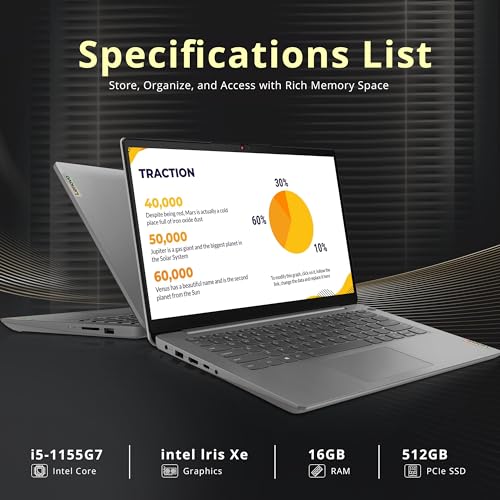


Lenovo IdeaPad 14" FHD Business Laptop 4 photos from the Amazon listing
Best for: Business professionals requiring Windows 11 Pro
Pros
- Generous 16GB RAM for multitasking
- Integrated fingerprint reader security
- Native Windows 11 Pro OS features
Cons
- 11th Gen Core i5 older processor generation
- Standard clamshell without touch capability
Targeted at office productivity and corporate deployments, the Lenovo IdeaPad 14″ FHD Business Laptop features an 11th Generation Intel Core i5-1155G7 processor supported by integrated Intel Iris Xe Graphics. The hardware is paired with 16GB of system RAM to manage intense tabular data and multi-application multitasking, alongside a fast 512GB PCIe solid-state drive. Unlike standard consumer builds, this model ships configured with Windows 11 Pro, unlocking native hardware encryption, remote desktop support, and domain access protocols.
The display is a 14.0-inch Full HD (1920 x 1080) panel housed in a traditional clamshell chassis finished in Gray. The entire notebook weighs 3.1 pounds, balancing mechanical rigidity with daily commute portability. System security is enhanced via an integrated hardware fingerprint reader for biometric authentication through Windows Hello, alongside an HD webcam. Networking is handled by an onboard Wi-Fi 6 wireless adapter, and the package includes an external 32GB Hotface USB storage card for physical file distribution.
For enterprise personnel and independent contractors auditing a balanced lenovo laptop 16 gb ram 512 ssd specification, this machine offers the required memory density and operating system credentials. It yields to the IdeaPad 5 2-in-1 in sheer processor generations and screen brightness, but stands as an ideal conventional clamshell for business users wanting out-of-the-box Windows 11 Pro deployment.
Lenovo IdeaPad Slim 3 14″ Chromebook for Interactive Media and Classroom Work


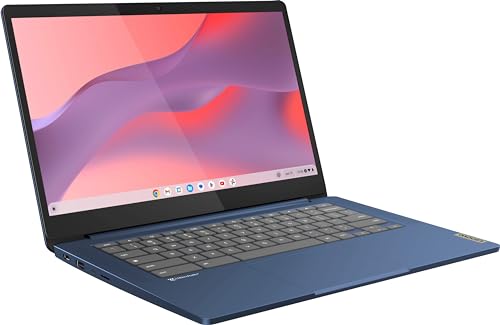

Lenovo IdeaPad Slim 3 14" Chromebook Laptop (14" FHD 4 photos from the Amazon listing
The Lenovo IdeaPad Slim 3 14″ Chromebook upgrades the Chrome OS experience through a higher-specification display and expanded storage configuration. Processing is driven by an 8-core MediaTek Kompanio 520 SoC (configured with two performance ARM Cortex-A76 cores clocked at 2.05GHz and six efficiency ARM Cortex-A55 cores clocked at 2.0GHz) paired with an integrated ARM Mali-G52 2EE MC2 GPU. The mainboard incorporates 4GB of soldered high-frequency LPDDR4x-3733 RAM. Storage spans 128GB total capacity, split between 64GB of fast onboard eMMC 5.1 storage and an included 64GB SD card.
Display quality is a notable highlight: the 14.0-inch Full HD (1920 x 1080) IPS touchscreen provides anti-glare diffusion, 300 nits of luminance, and 100% sRGB color gamut coverage, making it visually superior to baseline entry-level panels. Operating on an integrated 47Wh lithium-polymer battery, the platform delivers up to 13.5 hours of operating time per the Google power load metric. The system includes an Auto Update Expiration (AUE) date documented through June 2032. Physical interfaces consist of a USB-C 3.2 Gen 1 port, a USB 3.2 Gen 1 Type-A port, a microSD card slot, a headphone/microphone combo jack, Wi-Fi 6 (11ax 2×2), and Bluetooth 5.1. Audio is driven by 2W stereo speakers with Waves MaxxAudio, and the 720p HD webcam features a manual physical shutter.
Weighing 2.9 pounds in an Abyss Blue form factor, this notebook suits students, educators, and multimedia viewers who value touchscreen interaction and accurate color rendering within the Chrome OS ecosystem. It steps back when compared to x86 systems if users need more than 4GB of RAM or must run specialized Windows executable programs.
Lenovo IdeaPad 1i 14″ HD Laptop for Budget-Conscious Everyday Computing


Lenovo IdeaPad 1i 14" HD Laptop with Office 365, 4 photos from the Amazon listing
Best for: Budget office tasks demanding high memory capacity
Pros
- Expanded 12GB DDR4 memory configuration
- Intel 12th Gen 6-core processor
- Ships with Windows 11 Pro
Cons
- Low resolution 1366×768 display panel
- Upgraded unit with opened packaging
The Lenovo IdeaPad 1i 14″ HD Laptop integrates Intel’s 12th Generation Alder Lake architecture via the Intel Core i3-1215U processor. This CPU incorporates 6 cores (2 Performance cores and 4 Efficient cores) with 10MB of Intel Smart Cache, capable of reaching dynamic clock frequencies up to 4.4 GHz. Integrated Intel UHD Graphics controls video rendering. The hardware features an expanded 12GB of DDR4 3200MHz RAM and a 512GB solid-state drive, running on Windows 11 Pro. Note that the listing states the manufacturer packaging is opened and resealed to install and inspect these hardware upgrades prior to sale.
Visual output relies on a 14.0-inch HD display running a native resolution of 1366 x 768. Acoustic output is powered by dual stereo speakers utilizing Dolby Audio processing, supported by dual microphone arrays for voice clarity during calls. The integrated 720p webcam includes a physical privacy shutter. Physical I/O provides a USB-C port, two USB-A ports, an HDMI output, an SD card reader, and an audio combo jack, along with built-in Wi-Fi and Bluetooth wireless adapters. The gray clamshell weighs 3.1 pounds.
This unit is tailored for users who require extensive memory capacity for browser tab overhead, document preparation, and office multitasking while operating within the Windows 11 Pro environment. It gives up panel sharpness due to its 768p resolution when compared to the 1080p and 1200p models in the lineup, making it a functional choice where RAM allocation is prioritized over high-density visual detail.
How to Choose the Right Lenovo 14-inch laptops
Selecting the optimal device from Lenovo’s 14-inch IdeaPad catalog requires matching hardware capabilities to your computational requirements. Begin by evaluating processor architecture. The MediaTek Kompanio 520 chips found in the IdeaPad Slim 3 Chromebook variants operate on ARM architecture, offering fanless operation, low power consumption, and prolonged battery runtimes reaching 13.5 hours. In contrast, the x86 processors—spanning the Intel Core i3-1215U, Intel Core i5-1155G7, AMD Ryzen 5 5500U, and AMD Ryzen AI 7 445—provide the instruction sets required for native Windows applications, complex macro processing, and local database management.
System memory ceilings dictate multitasking thresholds. The Chromebook entries feature 4GB of soldered RAM, which matches the memory management model of Chrome OS but will bottleneck under intensive local workloads. The IdeaPad 3 provides 8GB DDR4, establishing the standard baseline for daily productivity. For heavier multitasking involving simultaneous virtual conferencing, large spreadsheets, and multi-tab browser sessions, the 12GB configuration in the IdeaPad 1i and the 16GB allocations in the IdeaPad 14 Business Laptop and IdeaPad 5 2-in-1 prevent paging slowdowns. If you anticipate running local artificial intelligence workloads, the IdeaPad 5 2-in-1 is uniquely equipped with high-speed DDR5 memory and a 50 TOPS NPU.
Display metrics represent another critical differentiator across these 14-inch panels. Entry-tier units like the IdeaPad 1i and base Slim 3 Chromebook utilize HD (1366 x 768) resolution panels. Moving to the IdeaPad 3 and IdeaPad 14 Business Laptop upgrades clarity to Full HD (1920 x 1080). For users requiring enhanced color fidelity and touch input, the Slim 3 14″ Touch Chromebook offers 100% sRGB color space reproduction and 300 nits, while the IdeaPad 5 2-in-1 delivers a 16:10 WUXGA (1920 x 1200) IPS touch panel rated at 400 nits with bundled digital pen support.
Finally, examine the operating system and peripheral connectivity. If your software stack relies entirely on web tools, Chrome OS provides automatic updates (documented through 2032 on the touch model) and low administrative overhead. For enterprise domain joining, BitLocker encryption, and remote desktop services, choose configurations shipping with Windows 11 Pro, such as the IdeaPad 14 Business Laptop or the IdeaPad 1i. Port bandwidth also scales with chassis tier: while all models supply USB-C, the IdeaPad 5 2-in-1 features 10Gbps transfer speeds with full DisplayPort 1.4 and Power Delivery alongside Wi-Fi 7, compared to standard 5Gbps USB-C and Wi-Fi 6 on the standard IdeaPad models.
FAQ
What is the difference between an ARM-based IdeaPad and an x86 IdeaPad?
ARM-based models, such as the IdeaPad Slim 3 Chromebooks powered by the MediaTek Kompanio 520, use an instruction set architecture engineered for thermal efficiency and long battery life. They run Chrome OS and execute web applications and Android apps efficiently with minimal power draw. Models equipped with Intel Core or AMD Ryzen processors use x86 architecture, which draws more power but supports full desktop operating systems like Windows 11 Home and Pro, running traditional win32 desktop software, advanced spreadsheet tools, and enterprise utilities.
Can the internal memory and storage be upgraded on all 14-inch IdeaPad models?
Upgrade potential varies across motherboards. On the IdeaPad Slim 3 Chromebook models, the 4GB LPDDR4x memory is soldered directly to the system board and cannot be expanded. In contrast, several Windows-based IdeaPad variants feature modular or semi-modular configurations. Listings for the IdeaPad 5 2-in-1 and IdeaPad 1i explicitly indicate that systems were opened and resealed to install aftermarket RAM and SSD upgrades, confirming that those chassis house serviceable storage slots and memory interfaces.
Which 14-inch IdeaPad provides the highest display quality?
The Lenovo IdeaPad 5 2-in-1 features the highest visual specification in this group, boasting a 14.0-inch WUXGA (1920 x 1200) IPS touchscreen with 400 nits of brightness and hardware Low Blue Light certification. Among clamshell options, the IdeaPad Slim 3 14″ Touch Chromebook provides superior color fidelity with a 1080p panel delivering 300 nits and 100% sRGB coverage, outperforming the standard HD (1366 x 768) panels found on base-tier units.
Are privacy shutters included on every Lenovo IdeaPad webcam?
Yes, physical privacy shutters are an established design standard across Lenovo’s 14-inch IdeaPad chassis. Every model in this comparison—spanning the IdeaPad 3, IdeaPad 5 2-in-1, both Slim 3 Chromebooks, the IdeaPad 14 Business Laptop, and the IdeaPad 1i—features a physical slider mechanism over the webcam lens to ensure hardware-level privacy when the camera is not actively in use.
What does a resealed listing mean when purchasing an IdeaPad?
Certain merchant listings, such as those for the IdeaPad 5 2-in-1 and IdeaPad 1i, state that the original factory packaging was opened and resealed by an authorized vendor. This procedure is executed to install upgraded components, such as secondary memory modules or larger PCIe solid-state drives, followed by quality inspection and testing prior to shipment to guarantee that the hardware meets the advertised non-factory configuration.


