As Amazon Associates, we earn from qualifying purchases. This means we may receive a small commission at no extra cost to you if you click through and make a purchase.
QNAP has established itself as an engineering-driven powerhouse in the network-attached storage ecosystem, distinguished by high-bandwidth network controllers, extensive storage tiering options, and dual-operating-system architectures. Rather than limiting users to standard consumer file storage, QNAP NAS storage hardware integrates multi-gigabit Ethernet interfaces, flexible PCIe expansion pathways, and hybrid drive-tiering engines designed for intensive data workloads, virtualization clusters, and local snapshot protection.
Within this comprehensive lineup, models range from compact two-bay ARM configurations designed for personal cloud synchronization to high-density eight-bay hybrid chassis powered by eight-core Intel processors and 10GbE throughput for demanding multi-user virtual environments.
QNAP NAS Systems Compared
| Model | Drive Bays | Processor Architecture | Base Memory | Network Connectivity |
|---|---|---|---|---|
| QNAP TS-855X-8G-US | 8 bays (6x 3.5-inch + 2x 2.5-inch) | Intel Atom C5125 8-Core 2.8GHz | 8GB DDR4 (ECC support up to 128GB) | 1x 10Gbase-T + 2x 2.5GbE |
| QNAP TS-464-8G-US | 4 bays (3.5-inch SATA) | Intel Celeron Quad-Core up to 2.9GHz | 8GB DDR4 | 2x 2.5GbE |
| QNAP TS-216G-US | 2 bays (2.5-inch SATA) | ARM Cortex-A55 Quad-Core 2.0GHz with NPU | 4GB DDR4 | 1x 2.5GbE |
| QNAP TS-264-8G-US | 2 bays (3.5-inch SATA) | Intel Celeron Quad-Core up to 2.9GHz | 8GB DDR4 (expandable to 16GB) | 2x 2.5GbE |
| QNAP TS-462A-4G | 4 bays (3.5-inch SATA) | Intel Quad-Core burst up to 2.9GHz | 4GB DDR4 | 1x 2.5GbE |
| QNAP TS-233-US | 2 bays | ARM Cortex-A55 Quad-Core 2.0GHz | 2GB DDR4 | Not listed |
Table from this guide — scroll sideways for the remaining columns.
QNAP TS-855X-8G-US 8 Bay NAS for Enterprise Virtualization


QNAP TS-855X-8G-US 8 Bay NAS 4 photos from the Amazon listing
Best for: Enterprise virtualization and high-throughput multi-user teams
Pros
- Intel 8-core 2.8GHz processor
- Native 10GbE and dual 2.5GbE
- Dual PCIe Gen 3 x4 slots
- QuTS hero ZFS OS support
Cons
- Large desktop footprint
- Requires 10G network switch
Engineered for high-throughput environments and virtualization hosts, the QNAP TS-855X-8G-US 8 Bay NAS represents a hybrid storage architecture in a desktop form factor. At its core, the system features an 8-core Intel Atom C5125 processor operating at 2.8GHz with Intel QuickAssist Technology (QAT), coupled with 8GB of U-DIMM DDR4 RAM that can expand up to 128GB with error-correcting code (ECC) modules. The physical layout utilizes a hybrid chassis containing six 3.5-inch SATA bays for high-capacity mechanical drives alongside two dedicated 2.5-inch SATA bays reserved for solid-state drive acceleration, creating an optimal foundation for tiered storage pools.
Networking and peripheral expansion are primary highlights of the TS-855X architecture. The mainboard incorporates a native 10Gbase-T multi-gigabit port supporting 10G, 5G, 2.5G, 1G, and 100M link speeds, paired with two separate 2.5GbE ports. Internal expansion includes dual M.2 PCIe Gen 3 x4 NVMe SSD slots for caching or high-speed pools, as well as dual full-height PCIe Gen 3 x4 expansion slots compatible with supplementary network interface cards, QM2 storage modules, or Fibre Channel host adapters. Software flexibility is extensive, enabling administrators to deploy either the default QTS operating system or switch to the enterprise-grade ZFS-based QuTS hero operating system to leverage end-to-end data integrity.
This appliance suits IT managers, virtualization engineers, and business departments requiring integrated cloud backup for Microsoft 365 and Google Workspace accounts via Boxafe. While it delivers class-leading bandwidth and scalability supported by a 3-year warranty, small workspaces with modest throughput demands will find its physical footprint and complex hybrid architecture excessive compared to compact desktop alternatives.
QNAP TS-464-8G-US 4 Bay Desktop NAS for Expandable Performance


QNAP TS-464-8G-US 4 Bay Desktop NAS 4 photos from the Amazon listing
Best for: Power users needing expandable multi-bay network storage
Pros
- Quad-core Intel burst to 2.9GHz
- Dual 2.5GbE network interfaces
- Dual M.2 PCIe NVMe slots
- 10Gbps USB 3.2 Gen 2 ports
Cons
- Fixed 8GB DDR4 RAM
- Drive trays lack key locks
The QNAP TS-464-8G-US 4 Bay Desktop NAS serves as a versatile multi-drive hub that bridges personal productivity and power-user performance. Powered by a quad-core Intel Celeron processor (N5105/N5095) with burst speeds reaching 2.9GHz and equipped with 8GB of DDR4 system memory, this four-bay desktop NAS offers substantial computational bandwidth for data protection and multi-user environments. Its four hot-swappable 3.5-inch SATA 6 Gb/s drive bays accommodate high-capacity 7200 rpm internal hard drives, making it simple to construct resilient RAID arrays.
Network connectivity is anchored by dual 2.5GbE Ethernet ports that accelerate multi-gigabit file sharing and large file transfers across local workgroups. Internally, the TS-464 features dual M.2 PCIe Gen 3 x2 NVMe SSD slots, allowing administrators to configure dedicated flash storage pools or read/write SSD cache acceleration to eliminate mechanical disk latency. When constructing an array with high-density mechanical media such as a western digital 5tb drive, the integrated M.2 slots ensure responsive file indexing and rapid read speeds. The chassis also provides multiple USB 3.2 Gen 2 Type-A ports delivering up to 10Gbps for fast offloading to external expansion enclosures.
Designed for tech-savvy home labs, creative studios, and small workgroups, the TS-464 is an ideal choice for centralized family photo and video libraries as well as secure document backups. It delivers significantly greater storage headroom and caching flexibility than two-bay models, though users who require native 10GbE network ports or enterprise ZFS file structures will need to step up to the eight-bay TS-855X.
QNAP TS-216G-US 2-Bay 2.5GbE Desktop NAS for Smart Media Indexing


QNAP TS-216G-US 2-Bay 2.5GbE Desktop NAS 4 photos from the Amazon listing
Best for: Home users prioritizing AI-accelerated photo organization
Pros
- Integrated NPU for AI recognition
- 5GbE multi-gigabit interface
- Quad-core ARM 2.0GHz processor
- 4GB DDR4 system memory
Cons
- No M.2 NVMe caching slots
- Limited to 2.5-inch drive bays
Targeting home users and small offices seeking modern connectivity on an energy-efficient footprint, the QNAP TS-216G-US 2-Bay 2.5GbE Desktop NAS balances simplicity with intelligent media management. The hardware platform centers on an ARM Cortex-A55 quad-core 2.0GHz processor paired with 4GB of DDR4 system memory. What sets this model apart in the two-bay segment is the dedicated Neural Processing Unit (NPU) built into the silicon, designed specifically for AI acceleration to dramatically speed up face and object recognition inside QNAP automated photo management tools.
Network integration is elevated above standard entry-level storage by a native 2.5GbE interface providing 2.5 gigabits per second throughput. This multi-gigabit port eliminates standard gigabit bottlenecks during multi-device synchronization, high-bitrate video streaming, and centralized file access. The desktop chassis supports two drive bays compatible with 2.5-inch SATA drives, delivering quiet operation while serving as an always-available private cloud for family media collections and office productivity tools.
This system suits budget-conscious users, photographers, and home office workers who want streamlined AI photo categorization without paying for enterprise x86 hardware. However, because it relies on an ARM processor and lacks onboard M.2 NVMe SSD slots, users demanding full container virtualization, dual multi-gigabit link aggregation, or high-speed SSD caching should look toward the Intel-driven TS-264 instead.
QNAP TS-264-8G-US 2 Bay Desktop NAS for Compact Business Workloads


QNAP TS-264-8G-US 2 Bay Desktop NAS 4 photos from the Amazon listing
Best for: Small offices needing compact x86 virtualization storage
Pros
- Intel quad-core Celeron CPU
- Dual M.2 PCIe Gen 3 slots
- Dual 2.5GbE network ports
- Expandable memory up to 16GB
Cons
- Limited to two 3.5-inch bays
- PCIe expansion occupies M.2 lane
The QNAP TS-264-8G-US 2 Bay Desktop NAS packs x86 computational capabilities and comprehensive expansion into a space-saving two-bay footprint. Driven by an Intel Celeron N5105/N5095 quad-core processor bursting up to 2.9GHz, the system ships with 8GB of DDR4 memory and supports memory expansions up to 16GB. It features integrated Intel AES-NI hardware encryption, allowing small businesses to secure sensitive business documents and confidential records without degrading read and write throughput across the network.
The hardware architecture mirrors many enterprise-class features found in larger desktop units. Network traffic is managed by dual 2.5GbE Ethernet ports that support link teaming and multi-device bandwidth balancing. Beneath the hood, two M.2 PCIe Gen 3 x2 NVMe SSD slots provide dedicated flash channels for cache acceleration or independent high-speed storage pools. External connectivity includes multiple USB 3.2 Gen 2 Type-A ports reaching transfer speeds of 10Gbps, enabling swift direct backups to external drives and expansion arrays.
The TS-264 is an outstanding option for remote professionals, branch offices, and small business administrators who require lightweight virtualization, container hosting, and rapid multi-gigabit transfers without dedicating shelf space to a large enclosure. For organizations that anticipate needing more than two primary mechanical hard drives for RAID 5 or RAID 6 parity arrays, the four-bay TS-464 is the natural step up.
QNAP TS-462A-4G 4-Bay Desktop NAS for Everyday Home Multimedia


QNAP TS-462A-4G 4-Bay Desktop NAS 4 photos from the Amazon listing
Best for: Home entertainment streaming and automated family backups
Pros
- Intel UHD Graphics transcoding
- Dual M.2 slots for Qtier tiering
- Tool-less hot-swappable drive bays
- One Touch Copy 10Gbps USB
Cons
- 4GB RAM base capacity
- Single 2.5GbE network port
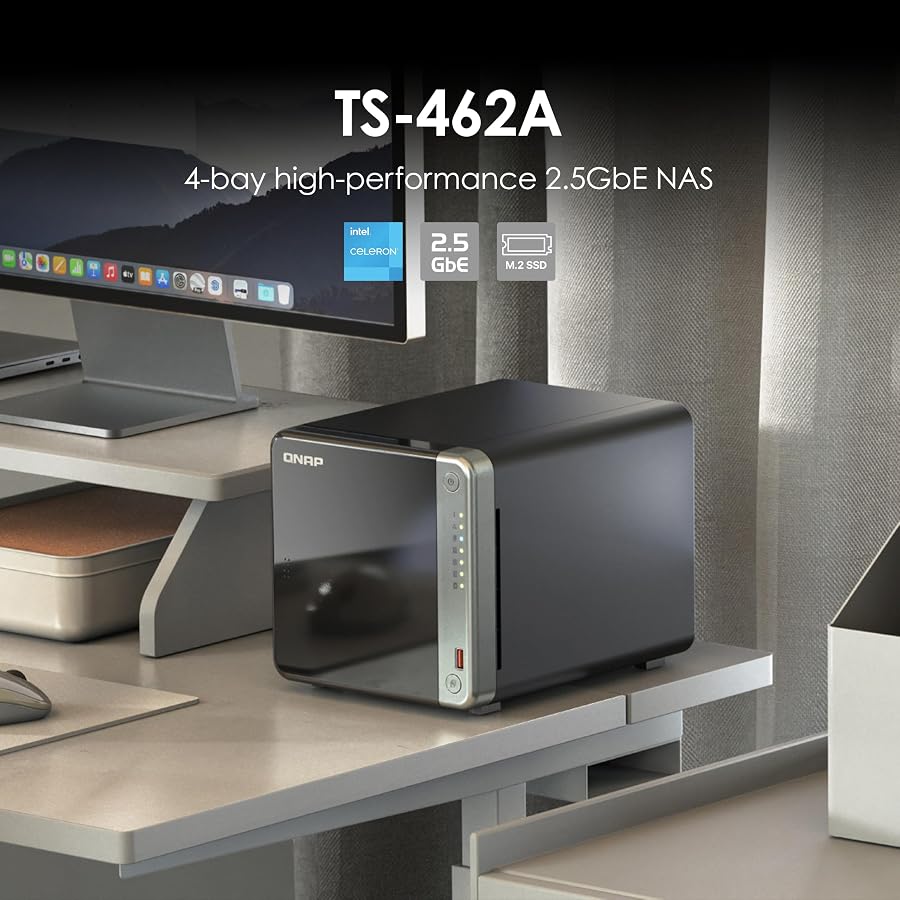
Built to serve as an accessible private cloud and entertainment server, the QNAP TS-462A-4G 4-Bay Desktop NAS brings four-bay storage capacity to household environments. Operating on an Intel quad-core processor with burst capabilities up to 2.9GHz and 4GB of RAM, this model is specifically optimized for media delivery. Integrated Intel UHD Graphics hardware-transcodes high-resolution video on the fly, allowing family members to stream movies and music seamlessly across tablets, mobile phones, and smart televisions throughout the home.
Storage flexibility is a defining strength of the TS-462A architecture. The unit houses four 3.5-inch SATA drive bays with tool-less, hot-swappable trays, facilitating effortless drive installation and replacement. Networking is handled by a built-in 2.5GbE port, complemented by dual M.2 PCIe SSD slots configured for SSD caching and Qtier auto-tiering technology. Auto-tiering continuously moves frequently accessed data to solid-state storage while keeping bulk archives on high-capacity mechanical drives. Front-panel One Touch Copy over a 10Gbps USB 3.2 Gen 2 port simplifies direct media offloading from cameras and thumb drives, backed by snapshot protection and 16GB of complimentary myQNAPcloud cloud storage.
This unit represents an exceptional balance for families, content collectors, and home multimedia enthusiasts who need multi-bay redundancy and smooth hardware transcoding. Compared to the TS-464, which offers dual 2.5GbE ports and 8GB of baseline RAM, the TS-462A prioritizes streamlined consumer media hosting while delivering a robust 3-year manufacturer warranty.
QNAP TS-233-US 2 Bay Desktop NAS for Basic Private Cloud Backups


QNAP TS-233-US 2 Bay Desktop NAS 4 photos from the Amazon listing
Best for: Entry-level users needing quiet private cloud backups
Pros
- Energy-efficient quad-core ARM
- Ransomware mitigation via snapshots
- Quiet compact desktop chassis
- Time Machine and NetBak support
Cons
- Non-upgradable 2GB DDR4 RAM
- Network speed not listed
Offering an accessible entry point into centralized network storage, the QNAP TS-233-US 2 Bay Desktop NAS emphasizes quiet, clean desktop integration for daily digital management. The slim chassis houses an ARM Cortex-A55 quad-core 2.0GHz processor accompanied by 2GB of DDR4 memory. Engineered for low power consumption and quiet acoustic operation, an effective internal cooling fan ensures optimal thermal control during long automated backup operations.
Despite its streamlined hardware profile, the TS-233 includes essential data integrity tools. It supports QNAP storage snapshot technology, allowing users to record block-level states of their volumes to mitigate the operational threat of ransomware or accidental file deletions. Centralized client backup is simplified through QNAP NetBak Replicator utility for Windows workstations and native Apple Time Machine support for Mac computers, making it an effortless automated destination for personal laptops and desktops.
The TS-233 is a dependable choice for students, first-time NAS owners, and home users who want a dedicated backup target for documents and photos without recurring cloud subscription fees. Users who anticipate running memory-intensive container applications, AI-driven photo indexing, or multi-gigabit network transfers should consider the TS-216G or TS-264 instead.
How to Choose the Right QNAP NAS Systems
Selecting the best qnap nas storage requires aligning your bandwidth demands, drive capacity requirements, and processor workloads with the appropriate hardware tier. QNAP differentiates its product line across clear architectural boundaries, making it essential to evaluate your networking infrastructure and virtualization needs before making an investment. When conducting a comprehensive qnap nas storage comparison to determine which qnap nas to buy, focus on four fundamental technical factors:
- Drive Bay Count and RAID Configurations: Two-bay enclosures like the TS-233, TS-216G, and TS-264 provide basic RAID 1 mirroring or single-volume storage for compact footprints. Moving to four-bay enclosures like the TS-464 and TS-462A unlocks RAID 5 and RAID 6 configurations, providing higher fault tolerance and expanded storage pools. For enterprise-scale storage pools with mixed SSD and HDD tiers, the eight-bay TS-855X provides six 3.5-inch and two 2.5-inch bays.
- Network Interface Speeds: Network throughput dictates how fast clients can read and write files. While the TS-233 is designed for standard network environments, modern qnap multi gigabit nas models like the TS-216G and TS-462A provide 2.5GbE ports. Power-user models such as the TS-264 and TS-464 feature dual 2.5GbE ports that support link aggregation, while the enterprise TS-855X integrates native 10Gbase-T for high-speed network backbones.
- Processor Architecture and Virtualization: If your NAS workload is confined to file sharing, backup synchronization, and basic photo storage, energy-efficient ARM Cortex-A55 processors (featured in the TS-233 and TS-216G) offer low power draw. Conversely, if you plan to run Docker containers, multiple virtual machines, or hardware video transcoding, Intel quad-core processors in the TS-464, TS-264, and TS-462A or the 8-core Intel Atom C5125 in the TS-855X are essential.
- M.2 NVMe Caching and PCIe Expandability: Solid-state acceleration transforms performance under randomized I/O workloads. Units like the TS-464, TS-264, TS-462A, and TS-855X feature dedicated M.2 NVMe slots for cache acceleration or Qtier auto-tiering without occupying front drive bays. Additionally, the TS-855X provides dual PCIe Gen 3 x4 slots for adding high-speed adapters, QM2 cards, or Fibre Channel connectivity.
For shoppers evaluating multi-drive options across alternative platforms, comparing these specs against a synology 4-bay nas diskstation illustrates QNAP focus on multi-gigabit Ethernet and PCIe expansion.
Similarly, users assessing alternative consumer platforms like a ugreen nas 4 bay setup will find that QNAP operating system options—specifically the choice between QTS and ZFS-based QuTS hero—offer distinct advantages for enterprise data integrity.
FAQ
What is the difference between QTS and QuTS hero operating systems on QNAP NAS storage?
QTS is QNAP standard operating system designed for mainstream performance, intuitive multimedia streaming, and broad app compatibility using the ext4 file system. QuTS hero is an operating system based on the ZFS file system, which prioritizes end-to-end data integrity, inline data deduplication, inline compression, and self-healing storage pools. While most consumer units run QTS, advanced enterprise systems like the TS-855X allow administrators to switch between QTS and QuTS hero depending on workload requirements.
Can I use M.2 NVMe SSDs for dedicated storage pools instead of caching?
Yes. On compatible QNAP models equipped with onboard M.2 PCIe NVMe slots—such as the TS-855X, TS-464, and TS-264—the operating system gives you the choice to configure installed SSDs as high-speed read/write cache acceleration or as independent all-flash storage pools. Configuring M.2 drives as independent storage pools is beneficial for hosting virtual machines, database files, and container volumes where fast access is required.
Why does the QNAP TS-216G include an integrated Neural Processing Unit?
The integrated Neural Processing Unit (NPU) inside the ARM Cortex-A55 processor of the TS-216G is dedicated hardware silicon built specifically to accelerate artificial intelligence workloads. It offloads computational calculations during automated facial recognition and object recognition within QNAP photo management software. By offloading these tasks to the NPU, the primary CPU cores remain free to manage network file transfers and system services smoothly.
Are QNAP NAS drive bays compatible with both 3.5-inch and 2.5-inch drives?
Most standard QNAP multi-bay desktop chassis—including the TS-464, TS-264, and TS-462A—feature universal hot-swappable drive trays with mounting screw holes for both standard 3.5-inch SATA hard disk drives and 2.5-inch SATA solid-state drives. Furthermore, hybrid systems like the TS-855X offer dedicated physical bays specifically engineered for each format, pairing six 3.5-inch hard drive bays with two distinct 2.5-inch SSD bays for specialized storage tiering.
How does snapshot technology protect data against ransomware attacks?
QNAP storage snapshots record the block-level status of your data volumes at specific points in time. Because snapshots are isolated from normal network file-sharing protocols and read-only by nature, ransomware cannot alter or encrypt previously generated snapshot blocks. If files on the active volume become encrypted or deleted by malware, administrators can rapidly revert the entire volume or individual folders back to an uninfected snapshot state in seconds.


