As Amazon Associates, we earn from qualifying purchases. This means we may receive a small commission at no extra cost to you if you click through and make a purchase.
Toshiba has long maintained an established engineering footprint in magnetic data storage, manufacturing mechanical drives across personal computing, consumer backup, and industrial hardware environments. In the 1TB personal storage category, the company focuses on high-density 2.5-inch platters operating primarily at 5400 RPM spindle speeds, balancing acoustic dampening, power dissipation, and physical resilience. Whether deployed as bare OEM mechanical drives inside legacy notebook bays or wrapped in bus-powered external housings, these drives provide reliable secondary expansion and structured archiving for systems running on standard USB or SATA bus configurations.
While every model analyzed in this toshiba 1tb hard drive comparison shares a common 1TB capacity ceiling and 2.5-inch internal platter design, they differ fundamentally in their physical host interfaces, pre-formatted file systems, chassis finishes, and bundled software utilities.
Toshiba Hard Drives Compared
| Model | Interface Protocol | Spindle Speed | Form Factor & Enclosure | Factory File System |
|---|---|---|---|---|
| Toshiba Canvio Basics 1TB Portable External | USB 3.0 (USB 2.0 compatible) | 5400 rpm | 2.5-inch Matte Smudge-Resistant External | NTFS (Windows PC) |
| Toshiba Canvio Advance 1TB Portable External (Black) | USB 3.0 (USB 2.0 compatible) | Not listed | 2.5-inch Textured Black External | NTFS (Windows PC) |
| Toshiba Canvio Advance 1TB Portable External (Green) | USB 3.0 (USB 2.0 compatible) | Not listed | 2.5-inch Textured Green External | NTFS (Windows PC) |
| Toshiba Canvio Advance 1TB Portable External (Red) | USB 3.0 (USB 2.0 compatible) | Not listed | 2.5-inch Textured Red External | NTFS (Windows PC) |
| Toshiba 1TB 5400RPM 8MB Cache SATA | Serial ATA-300 (SATA 3.0Gb/s) | 5400 rpm | 2.5-inch Internal (9.5mm height) | Not listed (OS dependent) |
| Toshiba Canvio Flex 1TB Portable External | USB 3.0 (USB-C ready) | 5400 rpm | 2.5-inch Silver External | exFAT (Cross-Platform) |
Table from this guide — scroll sideways for the remaining columns.
Toshiba Canvio Basics 1TB Portable External for Everyday Plug-and-Play Storage


Toshiba Canvio Basics 1TB Portable External 4 photos from the Amazon listing
Best for: Everyday Windows plug-and-play storage
Pros
- Zero-software operation
- Smudge-resistant matte finish
- USB 3.0 bus powered
Cons
- Requires reformatting for Mac
- No automated backup software
The Toshiba Canvio Basics 1TB Portable External represents the baseline standard for bus-powered, plug-and-play external storage. Built around a 2.5-inch form factor spinning at 5400 rpm, this drive is engineered for frictionless deployment without the need to navigate configuration wizards or background service daemons. Its exterior features a minimalist profile with a matte, smudge-resistant finish that resists fingerprint buildup during regular desktop handling or transit in laptop bags.
From an interface standpoint, the unit operates over USB 3.0, delivering data transfer bus rates up to 5 gigabits per second while retaining complete backward compatibility with legacy USB 2.0 ports. Power is drawn directly over the USB bus, eliminating the necessity for a secondary AC power brick. The drive comes pre-formatted in the NTFS file system for Windows PC environments, enabling users to simply connect the cable and initiate drag-and-drop file transfers immediately. The listing specifies a 1 byte per second read speed metric and a cache memory installed size of 1.
This model is the ideal choice for Windows laptop users who prioritize pure hardware simplicity and want to store media files or manual system backups without background software overhead. However, it gives way to the Canvio Advance line for users who require automated scheduling or password locking, and to the Canvio Flex for those operating natively within macOS without reformatting.
Toshiba Canvio Advance 1TB Portable External in Black for Automated Backup Management


Toshiba Canvio Advance 1TB Portable External 4 photos from the Amazon listing
Best for: High-visibility travel and field backup
Pros
- Vibrant red exterior
- Automated backup software
- USB 3.0 data speeds
Cons
- Reformatting required for Mac
- Backup tool Windows only

Best for: Color-coded external data organization
Pros
- Distinct green chassis
- Password security software
- Compact portable enclosure
Cons
- Software requires Windows PC
- Reformatting needed for macOS
Best for: Automated PC backups and file security
Pros
- Downloadable backup software
- Password protection utility
- Textured modern finish
Cons
- Software is Windows only
- Requires reformatting for Mac
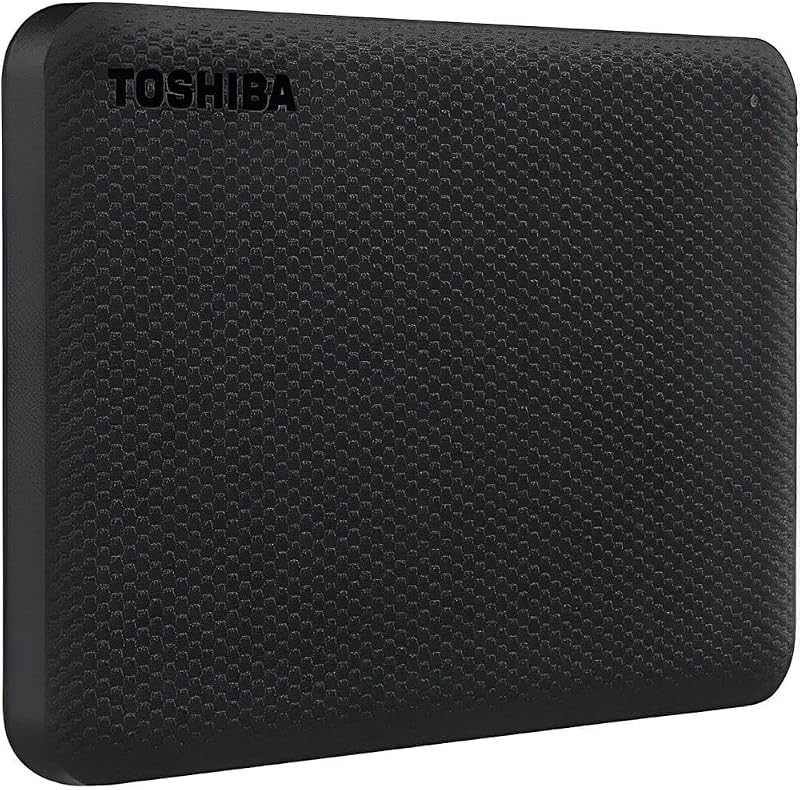
The Toshiba Canvio Advance 1TB Portable External in black expands upon basic portable storage by introducing dedicated software capabilities alongside an upgraded chassis design. Designed with a compact profile that showcases a stylish, textured finish, this drive is positioned for business and multimedia professionals who manage recurring file backups and require proactive data protection on Windows workstations.
Connectivity specifications for this 2.5-inch portable unit indicate USB 3.0 and USB 2.0 compatibility with a maximum 5 gigabits per second bus transfer rate, alongside listing entries noting USB 1.1 and Bluetooth connectivity protocols. Read performance metrics list 5 gigabytes per second and 5 GB/s media speeds. The core functional advantage of the Advance series lies in its bundled software access: users can download Toshiba’s automated backup utility to create hands-free file syncing schedules, as well as password protection software to lock down data volumes from unauthorized access on Windows systems.
For PC operators who handle proprietary documents or client deliverables, this black variant serves as a secure, structured repository. It yields to the Canvio Basics if a user explicitly avoids utility software, or to the bare SATA drive if direct motherboard bus integration is required.
Toshiba Canvio Advance 1TB Portable External in Green for Color-Coded Data Archives


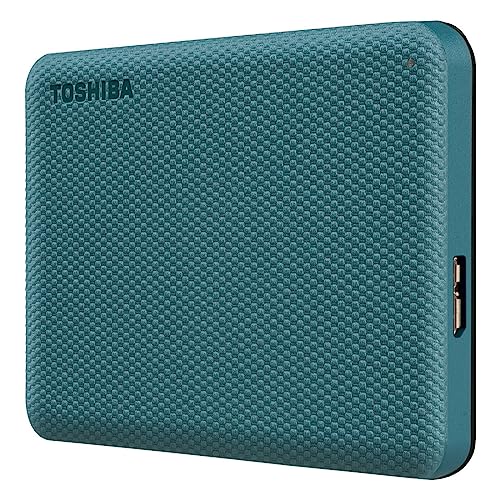

Toshiba Canvio Advance 1TB Portable External Hard Drive USB 4 photos from the Amazon listing
Sharing the technical architecture of the Advance platform, the green edition of the Toshiba Canvio Advance 1TB Portable External provides identical utility support within a distinctive chassis colorway. It utilizes a 2.5-inch external form factor with a compact casing and textured finish, making it a viable solution for multi-drive environments where physical drive identification is vital for organizational efficiency.
The drive leverages a USB 3.0 interface protocol with standard USB connectivity, ensuring backward compatibility with USB 2.0 ports on older computing hardware. Like its counterpart models, it supports free downloadable automatic backup software and password protection tools developed specifically for Windows PC operating systems. For Mac environments, the drive is fully compatible but requires complete volume reformatting from its factory state.
This green version is suited for creative professionals or office managers who use color-coding to segment financial databases, raw video footage, or personal projects across separate physical drives. Those looking for out-of-the-box Mac and iPad compatibility without administrative reformatting should look instead toward the Canvio Flex.
Toshiba Canvio Advance 1TB Portable External in Red for High-Visibility Mobile Backups


Toshiba Canvio Advance 1TB Portable External Hard Drive USB 3 photos from the Amazon listing
The red variant of the Toshiba Canvio Advance 1TB Portable External completes the color lineup of Toshiba’s automated external series. Encased in a high-visibility, textured red housing, this 2.5-inch portable drive combines the line’s security utilities with an exterior that is easy to spot in dark studio bags, equipment cases, or busy workstation setups.
Under the shell, the drive connects via standard USB 3.0 and USB 2.0 hardware connectivity, supporting data transfer rates up to 5 gigabits per second, with listing specifications citing a 1 gigabyte per second read speed. It includes access to the same free Windows PC utilities for scheduled automated data mirroring and password encryption. Users seeking detailed toshiba portable hard drive metrics will find that this model maintains the standard Advance hardware footprint while offering high optical contrast.
Field technicians, mobile editors, and students working on location benefit from the bright casing, which minimizes accidental loss. However, if internal hardware repair or secondary drive bay mounting is the primary objective, this external housing must be bypassed in favor of a dedicated SATA drive.
Toshiba 1TB 5400RPM 8MB Cache SATA for Internal Laptop and Enclosure Integration


Toshiba 1TB 5400RPM 8MB Cache SATA 3.0Gb/s 2.5 inch 4 photos from the Amazon listing
Best for: Laptop drive replacement and DIY enclosures
Pros
- Standard SATA 3.0Gb/s interface
- 8MB onboard data buffer
- Low power 5400 RPM motor
Cons
- Internal bare drive only
- No included USB cable
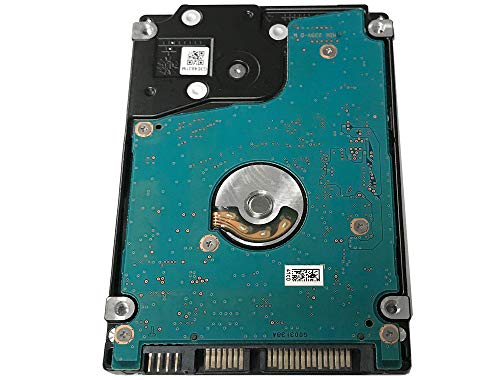
The Toshiba 1TB 5400RPM 8MB Cache SATA, carrying model number MQ01ABD100V, diverts completely from external plastic enclosures by offering a bare 2.5-inch internal mechanical hard drive. Measuring 9.5mm in drive height, this internal unit is engineered for direct integration into laptop chassis, notebooks, older MacBook systems, or standalone external DIY drive enclosures.
Internally, the MQ01ABD100V operates over a Serial ATA-300 interface (SATA 3.0Gb/s) and features a rotational speed of 5400 RPM supported by an 8MB onboard cache buffer. Toshiba engineered this drive with an areal density of 254 gigabits per square inch per platter, yielding a system-level performance gain of up to 12 percent over older 4200 RPM designs while keeping operational power consumption below traditional 3.5-inch desktop hard drives. The listing specifies data transfer capabilities of 3 gigabytes per second and media speeds ranging between 50 and 100 MB/s.
This bare drive is the definitive selection for hardware repair technicians, IT administrators, and retrofitting enthusiasts seeking an internal replacement drive for notebook maintenance or portable video recording units. It is not suitable for consumers needing an out-of-the-box plug-and-play USB storage device, as it lacks an integrated bridge board, protective casing, and bundled external cables.
Toshiba Canvio Flex 1TB Portable External for Multi-Platform USB-C Ecosystems


Toshiba Canvio Flex 1TB Portable External Hard Drive USB-C 4 photos from the Amazon listing
Best for: Cross-platform Mac, PC, and tablet workflows
Pros
- Pre-formatted exFAT filesystem
- Includes USB-C and USB-A cables
- Tablet and Mac compatible
Cons
- No backup software included
- Lacks hardware password lock
Designed specifically to address mixed-platform workflows, the Toshiba Canvio Flex 1TB Portable External bridges the hardware gap between legacy computers and modern mobile computing platforms. Housed in an elegant silver 2.5-inch enclosure, the internal mechanism spins at 5400 rpm and communicates over a versatile USB 3.0 interface layer supporting 5 gigabits per second transfer speeds, with listing metrics detailing a 1 byte per second read speed.
The defining technical feature of the Canvio Flex is its pre-formatted exFAT file system, which delivers native read and write capability across Windows PC, macOS, and supported USB-C tablet devices right out of the packaging. Unlike standard external drives that require disk management utilities to wipe and convert NTFS volumes for Mac or iPad use, the Flex functions across operating systems without alteration. Furthermore, Toshiba bundles both standard USB-A and modern USB-C cables in the box, ensuring direct connectivity to contemporary laptops without third-party dongles.
This drive is best suited for multi-device professionals, educators, and creators who move files continuously between Windows desktop workstations, MacBooks, and mobile tablets. Those who demand downloadable automated backup software or built-in password encryption will prefer the Canvio Advance series, as the Flex prioritizes universal hardware versatility over bundled desktop tools.
How to Choose the Right Toshiba Hard Drives
Selecting the appropriate drive from Toshiba’s 1TB catalog requires evaluating physical host connectivity, target operating system environments, software security preferences, and mounting form factors. Because all external models share a 2.5-inch internal mechanical structure, the primary deciding factors rest on how the drive interfaces with your workflow.
- Physical Host Interface: Determine whether you require a bare drive with a Serial ATA-300 interface for internal chassis bay installation, like the MQ01ABD100V, or a bus-powered external solution utilizing USB 3.0 protocols. External drives draw sufficient power straight through the host USB bus, requiring no wall adapters.
- File System Compatibility: If you work strictly within Windows, NTFS-formatted drives such as the Canvio Basics or Advance function seamlessly out of the box. However, if your environment includes macOS or USB-C tablets, the factory exFAT partition on the Canvio Flex eliminates the need to wipe and reformat the storage volume.
- Cable Ecosystems: Modern ultra-thin laptops frequently omit legacy USB Type-A ports. The Canvio Flex includes dedicated USB-C and USB-A cables, whereas the Basics and Advance models ship with standard Micro-B to USB-A connections that may require adapters on newer systems.
- Security and Backup Software: For automated versioning and data encryption, the Canvio Advance line includes downloadable utilities for Windows PC. The Canvio Basics and Canvio Flex intentionally omit software layers in favor of direct plug-and-play simplicity.
When assessing how these 1TB storage devices fit alongside broader hardware setups, shoppers often cross-reference our benchmarks on the aiolo innovation 1tb external hard drive for single-terabyte comparisons. Similarly, users requiring expanded archival footprints beyond 1TB configurations can inspect our seagate 4tb portable hard drive analysis for higher-capacity mechanical drive evaluations.
FAQ
Can Toshiba Canvio external hard drives work on both Windows and Mac computers?
Yes, but compatibility depends on the factory file system. The Canvio Basics and Canvio Advance models come pre-formatted in NTFS for Windows PC and require reformatting via macOS Disk Utility to enable write access on Apple computers. Conversely, the Canvio Flex is factory pre-formatted in exFAT, allowing it to read and write on both Windows and Mac operating systems out of the box without reformatting.
What is the functional difference between Canvio Basics and Canvio Advance?
The Canvio Basics is designed strictly for plug-and-play drag-and-drop file transfers, featuring a matte finish and no bundled software utilities. The Canvio Advance features a glossy textured casing available in multiple colors (such as black, green, and red) and provides access to free downloadable Windows PC software for scheduled automatic backups and password protection security.
Does the Toshiba MQ01ABD100V 1TB drive fit into any standard laptop?
The Toshiba MQ01ABD100V uses a standard 2.5-inch form factor with a 9.5mm drive height and a SATA 3.0Gb/s interface. While it fits most traditional laptops, notebooks, and MacBooks that accommodate 9.5mm bays, some ultra-thin modern laptops only accept 7mm drives or M.2 solid-state formats. Always verify your laptop bay clearance before purchasing an internal mechanical drive.
Why does the Toshiba Canvio Flex operate across multiple operating systems without formatting?
The Canvio Flex is formatted at the factory with the exFAT file system. Because exFAT is natively supported by Microsoft Windows, Apple macOS, and mobile operating systems like iPadOS and Android, the drive can mount, read, and write data interchangeably across diverse platforms without partition modifications.
Do Toshiba 1TB external drives require a dedicated external power supply?
No. All 1TB Toshiba Canvio external hard drives (Basics, Advance, and Flex) are bus-powered devices. They draw operating current directly from the host computer or tablet via the included USB cable, eliminating the need for an external AC power cord or wall adapter.


