As Amazon Associates, we earn from qualifying purchases. This means we may receive a small commission at no extra cost to you if you click through and make a purchase.
Dell has long maintained a commanding presence in enterprise and commercial workstation computing, established through reliable motherboard layouts, robust lifecycle support, and standardized hardware management. When selecting a dell i7 desktop for modern business workloads, technical evaluators must navigate critical differences across Intel processor architectures, thermal design envelopes, memory configurations, and form factors. Dell builds these desktop systems to handle sustained multi-threaded computation, equipping them with enterprise-grade firmware protections like discrete Trusted Platform Modules (TPM), efficient multi-zone cooling enclosures, and long-term hardware validation. Whether deployed for complex financial modeling, extensive code compilation, or high-density office productivity, these machines deliver stable, consistent throughput across demanding professional workflows.
In this dell desktop i7 comparison, four systems demonstrate how physical footprint and silicon architecture define performance: unlocked 12th Generation Alder Lake mid-towers, a high-core-count 14th Generation Raptor Lake Refresh slim desktop, and an Intel Core Ultra Series 2 tower featuring integrated artificial intelligence acceleration.
Dell i7 Desktops Compared
| Model | Processor Architecture | Memory & Storage | Chassis Dimensions | Display Connectivity |
|---|---|---|---|---|
| Dell Desktop Tower | Intel Core i7-12700K (12 Cores, 20 Threads, up to 5.0 GHz) | 32GB DDR5 RAM, 1TB PCIe NVMe SSD | Not listed | 1x HDMI 2.1, 1x DisplayPort 1.4a |
| Dell Pro Business Desktop | Intel Core i7-12700K vPro (12 Cores, 20 Threads, up to 5.0 GHz) | 32GB DDR5 RAM, 1TB PCIe NVMe SSD | 12.77 x 6.06 x 11.54 inches | 1x HDMI 2.1, 1x DisplayPort 1.4a |
| Dell Pro Slim QCS1250 Business Desktop | Intel Core i7-14700 vPro (20 Cores, 28 Threads, up to 5.6 GHz) | 16GB DDR5 RAM, 512GB PCIe NVMe SSD | 11.95 x 3.74 x 11.54 inches | 1x HDMI 2.1, 1x DisplayPort 1.4a |
| Dell Tower Desktop | Intel Core Ultra 7-265 (Series 2 with Built-in AI) | 16GB DDR5 RAM, PCIe SSD (Capacity not listed) | 11.53 x 6.06 x 12.76 inches | 1x HDMI 2.1, 1x DisplayPort |
Table from this guide — scroll sideways for the remaining columns.
Dell Desktop Tower for High-Compute Multitasking


Dell Desktop Tower 4 photos from the Amazon listing
Best for: Heavy multitasking and data-intensive workflows
Pros
- Core i7-12700K unlocked processor
- 32GB DDR5 5600 MHz memory
- Dual 4K HDMI and DisplayPort
- Front USB-C 10 Gbps port
Cons
- Chassis dimensions not listed
- Integrated graphics only
The Dell Desktop Tower, also designated as the Dell QCT1250 in technical documentation, is engineered around an enthusiast-grade Intel Core i7-12700K processor. This unlocked desktop chip features a hybrid core architecture comprising 8 Performance-cores and 4 Efficient-cores, yielding 12 physical cores and 20 computational threads capable of boosting up to 5.0 GHz alongside 25MB of Intel Smart Cache. Built to maintain sustained processing throughput, this configuration addresses heavy data processing, computational mathematics, and dense enterprise software stacks without the thermal throttling frequently observed in micro enclosures. System graphics are driven by the integrated Intel UHD Graphics 770 engine, which natively powers dual 4K independent monitor arrays over dedicated HDMI 2.1 and DisplayPort 1.4a interfaces.
Memory bandwidth and storage expansion represent central strengths of this chassis configuration. Outfitted with 32GB of high-speed DDR5 memory operating at 5600 MHz, the system allows memory expansion up to 64GB DDR5 across dual channels to prevent page-file swapping during intense operations. Internal storage features a 1TB M.2 PCIe x4 NVMe solid-state drive, with factory support accommodating configurations up to a 4TB PCIe M.2 SSD. Peripheral expansion is split across the front and rear panels: the front features one USB 3.2 Gen 2 Type-C port (10 Gbps), one USB 3.2 Gen 1 Type-A port, and an audio headset jack; the rear houses two USB 3.2 Gen 1 ports, two USB 2.0 ports, RJ-45 Gigabit Ethernet, DisplayPort 1.4a, and an HDMI 2.1 output. Wireless networking includes an integrated Intel Wi-Fi and Bluetooth card with internal antennas, while hardware TPM encryption, a padlock loop, and a Kensington lock slot secure enterprise deployments running Windows 11 Pro with included wired keyboard and mouse accessories.
For operations managers and technical professionals deciding which dell i7 desktop to buy, this Dell Desktop Tower i7-12700K configuration delivers exceptional multi-core muscle and an immediate 32GB memory footprint for complex workloads. It is ideal for local data compilation, virtualization testing, and heavy daily multitasking. Where it yields to other configurations is physical economy: for space-limited cubicles, the slimmer Dell Pro Slim QCS1250 Business Desktop provides higher raw thread counts in a fraction of the volume, while users seeking integrated neural network acceleration will favor the Dell Tower Desktop.
Dell Pro Business Desktop for Expandable Office Deployments


Dell Pro Business Desktop 4 photos from the Amazon listing
Best for: Enterprise deployments needing vPro manageability
Pros
- Core i7-12700K with vPro support
- Generous 32GB DDR5 RAM installed
- Ultra-quiet acoustic chassis design
- Dedicated front SD card reader
Cons
- Wider mid-tower footprint
- Conflicting keyboard listings in data
The Dell Pro Business Desktop, identified as the Dell Pro 1250 Business Desktop Computer and updated OptiPlex version, combines the processing power of the Intel Core i7-12700K vPro processor with an ultra-quiet acoustic chassis. Featuring 12 cores, 20 threads, 25MB of cache, and boost clocks reaching 5.0 GHz, this configuration incorporates Intel vPro technology to give enterprise IT departments essential hardware-level remote management, out-of-band maintenance, and fleet-wide validation. Dell engineers this mid-tower enclosure specifically to minimize acoustic output during elevated CPU loads, using optimized internal baffling to prevent fan noise from disrupting quiet professional environments like corporate boardrooms, legal offices, and health clinics.
The physical chassis measures 12.77 inches tall, 6.06 inches wide, and 11.54 inches deep, establishing a rigid mid-tower footprint with room for internal thermal dispersion and component access. This dell optiplex i7 desktop includes 32GB of DDR5 5600 MHz RAM (configurable up to 64GB) and a 1TB M.2 PCIe x4 NVMe solid-state drive, with support for up to 4TB SSD storage pools. External connectivity is comprehensive: the front provides a USB 3.2 Gen 2 Type-C port, a USB 3.2 Gen 1 port, an SD card reader, and a headset combo jack; the rear features two USB 3.2 Gen 1 ports, two USB 2.0 ports, Gigabit Ethernet, an HDMI 2.1 port, and a DisplayPort 1.4a output. Powered by Intel UHD Graphics 770, it pairs seamlessly with standard enterprise desktop monitors dell workstations to drive dual 4K displays at 60Hz. It operates Windows 11 Pro, backed by integrated Wi-Fi, Bluetooth, hardware TPM security, and chassis physical locking loops.
This Dell Pro Business Desktop is the logical deployment choice for corporate fleets requiring standard desktop dimensions, vPro manageability, and generous 32GB memory out of the box. It manages financial databases, administrative enterprise platforms, and continuous productivity suites with silence and stability. However, for organizations with rigid desk-surface restrictions, the 6.06-inch width yields to the narrower Dell Pro Slim QCS1250, while workflows leaning into machine-learning acceleration are better addressed by the Core Ultra Series 2 architecture.
Dell Pro Slim QCS1250 Business Desktop for Space-Constrained Workstations


Dell Pro Slim QCS1250 Business Desktop 4 photos from the Amazon listing
Best for: Space-constrained desks needing high core density
Pros
- 14th Gen 20-core i7-14700 processor
- Compact 3.74-inch slim chassis
- High 5.6 GHz single-core turbo
- Dual 4K video outputs
Cons
- 16GB base memory configuration
- 512GB base SSD capacity
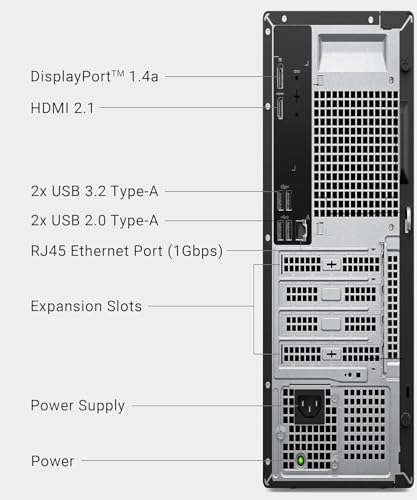
The Dell Pro Slim QCS1250 Business Desktop brings a major architectural upgrade to a space-saving small form factor (SFF) chassis. Driven by the 14th Generation Intel Core i7-14700 vPro processor, this desktop expands physical execution resources to 20 cores (8 Performance-cores and 12 Efficient-cores) and 28 threads. It features 33MB of Intel Smart Cache and an aggressive single-core turbo frequency reaching 5.6 GHz. Despite measuring only 11.95 inches high, 3.74 inches wide, and 11.54 inches deep with a total weight of 13 pounds, the QCS1250 achieves high processing density. While offering a footprint that approaches a compact dell mini desktop computer installation, it preserves desktop-grade component thermal margins and standardized I/O routing.
Internally, this dell ddr5 i7 desktop is configured with 16GB of DDR5 5600 MHz memory and a 512GB M.2 PCIe x4 NVMe solid-state drive. The high-speed DDR5 memory bus handles rapid data streaming, while the PCIe SSD ensures swift operating system boots and prompt software launches. Despite its slim 3.74-inch profile, Dell incorporates an ultra-quiet internal cooling design alongside a broad external port selection. The front panel provides a USB 3.2 Gen 2 Type-C port, a USB 3.2 Gen 1 Type-A port, and an audio headset jack. The rear I/O plate includes two USB 3.2 Gen 1 ports, two USB 2.0 ports, RJ-45 Gigabit Ethernet, an HDMI 2.1 port, and a DisplayPort 1.4a connector. Integrated Intel UHD Graphics 770 natively outputs dual 4K video streams for multi-monitor productivity setups. Network traffic is managed via Intel Wi-Fi and Bluetooth using an internal antenna, running Windows 11 Pro with an included Dell KB216 wired keyboard and wired optical mouse.
Positioned as a strong contender for the best dell i7 desktop in dense professional spaces, the Dell Pro Slim QCS1250 delivers immense processing power for parallel software development, multi-tab financial analysis, and intensive multitasking. Its compact footprint makes it ideal for call centers, medical nursing carts, and tight cubicle desks. However, because it ships with 16GB of RAM and a 512GB SSD, users who need 32GB of immediate memory or larger baseline storage out of the box will prefer the Dell Pro Business Desktop or Dell Desktop Tower.
Dell Tower Desktop for AI Workflows and Energy Efficiency


Dell Tower Desktop 4 photos from the Amazon listing
Best for: AI workflows and low-energy office setups
Pros
- Intel Core Ultra 7 with built-in AI
- Tool-less entry removable side panel
- Quad-monitor daisy chaining support
- Low 180W power consumption
Cons
- SSD capacity not listed
- 16GB base memory configuration
The Dell Tower Desktop represents an architectural shift toward specialized on-die intelligence, powered by the Intel Core Ultra 7-265 desktop processor (Series 2). Departing from purely general-purpose core scaling, this Core Ultra architecture integrates a dedicated Neural Processing Unit (NPU) alongside compute cores and graphics silicon. This NPU offloads localized AI inferencing tasks—such as video background masking, automated transcription, generative productivity assistance, and computer vision scripts—reducing the computational burden on the primary CPU cores. While not configured as a specialized dell workstation desktop with dedicated graphics, this Dell Tower Desktop Core Ultra 7 platform operates with superior electrical efficiency, drawing an operational power envelope of just 180 watts while meeting Energy Star standards.
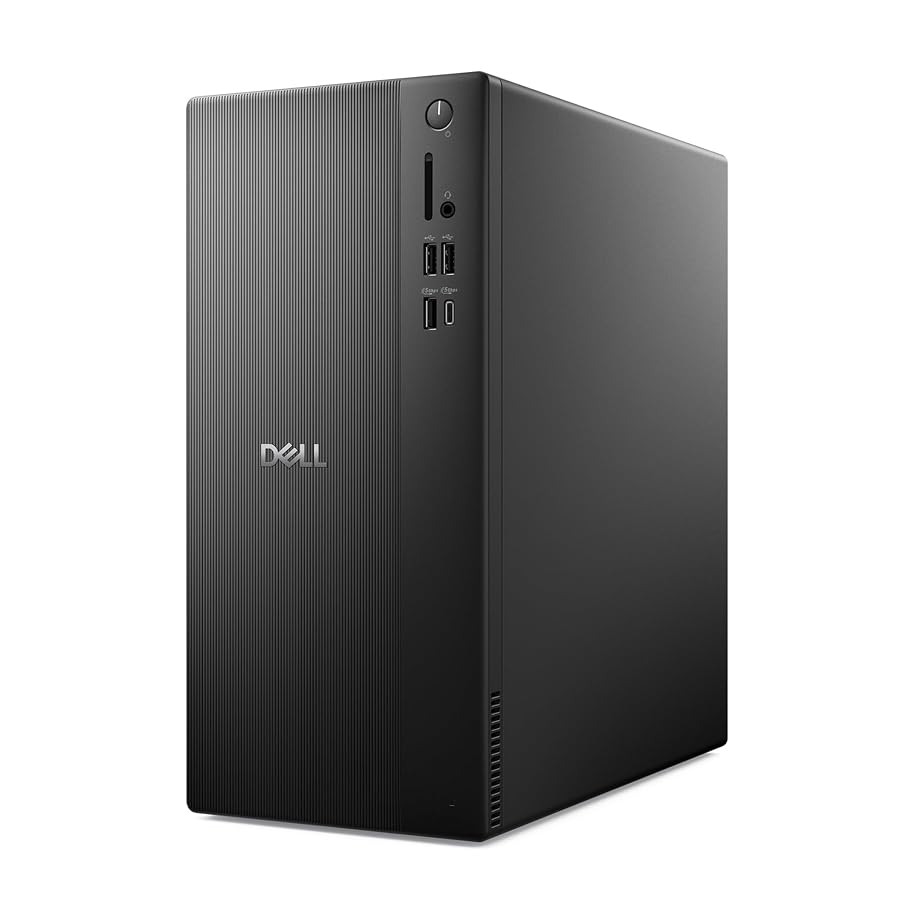
The chassis combines functional serviceability with modern aesthetic design. Finished in black with refined corners and crafted using recycled materials, the enclosure measures 11.53 x 6.06 x 12.76 inches and weighs 12 pounds. It features tool-less entry via a removable side panel, enabling IT staff to inspect components or execute internal upgrades without requiring hand tools. The hardware configuration includes 16GB of DDR5 RAM, a PCIe solid-state drive (specific capacity not listed in the listing), and an integrated Secure Digital (SD) memory card reader. Display flexibility is particularly expansive: equipped with HDMI 2.1 and DisplayPort outputs, the system drives dual 4K monitors or up to four Full HD monitors simultaneously using DisplayPort daisy chaining. Comprehensive I/O includes USB 3.2 Gen 1, USB 2.0, Gigabit Ethernet, Bluetooth, hardware TPM security, Windows 11 Pro, and 1 Year Onsite Service support.
This Dell Tower Desktop suits early adopters, commercial offices, and educational environments modernizing their software stacks for on-device AI integration and multi-display desk setups. Its low 180W power consumption and quad-monitor daisy chain capability make it an excellent control terminal. Nevertheless, organizations prioritizing raw, unlocked clock frequencies for legacy single-threaded software, or those requiring 32GB of pre-installed RAM, will find a better match in the 12th Gen Dell Desktop Tower or Dell Pro Business Desktop.
How to Choose the Right Dell i7 Desktop
Choosing the ideal Dell desktop from this lineup requires balancing silicon architectures, physical workspace limits, memory capacity, and visual display demands across your daily workflow requirements.
- Silicon Generation and Thread Density: The Intel Core i7-12700K found in the Dell Desktop Tower and Dell Pro Business Desktop offers 12 cores (8P + 4E) and 20 threads reaching 5.0 GHz, delivering robust unlocked desktop performance. In contrast, the 14th Gen Intel Core i7-14700 in the Dell Pro Slim QCS1250 scales to 20 cores (8P + 12E) and 28 threads with a 5.6 GHz boost and 33MB cache, making it superior for heavily parallelized computational tasks. The Intel Core Ultra 7-265 in the Dell Tower Desktop diverges by incorporating an on-die NPU, optimizing local AI inferencing and reducing overall power draw to 180 watts.
- Memory Allocation and Storage Headroom: Both the Dell Desktop Tower and Dell Pro Business Desktop arrive equipped with 32GB of DDR5 5600 MHz memory and 1TB PCIe NVMe SSDs, expandable to 64GB RAM and up to 4TB storage. The Dell Pro Slim QCS1250 provides 16GB of DDR5 memory alongside a 512GB SSD, while the Dell Tower Desktop includes 16GB DDR5 with an unlisted SSD capacity. Workflows requiring immediate virtualization or large local database caching benefit from the 32GB base configurations.
- Form Factor and Chassis Footprint: Physical dimensions dictate placement flexibility. The Dell Pro Slim QCS1250 measures just 3.74 inches wide, taking up minimal room on compact work surfaces. In contrast, the Dell Pro Business Desktop (6.06 inches wide) and Dell Tower Desktop (6.06 inches wide) utilize mid-tower profiles that provide greater internal airflow spacing and, in the case of the Core Ultra tower, convenient tool-less side panel entry.
- Display Infrastructure and Multi-Screen Output: All four models feature HDMI 2.1 and DisplayPort outputs capable of driving dual 4K displays concurrently via Intel UHD Graphics 770 or Core Ultra graphics. Deployments utilizing multi-monitor productivity setups like dell monitors 27 inch configurations can rely on the native dual-display layout across all models, while the Dell Tower Desktop uniquely supports daisy-chaining up to four Full HD displays over DisplayPort.
FAQ
What is the difference between an Intel Core i7 and an Intel Core Ultra 7 desktop processor?
Traditional Intel Core i7 processors, including the 12th Gen i7-12700K and 14th Gen i7-14700, focus on general compute scaling using Performance and Efficient x86 cores with high boost frequencies. The Intel Core Ultra 7-265 (Series 2) incorporates an integrated Neural Processing Unit (NPU) directly on the silicon package. This NPU is dedicated to accelerating artificial intelligence and machine learning workloads locally, offloading repetitive background tasks from the CPU and GPU to improve overall energy efficiency and system responsiveness.
Can these Dell desktops support dual 4K monitors without a discrete graphics card?
Yes. All four desktops reviewed feature integrated graphics (such as Intel UHD Graphics 770 on the Core i7 processors) paired with native HDMI 2.1 and DisplayPort 1.4a video outputs. These interfaces deliver sufficient display pipeline bandwidth to power two independent 4K monitors simultaneously at 60Hz without requiring an add-in discrete graphics card.
What are the benefits of DDR5 memory over older memory standards in these Dell desktops?
These Dell desktops utilize DDR5 memory clocked at high frequencies, with listings noting 5600 MHz speeds. DDR5 delivers significantly higher theoretical memory bandwidth and improved channel efficiency compared to older DDR4 platforms. This prevents memory bottlenecks during data-intensive operations, such as compressed archive extraction, large spreadsheet sorting, simultaneous background applications, and software compiling.
How do the security features on these Dell business desktops protect organizational data?
Each model incorporates a discrete hardware Trusted Platform Module (TPM) security chip that encrypts system storage keys, credentials, and platform integrity metrics at the hardware level. Additionally, all four systems include physical security provisions, such as integrated Kensington lock slots or padlock loops, alongside commercial Windows 11 Pro operating systems supporting BitLocker drive encryption.
Which Dell desktop is best suited for tight workspace environments?
The Dell Pro Slim QCS1250 Business Desktop is specifically engineered for space-constrained environments. Measuring just 3.74 inches in width and 11.95 inches in height, its small form factor chassis fits neatly onto crowded desks, beneath point-of-sale terminals, or behind monitors, while still delivering the high multi-threaded performance of a 20-core Intel Core i7-14700 processor.


