As Amazon Associates, we earn from qualifying purchases. This means we may receive a small commission at no extra cost to you if you click through and make a purchase.
Samsung has established itself as an engineering benchmark in the display industry by pairing self-emissive Quantum Dot OLED (QD-OLED) technology with expansive curved form factors. In high-performance gaming and visual workloads, a samsung oled curved monitor delivers true 0.03ms gray-to-gray response times, near-infinite 1,000,000:1 contrast ratios, and per-pixel illumination that eliminates traditional backlight haloing. Comparing these displays requires evaluating how individual panel architectures manage heat dissipation, variable refresh rate synchronization, and sustained subpixel integrity across different curved form factors. For an expansive overview of broader ultrawide configurations, our samsung widescreen monitor guide details how physical curvature radii interact with field-of-view geometry.
The six monitors analyzed in this breakdown diverge significantly across display dimensions, aspect ratios, native refresh rates, and thermal mitigation systems, ranging from competitive 16:9 panels reaching 180Hz to panoramic 32:9 Dual QHD and Dual 4K flagships operating at up to 240Hz.
Samsung OLED Curved Monitors Compared
| Model | Screen Size & Aspect Ratio | Refresh Rate & Response Time | Display Technology | Primary Burn-In & Thermal Safeguards |
|---|---|---|---|---|
| Samsung 49″ Odyssey OLED G9 (G91SD) | 49 inches, 32:9 | 144Hz, 0.03ms | QD-OLED (Dual QHD) | Thermal Modulation System, Logo & Taskbar Detection, Screen Saver |
| Samsung 49″ Odyssey (G93SC) | 49 inches, 32:9 | 240Hz, 0.03ms (GTG) | QD-OLED (Dual QHD) | Not listed |
| Samsung 34′ Odyssey G85SB Series QD-OLED | 34 inches, 21:9 | 175Hz, 0.03ms (GTG) | QD-OLED (Ultra-WQHD) | Not listed |
| Samsung 34″ Odyssey OLED G8 (G85SD) | 34 inches, 21:9 | 175Hz, 0.03ms (GtG) | QD-OLED (Ultra-WQHD) | Thermal Modulation System, Logo & Taskbar Detection, Screen Saver |
| Samsung 27” Odyssey OLED G5 (G50SF) | 27 inches, 16:9 | 180Hz, 0.03ms (GTG) | QD-OLED (QHD) | OLED Safeguard (Thermal Modulation, Logo/Taskbar Detection, Screen Saver) |
| Samsung 57″ Odyssey Neo G9 (G95NC) | 57 inches, 32:9 | 240Hz, 1ms (GTG) | VA Mini-LED (Dual UHD) | Inorganic Mini-LED (Immune to burn-in) |
Table from this guide — scroll sideways for the remaining columns.
Samsung 49″ Odyssey OLED G9 for Ultrawide Productivity and Simulation

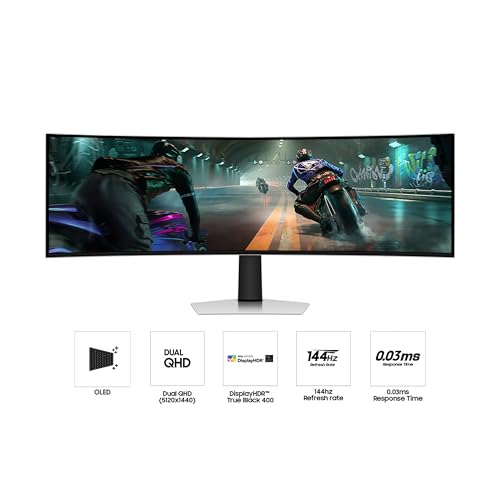


Samsung 49" Odyssey OLED G9 4 photos from the Amazon listing

Best for: Competitive racers seeking maximum frame rates
Pros
- Fluid 240Hz refresh rate
- Immersive 1800R screen curvature
- CoreSync ambient rear lighting
Cons
- Lacks active thermal modulation
- High GPU performance demands
Best for: Productivity users and flight sim enthusiasts
Pros
- 32:9 Dual QHD panoramic workspace
- Hardware thermal modulation system
- Near-instant 0.03ms pixel response
Cons
- 144Hz refresh rate ceiling
- Substantial desk depth requirement
The Samsung 49″ Odyssey OLED G9 (model G91SD) delivers a 32:9 super ultrawide canvas with a Dual QHD resolution of 5120 x 1440. Utilizing a refined QD-OLED panel, it produces an pixel density of 110 pixels per inch alongside a tight 0.16mm pixel pitch. The panel achieves a 1,000,000:1 contrast ratio, 250 cd brightness, and 0.99 color gamut coverage, complemented by VESA DisplayHDR True Black 400 certification for rich dynamic range without illumination bleed. Gamers seeking an expansive cockpit view will find this samsung 49 inch curved oled screen matches the physical width of dual 27-inch monitors without a dividing center bezel, making it an exceptional centerpiece evaluated in our samsung 49 inch monitor roundup.
From a hardware stability perspective, the G91SD integrates an extensive suite of samsung oled burn in prevention technologies. Its onboard Thermal Modulation System uses predictive algorithms to assess surface temperatures and autonomously regulate luminance, dampening thermal stress on organic diodes. The panel also features intelligent Logo & Taskbar Detection to dim static graphical elements, while a Screen Saver feature automatically attenuates the display after 10 minutes of inactivity. For motion clarity, the display runs at a 144Hz refresh rate backed by an instantaneous 0.03ms response time, with synchronization handled via both AMD FreeSync Premium Pro and certified G-Sync compatibility.
This monitor is tailored specifically for flight simulation fans, sim racers, and complex multi-window workstation users who prioritize horizontal visual estate and integrated thermal safeguards over ultra-high refresh headroom. Users demanding higher frame rates will prefer the faster 240Hz variant in the same chassis size.
Samsung 49″ Odyssey for High-Framerate Competitive Simulators


Samsung 49" Odyssey (G93SC) Series QD-OLED Curved Gaming Monitor 4 photos from the Amazon listing
The Samsung 49″ Odyssey (model G93SC) shares the 49-inch 32:9 Dual QHD footprint of the G91SD but targets high-velocity gameplay by doubling down on motion performance. Operating on an 1800R curvature that conforms to peripheral vision, this QD-OLED display raises the refresh ceiling to a blistering 240Hz while maintaining a 0.03ms (GTG) pixel response. The panel specifications detail a 0.23mm pixel pitch, 250 cd brightness, 1,000,000:1 contrast ratio, and a 0.99 color gamut, with HDR support handled through DisplayHDR True Black 400 and HDR10+ processing.
Hardware connectivity on the G93SC includes HDMI 2.1, DisplayPort, and an integrated USB hub that supports direct peripheral routing. An Auto Source Switch+ feature detects newly powered hardware inputs and routes visual signals immediately without manual menu navigation. Visual immersion is augmented by built-in stereo speakers alongside Samsung CoreSync and Core Lighting+ rear projection, which illuminates the wall behind the monitor by matching on-screen color profiles. Synchronization is backed by AMD FreeSync Premium Pro and G-Sync compatibility to mitigate stuttering.
This unit suits competitive sim racers and high-end rig owners who operate powerful graphics cards capable of outputting Dual QHD frames near the 240Hz ceiling. It cedes active automated thermal modulation systems to the G91SD, prioritizing maximum frame rate throughput instead.
Samsung 34′ Odyssey G85SB Series QD-OLED for Standalone Cloud Gaming and Media


Samsung 34' Odyssey G85SB Series QD-OLED 4 photos from the Amazon listing
Best for: Gamers wanting integrated smart streaming features
Pros
- Built-in Samsung Gaming Hub
- Neo Quantum Processor optimization
- Vibrant 99.3% color gamut
Cons
- Curved finish lacks glare-free coating
- Lacks hardware thermal modulation
The Samsung 34′ Odyssey G85SB Series QD-OLED (LS34BG850SNXZA) provides an Ultra-WQHD curved gaming experience across a cinema-standard 21:9 aspect ratio. Driven by an integrated Neo Quantum Processor, every frame is analyzed in real time to optimize color tone, shading, and contrast transitions. The display achieves a 175Hz refresh rate, a 0.03ms (GTG) response time (with an alternate 0.1ms rating listed in operational descriptions), a 1,000,000:1 contrast ratio, 250 cd brightness, 0.23mm pixel pitch, and 99.3% color gamut coverage under DisplayHDR True Black 400 and HDR10 standards.
Unlike standard computer displays, the G85SB functions as a standalone entertainment terminal via built-in Wi-Fi connectivity. It features the Samsung Gaming Hub, enabling direct cloud game streaming without an attached PC or console, and incorporates the Samsung TV Plus environment for streaming live content. Onboard utilities include Game Bar, which allows users to monitor real-time frame rates, toggle HDR profiles, and adjust screen aspect ratios on the fly without interrupting running software. Adaptive synchronization is maintained through AMD FreeSync Premium.
This monitor is the ideal match for gamers seeking an all-in-one entertainment station that doubles as an independent media console. Those needing matte anti-reflective coatings and hardware-level burn-in modulation algorithms will look toward the newer G85SD.
Samsung 34″ Odyssey OLED G8 for Dedicated PC Battlestations


Samsung 34" Odyssey OLED G8 4 photos from the Amazon listing
Best for: Dedicated PC gamers in lit rooms
Pros
- Glare Free matte panel finish
- Active burn-in thermal modulation
- Included 3-year warranty coverage
Cons
- No integrated Smart TV hub
- 175Hz refresh rate ceiling
The Samsung 34″ Odyssey OLED G8 (model G85SD / LS34DG856SNXZA) refines the 34-inch 21:9 ultrawide form factor into an uncompromising, PC-focused peripheral. Outputting an Ultra-WQHD resolution of 3440 x 1440 across an immersive curved panel, it delivers a sharp 110 pixels per inch. The display retains the signature 175Hz refresh rate and 0.03ms (GtG) response times of its series, while adding Samsung Glare Free technology. This specialized optical coating diffuses external ambient light to prevent surface reflections without washing out deep black levels.
Comparing the samsung odyssey g85sd vs g85sb reveals crucial internal upgrades targeted directly at longevity. The G85SD incorporates Samsung advanced Thermal Modulation System, utilizing predictive surface heat monitoring to adjust luminance across high-thermal zones. It adds automated Logo & Taskbar Detection to combat burn-in on static interface elements, alongside a 10-minute inactivity Screen Saver. Backed by a 3-year warranty, motion integrity is ensured with simultaneous support for G-Sync compatibility and AMD FreeSync Premium Pro.
The G85SD is designed specifically for desktop PC gamers operating in ambient-lit rooms who demand long-term panel protection and anti-glare coatings over smart TV streaming apps.
Samsung 27” Odyssey OLED G5 for Fast-Paced Esports Rigs


Samsung 27” Odyssey OLED G5 (G50SF) Series QHD & 4 photos from the Amazon listing
Best for: Esports players favoring standard aspect ratios
Pros
- Fast 180Hz refresh frequency
- Pantone Validated color accuracy
- OLED Safeguard thermal protection
Cons
- Standard 16:9 widescreen format
- Smaller overall display area
The Samsung 27” Odyssey OLED G5 (model G50SF) adapts QD-OLED performance to a conventional 16:9 desktop format. Delivering a native QHD 1440p resolution across a 27-inch matte curved surface, this display pushes visual fluidity to a 180Hz refresh rate with a rapid 0.03ms (GTG) pixel response time. The panel features a 1,000,000:1 contrast ratio, an elevated brightness output of 280 cd/m², and Pantone Validated color accuracy capable of reproducing over 2,100 distinct hues with HDR10 enhancement. Readers comparing compact desktop footprints can explore our samsung 32 curved monitor guide to see how 16:9 displays scale up in size.
Panel durability is governed by the integrated OLED Safeguard suite, which deploys the Thermal Modulation System to monitor operating temperatures continuously. Working in tandem with Logo and Taskbar Detection and an automated Screen Saver, the monitor actively suppresses static retention risks and includes a 3-year manufacturer warranty. Convenience features include Glare Free anti-reflection layers and Auto Source Switch+ for rapid signal acquisition, backed by G-Sync compatibility and AMD FreeSync.
The 32 inch computer monitor samsung alternatives offer larger fields of view, but the 27-inch G50SF remains the premier choice for competitive esports players who require concentrated peripheral vision, low input latency, and tight pixel response.
Samsung 57″ Odyssey Neo G9 for Extreme Dual 4K Immersion


Samsung 57" Odyssey Neo G9 (G95NC) Dual 4K UHD 4 photos from the Amazon listing
Best for: Sim enthusiasts demanding massive Dual 4K resolution
Pros
- DisplayPort 2.1 high-bandwidth connectivity
- 2,392 local dimming zones
- Peak 1,000 nit brightness
Cons
- VA Mini-LED rather than OLED
- 1ms response slower than QD-OLED
The Samsung 57″ Odyssey Neo G9 (model G95NC) breaks outside organic diode boundaries by utilizing a Quantum Mini-LED VA architecture to deliver the world’s first Dual UHD display. Spanning an expansive 57-inch diagonal with a 32:9 aspect ratio, this super ultrawide powerhouse produces a massive resolution equivalent to two 4K UHD monitors sitting side by side. Wrapped in an aggressive 1000R curvature, the panel achieves an unprecedented 1,000 nit peak brightness under VESA DisplayHDR 1000 specifications, driven by Quantum Matrix Technology featuring 2,392 local dimming zones and 12-bit black level control.
To transmit the colossal data throughput required for Dual 4K at a fluid 240Hz refresh rate, this samsung curved gaming monitor displayport 2.1 interface provides elite bandwidth alongside HDMI 2.1 inputs and an integrated USB hub. Motion clarity is maintained via a 1ms (GTG) response time and AMD FreeSync Premium Pro synchronization. The chassis is finished with CoreSync and Core Lighting+ rear illumination, an ergonomic stand, a 0.18mm pixel pitch, and a matte anti-glare screen treatment.
This flagship hardware is engineered for enthusiast simulator pilots and power users with flagship graphics systems. Because it relies on inorganic Mini-LED illumination rather than OLED, it provides total immunity to image retention at the cost of slightly higher response times than QD-OLED alternatives.
How to Choose the Right Samsung OLED Curved Monitor
Selecting the ideal samsung oled curved monitor requires matching panel dimensions, bandwidth requirements, and thermal features to your hardware profile and usage patterns.
- Aspect Ratio and Resolution Demands: Super ultrawide 32:9 displays like the 49-inch G91SD and G93SC provide an expansive 5120 x 1440 resolution that replaces dual-screen desk arrangements. Users seeking a balance between widescreen immersion and standard gaming support should consider 21:9 Ultra-WQHD displays like the 34-inch G85SD and G85SB. If your primary focus is competitive esports, standard 16:9 panels like the 27-inch G50SF maintain full focus within your central line of sight.
- Refresh Rate vs. GPU Bandwidth: In a samsung qd-oled refresh rate comparison, panel speeds scale from 144Hz on the G91SD to 175Hz on the 34-inch models, 180Hz on the 27-inch G5, and 240Hz on the G93SC and 57-inch Neo G9. Operating high refresh rates at Dual QHD or Dual 4K demands significant graphics processing power. Users driving the 57-inch Neo G9 should ensure their GPU supports DisplayPort 2.1 to achieve native 240Hz Dual UHD throughput.
- Burn-In Mitigation and Thermal Controls: Readers evaluating which samsung oled curved monitor to buy must examine panel preservation hardware. Samsung newer models, including the G91SD, G85SD, and G50SF, feature integrated Thermal Modulation Systems alongside Logo & Taskbar Detection to dynamically throttle heat on static pixels. If your workflow involves long hours with static spreadsheets or desktop taskbars, prioritize models featuring these safeguards.
- Smart Features vs. Dedicated PC Usage: The G85SB includes Samsung Gaming Hub and Smart TV streaming apps, allowing standalone gaming and viewing over Wi-Fi. In contrast, monitors like the G85SD and G91SD omit smart software overhead in favor of dedicated PC gaming performance, matte Glare Free coatings, and automated thermal protection.
FAQ
How does Samsung prevent OLED burn-in on curved gaming monitors?
Samsung mitigates burn-in risk on its latest QD-OLED models using a multi-tiered defense system. The Thermal Modulation System uses predictive algorithms to map surface temperatures and automatically reduce luminance in hot areas. Additionally, Logo & Taskbar Detection identifies static graphic elements and lowers their brightness independently, while an integrated Screen Saver dims the entire display after 10 minutes of inactivity.
What are the primary differences between the Samsung Odyssey G85SD and G85SB?
While both monitors share a 34-inch 21:9 Ultra-WQHD QD-OLED panel with a 175Hz refresh rate, their internal features differ. The G85SB includes the Neo Quantum Processor, Samsung Gaming Hub, and Tizen Smart TV streaming over Wi-Fi. The newer G85SD strips away the smart TV interface, adding Samsung Glare Free matte coating, the Thermal Modulation System, Logo & Taskbar Detection, and a 3-year warranty.
Does the Samsung 49-inch Odyssey OLED G9 support a 240Hz refresh rate?
Refresh rates depend on the specific model within the 49-inch OLED G9 lineup. The Samsung 49″ Odyssey OLED G9 (G91SD) operates at a 144Hz refresh rate with integrated Thermal Modulation. Users who require a 240Hz refresh rate must select the Samsung 49″ Odyssey (G93SC), which features 240Hz motion support over HDMI 2.1 and DisplayPort connections.
Why does the 57-inch Odyssey Neo G9 use Mini-LED instead of QD-OLED?
The 57″ Odyssey Neo G9 utilizes Quantum Mini-LED technology with a VA panel to achieve a massive Dual 4K UHD resolution with 1,000 nits of peak brightness under VESA DisplayHDR 1000. Mini-LED technology allows for 2,392 local dimming zones without the burn-in considerations associated with pushing large-format organic diodes to extreme luminance levels.
Do Samsung QD-OLED curved monitors support variable refresh rate technology?
Yes, all the QD-OLED monitors in this comparison feature adaptive synchronization. Models such as the G91SD, G93SC, G85SD, and G50SF offer both official G-Sync compatibility and AMD FreeSync Premium Pro (or standard AMD FreeSync on the G5) to eliminate screen tearing and display stutter across varying frame rates.


