As Amazon Associates, we earn from qualifying purchases. This means we may receive a small commission at no extra cost to you if you click through and make a purchase.
Sabrent has established a distinct footprint in workstation storage and connectivity by manufacturing purpose-built hardware bridges that eliminate the friction of traditional external drive enclosures. Rather than locking drives behind proprietary RAID arrays or sealed cases, the brand specializes in open-slot drive interfaces, controller bridges, and universal expansion hardware that interface directly with standard desktop or laptop host buses. This engineering approach appeals directly to technicians, IT professionals, and storage analysts who require bare-metal drive mounting, fast media hot-swapping, and uninhibited SATA throughput.
While each peripheral falls under the broad category of external host expansion, their underlying hardware controllers, physical topologies, and functional roles diverge sharply across the lineup: users can select between standalone offline duplication docks, horizontal test-bench drive slots, high-density five-bay direct-attached storage arrays, or full desktop universal display docks equipped with multi-monitor outputs and Power Delivery.
Sabrent Docking Station Comparison


SABRENT USB 3.0 to SATA Hard Drive Docking Station, 4 photos from the Amazon listing
| Model | Host Interface | Supported Media / Displays | Peak Interface Bandwidth | Primary Architecture |
|---|---|---|---|---|
| Sabrent EC-HD2B | USB 3.0 Type-A | 2x 2.5-inch or 3.5-inch SATA HDD/SSD | 5 Gbps (USB 3.0) | Dual-bay standalone offline cloner |
| Sabrent EC-DFLT | USB 3.0 Type-A | 1x 2.5-inch or 3.5-inch SATA HDD/SSD | 5 Gbps (UASP supported) | Single-bay horizontal lay-flat bridge |
| Sabrent EC-CH2B | USB Type-C | 2x 2.5-inch or 3.5-inch SATA HDD/SSD | 5 Gbps (USB 3.0) | Dual-bay USB-C offline cloner |
| Sabrent DS-SC5B | USB 3.2 Gen 2 Type-C | 5x 3.5-inch SATA HDD/SSD | 10 Gbps (USB 3.1 Gen 2) | 5-Bay DAS (5x ASMedia ASM1351) |
| Sabrent DS-WSPD | USB Type-C | Dual 4K displays (2x HDMI, 2x DP) | 5 Gbps (USB 3.2 Gen 1) | Universal 10-port laptop dock with 60W PD |
SABRENT USB 3.0 Dual Bay Hard for Offline Drive Duplication


SABRENT USB 3.0 Dual Bay Hard 4 photos from the Amazon listing

Best for: Bench technicians performing bare drive diagnostics
Pros
- Stable lay-flat horizontal form factor
- UASP transfer protocol support
- Includes dedicated 12V power supply
Cons
- No SMART telemetry passthrough
- Requires Type-A port or adapter
Best for: IT technicians needing standalone offline cloning over Type-A
Pros
- Standalone offline drive cloning
- Supports 2.5 and 3.5-inch SATA
- Driver-free plug and play
Cons
- Offline cloning capped at 60Mbps
- Older USB Type-A host interface
The SABRENT USB 3.0 Dual Bay Hard docking station (model EC-HD2B) is engineered for users who regularly service bare SATA storage without opening desktop chassis or fastening internal drive trays. Built with a vertical dual-slot form factor, this unit accepts both 2.5-inch and 3.5-inch standard desktop and laptop SATA hard drives or solid-state drives. The hardware interface connects via a standard USB 3.0 Type-A port, providing backward compatibility with USB 2.0 at 480Mbps and USB 1.1 at 12Mbps, while maintaining a top interface data rate of 5Gbps. Operating systems supported include Windows, Mac OS, and Linux platforms with plug-and-play installation that requires no external drivers.
A primary architectural feature of the EC-HD2B is its integrated offline hardware cloning engine. When disconnected from the host computer, the dock allows technicians to copy an entire source drive to a target drive at sector level with transfer rates specified up to 60Mbps. This feature runs entirely through the dock’s internal logic, freeing host system resources during large maintenance operations. In standard connected operation, the unit mounts drives up to 10TB per bay, yielding a 20TB total memory storage capacity across both slots for file transfers and partition diagnostics.
This dock suits system builders, IT repair specialists, and help-desk personnel who routinely image drives or extract data from decommissioned machines. For users evaluating a workspace transition to USB-C laptops, the older USB 3.0 Type-A interface represents the operational ceiling of the EC-HD2B, meaning users with modern type-C hardware may prefer later iterations with native Type-C connectivity.
SABRENT USB 3.0 to SATA Hard for Benchtop Testing
Designed with a low-profile footprint, the SABRENT USB 3.0 to SATA Hard drive dock (model EC-DFLT) utilizes a horizontal lay-flat chassis rather than a vertical top-loading slot. This layout minimizes mechanical stress on SATA data and power headers when inserting heavy mechanical disks. The dock supports SATA I, SATA II, and SATA III revisions across 2.5-inch and 3.5-inch drives, both mechanical HDDs and solid-state drives. The unit relies on a USB 3.0 Type-A host connection and requires a direct connection to a computer port rather than an unpowered USB hub to maintain communication stability.
The internal bridge controller supports the USB Attached SCSI Protocol (UASP), allowing faster queuing and command execution on compatible host operating systems including Windows 10/11, macOS, and Linux. The manufacturer notes that typical mechanical hard drives achieve real-world transfer rates between 100MB/s and 160MB/s due to platter physics, while SATA SSDs can push performance closer to the interface limit. A 12V/2A AC wall power adapter is included in the box and must be used for 3.5-inch drives, as desktop spinning disks cannot draw sufficient voltage from USB bus power alone. The dock features an activity and status LED, hot-swap support, and tool-free mounting.
This single-bay dock suits data recovery specialists and bench technicians who need to inspect single bare drives quickly without upright balancing hazards. It gives way to dual-bay options when sector-to-sector cloning is required, and buyers should note that its bridge chipset does not pass through drive S.M.A.R.T. diagnostic telemetry, nor does it support SAS, M.2 NVMe, or legacy IDE interfaces.
SABRENT Dual-Bay USB-C Hard Drive Docking for Modern Workstations
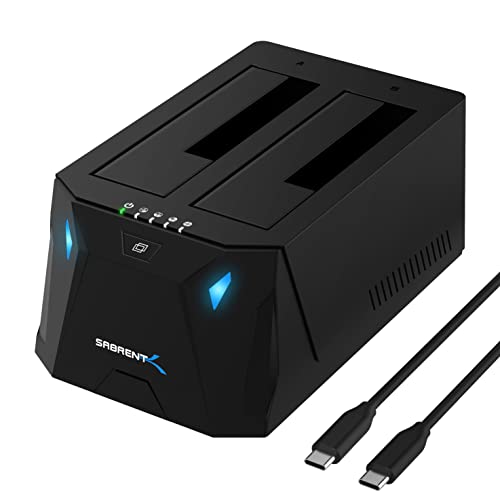


SABRENT Dual-Bay USB-C Hard Drive Docking 4 photos from the Amazon listing
Best for: Modern USB-C workstation users cloning bare drives
Pros
- Native USB Type-C host interface
- Reads two drives simultaneously
- Up to 40TB total storage capacity
Cons
- Offline cloning limited to 60MBps
- Does not support IDE or NVMe
The SABRENT Dual-Bay USB-C Hard Drive Docking station (model EC-CH2B) takes the dual-bay top-loading architecture and modernizes the physical host connection with a native USB Type-C port. Designed to bridge bare 2.5-inch and 3.5-inch SATA hard drives or solid-state drives directly to contemporary laptops and desktops, this model includes a USB Type-C cable and external power adapter in the package. It operates at USB 3.0 speeds up to 5Gbps, offering plug-and-play mounting on Windows OS and Mac OS platforms without requiring proprietary device drivers.
Internally, the EC-CH2B manages up to 40TB of total storage capacity across its two vertical bays. When plugged into an active host, the dock mounts both bays as independent drive volumes simultaneously, allowing users to transfer files directly from drive to drive or access dual volumes over a single USB-C pipeline. When disconnected from the computer, the hardware cloner function can be executed via an onboard push button, duplicating data from source to target drive at rates up to 60MBps provided the target disk has equal or greater capacity than the source.
This dock is suitable for users running contemporary USB-C hardware who require simultaneous two-drive workstation access alongside independent duplication capabilities. If your workflow requires expansive multi-drive setups with active cooling fans or high-density storage pools, this dual-bay dock relinquishes priority to Sabrent’s dedicated multi-bay direct-attached storage systems.
SABRENT 5-Bay USB-C 10Gbps 3.5in Hard for High-Capacity DAS Storage


SABRENT 5-Bay USB-C 10Gbps 3.5in Hard 4 photos from the Amazon listing
Best for: Creative pros needing high-capacity direct-attached storage
Pros
- 10Gbps USB 3.2 Gen 2 speed
- Dedicated ASMedia controller per bay
- Integrated PWM cooling fan
Cons
- No onboard hardware RAID support
- Form factor limited to 3.5-inch
When storage requirements surpass dual-bay docks, the SABRENT 5-Bay USB-C 10Gbps 3.5in Hard drive enclosure (model DS-SC5B) expands capacity into a dedicated Direct Attached Storage (DAS) array. Engineered with an aluminum and reinforced chassis weighing 10 pounds, this unit houses up to five empty 3.5-inch SATA I/II/III hard drives or SSDs. It connects over a USB 3.2 Gen 2 (USB 3.1 Gen 2) Type-C host interface capable of theoretical throughput up to 10Gbps. This higher bandwidth ceiling ensures that multiple drives operating simultaneously are not restricted by older 5Gbps bridge bottlenecks.
The internal controller topology uses a dedicated ASMedia ASM1351 controller assigned to each individual drive bay. This isolated controller architecture prevents connection dropouts and stabilizes multi-drive file operations. The DS-SC5B supports up to 100TB of total addressable storage (5 x 20TB drives). Each drive slot features an independent power switch, activity LED, tray-less tool-free latching door, and a mechanical key lock accompanied by a Kensington security slot. Thermal management is handled by an integrated 120mm cooling fan running intelligent PWM temperature control, which scales fan RPM based on internal thermal levels. An internal auto-switching power supply eliminates the need for an external AC power brick.
Unlike network-attached servers or hardware RAID arrays, the DS-SC5B presents every installed drive to Windows, macOS, or Linux as an independent JBOD volume. It also incorporates a secondary rear USB-C port for connecting external peripherals or daisy-chaining an additional storage dock. This direct-attached system suits content creators and video editors who need multi-terabyte localized storage pools, though users seeking mobile bus-powered operation or built-in display connectivity will need to look elsewhere in the Sabrent catalog.
SABRENT USB-C Dual 4K Universal Docking for Multi-Monitor Workstations


SABRENT USB-C Dual 4K Universal Docking Station, USB-C PD 4 photos from the Amazon listing
Best for: Laptop users requiring dual 4K displays and charging
Pros
- Dual 4K display outputs
- Integrated 60W USB Power Delivery
- Gigabit Ethernet and audio ports
Cons
- 4K display output limited to 30Hz
- USB data ports limited to 5Gbps
Pivoting from pure drive-bay storage bridges to complete workstation interface aggregation, the SABRENT USB-C Dual 4K Universal Docking station (model DS-WSPD) functions as a centralized laptop productivity hub. Built inside a compact horizontal chassis with a weight of 12 ounces, this dock connects to host laptops, tablets, or desktops using a single Type-C cable. The package includes both a USB-C to USB-C cable and a USB-C to USB-A cable to provide connectivity flexibility across modern and legacy host computers.
The DS-WSPD features a 10-port expansion layout headlined by dual 4K display outputs operating at 30Hz. Video ports include two HDMI ports and two DisplayPort connectors, allowing users to choose their preferred display cabling without adapters. Alongside its video outputs, the dock provides four USB 3.0 Type-A data ports and two USB-C data ports supporting transfer speeds up to 5Gbps. Workstation connectivity is completed with an RJ-45 Gigabit Ethernet port, a 3.5mm stereo audio output, and an independent 3.5mm microphone input. The dock also supports USB Power Delivery (PD), routing up to 60 watts of charging current back to compatible host laptops through the primary Type-C cable connection.
This dock is aimed at mobile professionals who need a single-cable desktop anchor that manages external displays, wired networking, and audio interfaces. While those seeking bare-drive maintenance will choose Sabrent hard drive dock hardware, users needing general desktop connectivity can evaluate how this compares to alternatives like an anker usb c dock or an enterprise-grade belkin thunderbolt 3 dock.
How to Choose the Right Sabrent Docking Station
Selecting the ideal hardware bridge from this lineup depends on your primary computing objective: bare drive maintenance, large-scale direct storage expansion, or desktop peripheral connectivity. When planning a plugable thunderbolt 5 dock or Sabrent installation, matching host port capabilities to downstream interface requirements prevents bandwidth throttling.
- Host Interface and Bus Speed: If your system utilizes legacy USB Type-A connections, models like the EC-HD2B and EC-DFLT connect directly out of the box using USB 3.0 (5Gbps) links. Conversely, systems outfitted with Type-C ports benefit from the EC-CH2B or the 10Gbps USB 3.2 Gen 2 bus on the DS-SC5B DAS enclosure, which provides the overhead necessary to run multiple drives concurrently.
- Single-Bay Testing vs. Standalone Duplication: For quick bench tests and software diagnostics, the lay-flat EC-DFLT offers a stable platform that eliminates vertical drive wobble. If your task involves disk migration, bare-metal backups, or operating system rollouts, a sabrent dual bay dock such as the EC-HD2B or EC-CH2B provides push-button offline hardware cloning without occupying computer processor cycles.
- Direct Attached Storage vs. Display Expansion: Determine whether you require raw drive bays or workstation display outputs. The DS-SC5B is strictly a 5-bay direct-attached storage unit holding up to 100TB with dedicated ASMedia controllers per bay and PWM cooling. If your priority is driving dual 4K monitors, running Gigabit Ethernet, and delivering 60W of laptop charging over a single cable, the DS-WSPD universal dock meets those requirements without bare drive slots.
- Physical Drive Form Factors: Pay attention to drive dimensions before ordering. While the EC-HD2B, EC-DFLT, and EC-CH2B accept both 2.5-inch and 3.5-inch SATA disks, the 5-bay DS-SC5B DAS specifies 3.5-inch drives. None of the drive docks in this guide support legacy IDE ribbons, 4-pin Molex power, SAS enterprise connectors, or internal M.2 NVMe sticks.
FAQ
Can I clone a larger hard drive onto a smaller SSD using Sabrent offline cloning docks?
No. When using the standalone offline cloning feature on the EC-HD2B or EC-CH2B, the target drive installed in the destination bay must have a capacity equal to or greater than the source drive. The offline hardware controller duplicates the drive block-by-block, meaning partition sizing cannot be dynamically truncated during an offline clone.
Do Sabrent multi-bay storage enclosures support hardware RAID configurations?
The Sabrent DS-SC5B is a Direct Attached Storage (DAS) unit operating under a JBOD (Just a Bunch of Disks) architecture, not a hardware RAID enclosure. Each inserted drive is assigned an independent ASMedia ASM1351 controller and mounts as an individual volume on your operating system. Any multi-disk redundancy, mirroring, or striping must be configured via software-based storage pools within Windows, macOS, or Linux.
Why does the Sabrent EC-DFLT lay-flat dock require an external power adapter for 3.5-inch drives?
A standard 3.5-inch mechanical hard disk requires both 5-volt and 12-volt power rails to spin up its internal drive motor and actuate the read/write heads. Standard USB 3.0 Type-A host ports provide only 5 volts. Without the included 12V/2A AC wall power adapter plugged into the dock, 3.5-inch desktop drives will fail to spin up or repeatedly drop off the host system.
Can the Sabrent DS-WSPD display dock power a gaming laptop requiring 100 watts?
The Sabrent DS-WSPD delivers up to 60 watts of Power Delivery over its primary USB Type-C host connection. While this wattage is sufficient for charging standard ultrabooks and productivity laptops, high-performance workstations or gaming laptops requiring 100 watts or more will experience slow charging or battery drain under load unless connected to their dedicated OEM power brick.
Do Sabrent hard drive docks pass through drive S.M.A.R.T. health data to the host computer?
The listing for the Sabrent EC-DFLT explicitly notes that S.M.A.R.T. diagnostic telemetry is not passed through its USB bridge controller. When diagnosing degraded drives or monitoring mechanical sector reallocation on that model, specialized software relying on raw S.M.A.R.T. queries will not receive complete telemetry over the USB bridge.


