As Amazon Associates, we earn from qualifying purchases. This means we may receive a small commission at no extra cost to you if you click through and make a purchase.
KOORUI has established a distinct presence in the display hardware landscape by engineering gaming screens focused on high refresh cycles, diverse panel architectures, and dedicated esports utilities. The brand emphasizes essential display metrics rather than superfluous cosmetic additions, equipping panels with Adaptive Sync variable refresh rate integration, wide color space coverage, and low-latency response profiles. By manufacturing displays across multiple panel configurations, KOORUI targets desktop setups that demand precise pixel response, whether for fast-paced competitive arena titles or color-critical multitasking workloads.
Across the six models evaluated in this technical review, the lineup diverges along display sizes from 21.5 inches to 34 inches, panel technologies between high-contrast VA and color-accurate Fast IPS, resolution tiers spanning 1080p Full HD to 3440×1440 UWQHD, and vertical refresh frequencies scaling from 120Hz up to 240Hz.
KOORUI Gaming Monitors Compared
Selecting the ideal display requires examining foundational hardware specifications, including panel type, native resolution, peak refresh rate, contrast capability, and physical interface standards. This koorui gaming monitor comparison outlines the critical technical metrics across the brand’s primary display options.
| Model | Panel Type & Size | Native Resolution | Refresh Rate | Static Contrast | Video Interfaces |
|---|---|---|---|---|---|
| KOORUI 24 Inch Gaming Monitor | 23.8″ Flat VA | 1920×1080 FHD | 180Hz | 3000:1 | HDMI, VGA |
| KOORUI 24 inch Curved Gaming Monitor | 24″ 1500R Curved LCD | 1920×1080 FHD | 180Hz | 3000:1 | 2x HDMI 2.0, 1x DP 1.2 |
| KOORUI 27″ FHD 1080p Gaming Monitor | 27″ Flat VA | 1920×1080 FHD | 240Hz | 3000:1 | HDMI 2.0, DP 1.4 |
| KOORUI 27 Inch 1440p Gaming Monitor | 27″ Flat Fast IPS | 2560×1440 QHD | 200Hz | 1000:1 | HDMI, DisplayPort |
| KOORUI 22 Inch Computer Monitor FHD | 21.5″ Flat VA | 1920×1080 FHD | 120Hz | 4000:1 | HDMI, VGA |
| KOORUI 34 Inch 240Hz Ultrawide Curved | 34″ 1500R Curved VA | 3440×1440 UWQHD | 240Hz | 4000:1 | 2x HDMI 2.1, 1x DP 1.4 |
Table from this guide — scroll sideways for the remaining columns.
KOORUI 24 Inch Gaming Monitor for Fast-Paced 1080p Esports


KOORUI 24 inch Curved Gaming Monitor 4 photos from the Amazon listing
Best for: Gamers seeking desktop immersion in compact spaces
Pros
- 1500R curved immersion
- DisplayPort and dual HDMI 2.0
- 1ms MPRT response mode
Cons
- Tilt-only adjustment stand
- No integrated speakers
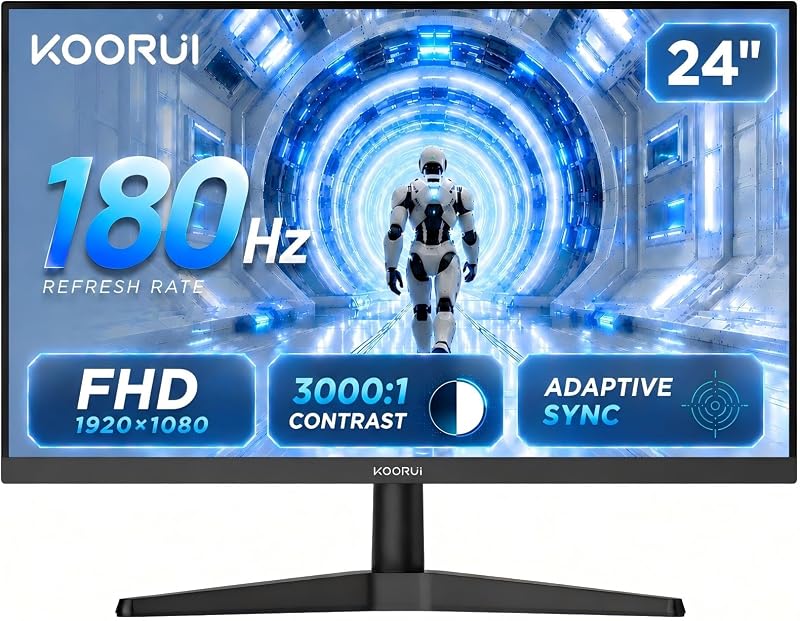
Best for: Entry-level competitive players needing fluid motion
Pros
- 180Hz refresh rate
- 3000:1 VA contrast ratio
- VESA 100x100mm mounting
Cons
- Legacy VGA without DisplayPort
- Modest 250 cd/m² brightness
The KOORUI 24 Inch Gaming Monitor is an entry-tier display engineered specifically for high-cadence competitive titles. Featuring a 23.8-inch diagonal display area with a 16:9 aspect ratio and a 0.28mm pixel pitch, the monitor pairs a 1920×1080 Full HD resolution with an elevated 180Hz refresh rate. As a dedicated koorui 180hz gaming monitor, it utilizes Adaptive Sync technology to synchronize panel scan rates with graphics card frame output, directly reducing screen tearing and stutter during rapid tracking sequences in first-person shooters and racing games.
Underlying visual performance is a vertical alignment (VA) LED panel with a matte finish, rated for a 3000:1 static contrast ratio. This high native contrast enables significantly deeper black floor reproduction and pronounced shadow separation in dark environments compared to conventional twisted nematic or low-contrast panels. The display delivers a peak luminance of 250 cd/m², a wide color gamut coverage value of 120, and broad 178-degree horizontal and vertical viewing angles. Physical eye comfort is supplemented by an anti-flicker backlighting module and an integrated low blue light configuration designed for protracted computing sessions.
Connectivity options incorporate an HDMI port for modern graphics cards and gaming consoles alongside an analog VGA interface for legacy system connectivity. The chassis incorporates slim bezels suitable for multi-display arrangements and standard VESA 100×100mm mounting holes on the rear. This model suits esports enthusiasts and students seeking a dedicated 180Hz high-refresh display in a compact footprint, though users requiring higher resolution or native DisplayPort connectivity will look toward the higher-tier alternatives in the lineup.
KOORUI 24 inch Curved Gaming Monitor for Compact Immersion


KOORUI 24 Inch Gaming Monitor, 180Hz 1080P VA Display 4 photos from the Amazon listing
The KOORUI 24 inch Curved Gaming Monitor shifts the visual experience to a curved form factor, implementing a 1500R curvature across its 24-inch diagonal viewing area. The 1500R arc brings the peripheral edges of the 1080p display equidistant to the human eye, enhancing visual depth and spatial immersion during cockpit simulations and action titles. Like its flat counterpart, it operates at a native 180Hz refresh frequency, but explicitly incorporates a 1ms Moving Picture Response Time (MPRT) mode alongside Adaptive Sync to suppress motion smear across high-velocity sequences.
Color rendering on this curved LCD panel covers 99% of the sRGB color gamut with 8-bit depth, rendering up to 16.7 million distinct hues. A 3000:1 static contrast ratio is supported by HDR10 decoding, allowing the display to map highlight and shadow gradients with greater distinction. The screen surface features a matte, anti-glare finish, while the panel achieves a standard luminance ceiling of 250 cd/m² alongside flicker-free driving circuitry and hardware-level blue light filtering.
Video input flexibility is superior to the entry flat model, providing two HDMI 2.0 ports, one DisplayPort 1.2 port, and a 3.5mm audio-out jack, though the listing confirms no internal speakers are installed. The exterior features a three-sided frameless bezel, support for front-and-rear tilt adjustments, and VESA 100×100mm mount compatibility. Supported by a one-year screen warranty and three-year accessory coverage, this monitor suits gamers wanting wrapped visual depth and DisplayPort support on a compact desk.
KOORUI 27″ FHD 1080p Gaming Monitor for High-Framerate Competitive Play


KOORUI 27" FHD 1080p Gaming Monitor 4 photos from the Amazon listing
Best for: High-framerate esports enthusiasts focusing on speed
Pros
- Blazing 240Hz refresh rate
- FreeSync and G-Sync compatibility
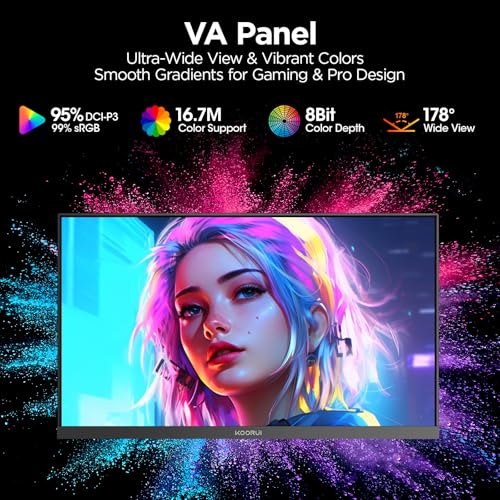
- 95% DCI-P3 color gamut
Cons
- Lower 1080p pixel density
- VESA mount restricted to 75x75mm
The KOORUI 27″ FHD 1080p Gaming Monitor, cataloged under model designation KOORUI GN02, represents a substantial jump in refresh capability for tournament-oriented players. Operating at 240Hz with a 1ms response time, this koorui 240hz monitor is built to display ultra-high frame outputs from high-end rendering pipelines. It natively supports FreeSync Premium and is certified G-SYNC Compatible, ensuring tear-free performance across both major GPU architectures.
Built around a 27-inch VA panel with a 0.31mm pixel pitch and 1920×1080 resolution, the GN02 elevates peak luminance to 300 cd/m² while maintaining a deep 3000:1 static contrast ratio. Shoppers evaluating tournament refresh rate tiers against an asus 240hz monitor will appreciate the broad color reproduction on this panel, which covers 95% of the digital cinema DCI-P3 gamut and 100% of the standard sRGB space. The onboard firmware integrates competitive utilities, including selectable crosshairs, on-screen timers, and custom FPS display presets.
The physical structure adopts an eagle-wing inspired ergonomic stand that permits tilt modifications between -5 degrees forward and 20 degrees backward. Rear interfaces comprise HDMI 2.0, DisplayPort 1.4, and a 3.5mm headphone passthrough connector, while chassis mounting relies on a compact VESA 75×75mm bolt pattern. Backed by a 12-month replacement warranty, this display serves competitive shooter players seeking pure 240Hz motion fluidity, though the 27-inch 1080p density means fine desktop text is less sharp than on 1440p panels.
KOORUI 27 Inch 1440p Gaming Monitor for Sharp Quad-HD Visuals


KOORUI 27 Inch 1440p Gaming Monitor 4 photos from the Amazon listing
Best for: Players prioritizing sharpness and broad viewing angles
Pros
- Sharp 2560×1440 Quad HD
- 200Hz Fast IPS panel
- Peak 350 cd/m² brightness
Cons
- Lower 1000:1 IPS contrast
- Stand lacks height adjustment
The KOORUI 27 Inch 1440p Gaming Monitor, designated as the KOORUI G2721P, marks the transition to high-density Quad HD resolution. Offering 2560×1440 active pixels across a 27-inch diagonal, this koorui 1440p gaming monitor delivers substantially higher pixel density than standard FHD screens, producing razor-sharp text and intricate environmental textures. The display pairs this higher pixel count with a rapid 200Hz refresh rate and a 1ms response profile driven by FreeSync synchronization.
A major technical differentiator in the koorui fast ips vs va comparison is this unit’s Fast IPS display technology. While VA panels prioritize deep black levels, Fast IPS focuses on pixel transition speeds and consistent chroma fidelity across wide angles. The G2721P delivers a 1000:1 contrast ratio, 100% color gamut rating, 95% DCI-P3 coverage, and a peak luminance of 350 cd/m² certified for VESA HDR400 content playback. Integrated gaming modes feature shadow detail processing to reveal structural elements in dark visual zones without blowing out highlights.
The unit measures 8.46 inches deep, 24.15 inches wide, and 18.59 inches tall, supported by a quick-assembly stand offering -5 to 20-degree tilt mechanics. Video connections include modern HDMI and DisplayPort inputs, alongside standard rear VESA wall-mount compatibility. Supported by a three-year total warranty and a 12-month replacement service, the G2721P is built for demanding enthusiasts who require 1440p clarity combined with the color precision and wide viewing angles native to Fast IPS.
KOORUI 22 Inch Computer Monitor FHD for Small Workstations and Casual Play


KOORUI 22 Inch Computer Monitor FHD 120Hz VA VESA 4 photos from the Amazon listing
Best for: Space-constrained workstations and light gaming setups
Pros
- Deep 4000:1 static contrast
- Sharp 0.25mm pixel pitch
- TÜV certified eye care
Cons
- No DisplayPort input
- Smaller 21.5-inch viewable area
The KOORUI 22 Inch Computer Monitor FHD, identifying as the E2212H, is a compact multi-purpose display with a 21.5-inch viewable area. Operating at 1920×1080 Full HD resolution, the screen features a remarkably tight 0.25mm pixel pitch, resulting in clean character edges and crisp document rendering on restricted desk surfaces. Unlike typical 60Hz or 75Hz office screens, this monitor steps up to a 120Hz refresh rate with Adaptive-Sync, smoothing out window navigation, scrolling, and casual gaming workloads.
The panel relies on high-grade VA technology, providing an outstanding 4000:1 static contrast ratio that outperforms standard gaming displays in black depth. Luminescence is rated at 250 cd/m², paired with 99% sRGB color gamut coverage over 16.7 million displayable colors. The display is TÜV Rheinland certified for flicker-free operation and low blue light emissions, safeguarding ocular comfort during extended study or work routines.
Physical I/O requires careful attention: the E2212H features HDMI and VGA ports only, and the listing explicitly notes that DisplayPort is not supported. The chassis dimensions measure 7.28 inches deep, 19.47 inches wide, and 15.28 inches high, supported by a -5 to 15-degree tilt stand and VESA 100×100mm mounting threads. Packaged with an HDMI cable, power brick, and a three-year structural warranty (one year for the panel), this monitor is best matched to dorm rooms, customer service desks, or auxiliary side-monitors where space efficiency is paramount.
KOORUI 34 Inch 240Hz Ultrawide Curved for Panoramic Simulation and Multitasking


KOORUI 34 Inch 240Hz Ultrawide Curved Gaming Monitor, WQHD 4 photos from the Amazon listing
Best for: Sim racers and multitasking ultrawide enthusiasts
Pros
- 240Hz 3440×1440 UWQHD resolution
- Dual HDMI 2.1 and DP 1.4
- Height, tilt, and swivel stand
Cons
- Substantial desk footprint
- Requires powerful GPU hardware
The KOORUI 34 Inch 240Hz Ultrawide Curved represents the technical apex of the KOORUI display portfolio. Utilizing a 21:9 ultrawide aspect ratio across a massive 34-inch diagonal, this koorui ultrawide curved monitor delivers a native UWQHD resolution of 3440×1440. The panel incorporates a 1500R wrap-around curve to match the natural peripheral span of the human field of view, creating deep immersion for flight simulators, racing rigs, and extensive productivity timelines.
The visual engine combines a native 4000:1 VA static contrast ratio with an extreme 240Hz refresh cycle driven over modern high-bandwidth interfaces. Gamers comparing panoramic setups against an msi 240hz monitor will note the advanced bandwidth integration on this model, featuring two HDMI 2.1 ports and one DisplayPort 1.4 port capable of driving full 3440×1440 resolution at 240Hz. Visual processing includes VESA HDR400 compliance, 400 cd/m² peak brightness, 99% sRGB coverage, and 90% DCI-P3 reproduction, complemented by onboard gaming assists such as crosshairs, timers, and an adjustable Black Equalizer.
Productivity is augmented by hardware-level Picture-in-Picture (PIP) and Picture-by-Picture (PBP) processing, allowing two separate computer inputs to display simultaneously on one physical screen. The fully articulated ergonomic stand features 110mm of vertical height adjustment, -5 to 20-degree tilt, and -15 to 15-degree horizontal swivel, alongside VESA 75×75mm mounting provisions. Requiring a desk footprint of 31.83 inches wide and 10.63 inches deep, this monitor is tailored specifically for flight sim, sim-racing, and power-user multi-window workflows.
How to Choose the Right KOORUI Gaming Monitor
Determining which koorui gaming monitor to buy depends primarily on balancing graphics card rendering capability against the desired resolution, panel speed, and physical desktop footprint.
- Resolution Versus GPU Throughput: Standard 1080p FHD monitors (such as the 24 Inch Gaming Monitor, 24 inch Curved, and GN02) place modest demands on GPU video memory, making them ideal for high framerates in competitive esports. Conversely, the 1440p G2721P requires significantly higher pixel throughput from mid-to-high tier GPUs, while the 3440×1440 ultrawide demands substantial rendering power to approach its 240Hz ceiling.
- Panel Technology: The koorui fast ips vs va trade-off centers on contrast versus viewing consistency. The Fast IPS panel in the G2721P maintains strict color calibration and superior viewing angles for creative tasks and color-sensitive play. The VA panels in the curved 24, 27-inch GN02, 22-inch E2212H, and 34-inch ultrawide deliver 3000:1 to 4000:1 static contrast ratios, excelling in dark environments and atmospheric single-player titles.
- Refresh Rate Tiers: Matching the koorui monitor refresh rate to your primary game genre is critical. The 120Hz E2212H serves casual gaming and general office navigation, the 180Hz models provide smooth performance for popular online titles, and the 200Hz to 240Hz models (GN02 and the 34-inch ultrawide) cater to rapid-response competitive gaming where frame latency must remain minimal.
- Interface Bandwidth and Cable Standards: Video port specifications vary considerably across the lineup. Compact units like the E2212H and flat 24-inch rely on HDMI and legacy VGA, lacking DisplayPort inputs altogether. Mid-tier screens feature DisplayPort 1.2 and HDMI 2.0, while the 34-inch ultrawide integrates HDMI 2.1 and DisplayPort 1.4 to support high-resolution 240Hz video feeds over included DP cabling.
- Ergonomics and Mounting Standards: Stand adjustments vary from basic tilt mechanisms on the 22-inch, 24-inch, and 27-inch frames to the comprehensive height, tilt, and swivel articulation on the 34-inch ultrawide. Furthermore, while the 22-inch and 24-inch models use standard VESA 100×100mm mounting patterns, the 27-inch GN02 and 34-inch ultrawide require VESA 75×75mm monitor arms.
FAQ
What is the primary difference between KOORUI Fast IPS and VA gaming panels?
The primary technical distinction lies in pixel orientation, contrast, and color stability. The Fast IPS panel found on the KOORUI G2721P prioritizes broad 178-degree viewing angles without chromatic shifting and features faster liquid crystal transitions, making it ideal for color fidelity and competitive tracking. In contrast, KOORUI VA panels (featured on the 24-inch, 27-inch GN02, and 34-inch ultrawide) offer static contrast ratios between 3000:1 and 4000:1, providing significantly deeper black levels and enhanced shadow separation in dark gaming environments.
Which KOORUI gaming monitor supports the highest resolution and refresh rate combination?
The KOORUI 34 Inch Ultrawide Curved Gaming Monitor delivers the highest performance threshold in the lineup. It combines a 3440×1440 UWQHD resolution across a 21:9 ultrawide canvas with a full 240Hz vertical refresh rate. To drive this heavy pixel bandwidth, the display incorporates dual HDMI 2.1 ports and a DisplayPort 1.4 connector with included high-bandwidth DP cabling.
Do all KOORUI gaming monitors include DisplayPort inputs?
No, connectivity varies across the product family. The entry-level flat 24 Inch Gaming Monitor and the 22 Inch E2212H monitor include HDMI and analog VGA inputs, explicitly omitting DisplayPort connections. Gamers requiring DisplayPort for high-bandwidth PC graphics output must select the 24-inch curved model (DisplayPort 1.2), the 27-inch GN02 (DisplayPort 1.4), the 27-inch G2721P, or the 34-inch ultrawide (DisplayPort 1.4).
Can KOORUI gaming monitors be mounted on aftermarket monitor arms?
Yes, all six KOORUI models reviewed support standard VESA mounting patterns, though the dimensions differ by chassis. The 22 Inch E2212H, 24 Inch Gaming Monitor, and 24 inch Curved Monitor utilize standard VESA 100×100mm bolt patterns. The 27-inch GN02 and the 34-inch ultrawide curved monitor utilize smaller VESA 75×75mm mounting interfaces, requiring an arm plate compatible with 75mm spacing.
How does Adaptive Sync function across the KOORUI lineup?
Adaptive Sync acts as a hardware-level synchronization protocol between the monitor panel and graphics processing unit. Supported across these KOORUI models via FreeSync and G-Sync compatibility protocols, it dynamically adjusts the monitor’s refresh cycle to match the instantaneous frame delivery of the GPU, eliminating screen tearing, micro-stuttering, and input delay during intensive gameplay sequences.


