As Amazon Associates, we earn from qualifying purchases. This means we may receive a small commission at no extra cost to you if you click through and make a purchase.
Samsung maintains an extensive presence across the desktop display market, engineering panels that cater to corporate offices, content workstations, and multipurpose home environments. Within the 24-inch category, the brand is particularly recognized for deploying advanced display technologies—such as wide-angle In-Plane Switching (IPS) panels, high static contrast alignments, and ergonomic business hardware—into compact, space-efficient form factors. These displays provide balanced pixel pitch and sharp visual fidelity without consuming the expansive footprint demanded by oversized desktop hardware.
While each monitor in this roundup shares the identical 24-inch physical class, they diverge substantially across core hardware specifications: refresh rates scale from standard 75Hz and fluid 100Hz up to a responsive 120Hz, screen geometries alternate between flat IPS panels and an immersive 1800R curve, and connectivity options range from basic single-cable video inputs to full-featured USB-C docking hubs with local area network support and daisy-chaining capabilities.
Samsung 24-Inch Monitors Compared
| Model | Native Resolution | Refresh Rate | Contrast Ratio | Panel Finish & Ergonomics |
|---|---|---|---|---|
| Samsung 24″ S3 | FHD (1920 x 1080) | 120Hz | 1000:1 | Glossy screen, fixed tilt stand |
| Samsung 24” | FHD (1920 x 1080) | 100Hz | 1000:1 | Flat screen, height-adjustable and pivot stand |
| Samsung 24″ Essential S3 | FHD (1920 x 1080) | 100Hz | 3,000:1 | 1800R curved screen, standard stand |
| SAMSUNG 24″ ViewFinity S6 | QHD (2560 x 1440) | 100Hz | 1000:1 | Flat screen, full ergonomic swivel, tilt, and 90-degree pivot |
| Samsung 24-in T350 LED Computer Monitor | FHD (1920 x 1080) | 75Hz | 3000:1 | Flat screen, compact tilt stand |
Table from this guide — scroll sideways for the remaining columns.
Samsung 24″ S3 for High Refresh Rate Workspaces


Samsung 24" S3 4 photos from the Amazon listing
Best for: Everyday fluid computing and casual gaming
Pros
- 120Hz high refresh rate
- IPS panel with wide viewing angles
- Slim bezel modern aesthetic
Cons
- Fixed basic stand
- Modest 0.72 color gamut
The Samsung 24″ S3 monitor represents a specialized entry in the everyday compact tier, defined principally by its responsive 120Hz refresh rate and IPS display panel. Designed with modern minimalist aesthetics, the chassis features ultra-thin border bezels that minimize visual interruption, making it suitable for multi-screen arrangements or compact desktop surfaces. Measuring 6.89 inches deep by 21.28 inches wide and 12.61 inches high, this monitor maintains a slim profile that integrates easily into limited office or bedroom work areas.
From an optical standpoint, the panel delivers Full HD resolution with a 1000:1 static contrast ratio, 250 cd/m2 brightness, and a 0.72 color gamut. The 177-degree viewing angles ensure consistent luminance across the display surface, while the glossy screen finish enhances visual pop and saturation under controlled lighting conditions. For users who switch between documentation, creative projects, and leisure, the inclusion of a dedicated Game Picture Mode dynamically optimizes contrast and color values to prevent crushing in shadowy scenes. Built-in Eye Saver Mode mitigates fatigue by limiting blue light emissions and eliminating irritating backlight flicker during sustained viewing sessions.
This monitor suits everyday users, casual gamers, and general office operators who prioritize the fluid motion of a 120Hz panel over advanced ergonomic adjustments. In a direct 24inch samsung monitor comparison, users requiring vertical screen orientation or high-wattage single-cable laptop charging will find the fixed-stand design restrictive and will prefer stepping up to Samsung’s dedicated business or productivity lines.
Samsung 24” for Ergonomic Business Deployments



Samsung 24” 4 photos from the Amazon listing
Best for: Ergonomic business desks and code editing
Pros
- Height-adjustable pivot stand
- Smooth 100Hz refresh rate
- Borderless three-sided design
Cons
- Standard 250 nit brightness
- Basic 1000:1 contrast ratio
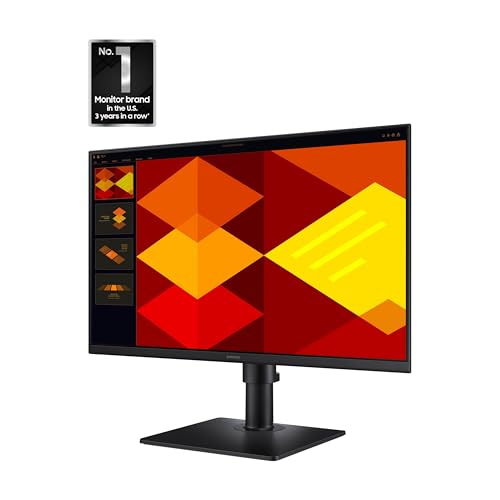
The Samsung 24” business monitor prioritizes physical ergonomics and clean workstation aesthetics. Built around a flat IPS display that delivers 178-degree horizontal and vertical viewing angles, this monitor ensures uniform chromatic performance across the entire screen without noticeable color shift or washing. The exterior design incorporates borderless bezels along three sides, optimizing overall screen space and presenting an uncluttered profile suited for dense corporate installations.
Ergonomic adjustability forms the core feature set of this model. The integrated mounting assembly provides comprehensive height adjustability and allows operators to pivot the panel 90 degrees into a portrait orientation, accommodating programming environments, spreadsheet review, and lengthy text documentation. In terms of display output, the monitor operates at a 100Hz refresh rate with a 1000:1 contrast ratio, 250 cd/m² peak brightness, and Full HD resolution. Motion blur and latency are substantially reduced compared to standard 60Hz corporate displays, while Eye Saver Mode and flicker-reduction technologies protect vision throughout extended shifts.
The unit weighs 7.7 pounds and measures 8.62 inches deep by 21.29 inches wide by 19.59 inches high at full extension. This samsung s40gd business monitor serves commercial professionals, administrative coordinators, and coders who require versatile physical orientation without sacrificing color consistency. It relinquishes higher resolution to the ViewFinity series, making it an optimal pick specifically for standard-resolution business operations.
Samsung 24″ Essential S3 for Immersive Desktop Media


Samsung 24" Essential S3 4 photos from the Amazon listing
Best for: Immersive multimedia and close-range entertainment
Pros
- 1800R wrap-around curved screen
- High 3,000:1 static contrast
- Certified TÜV eye comfort
Cons
- No height or pivot adjustment
- Not ideal for flat line drafting
The Samsung 24″ Essential S3 departs from conventional flat-panel designs by integrating an 1800R curved display. This structural curvature closely mirrors the human ocular field, wrapping the peripheral periphery around the viewer to heighten depth perception and eliminate edge distortion. Unlike multipurpose consumer televisions such as a samsung 24 inch smart tv, this dedicated computer display is engineered specifically for near-field desktop distances where the 1800R radius provides maximum visual immersion.
Internally, the monitor utilizes an LED-backlit panel that achieves a notable 3,000:1 static contrast ratio—three times higher than standard IPS panels. This deep contrast creates rich black levels and crisp shadow delineation, reinforced by a 0.95 color gamut rating and a fine 0.27 pixel pitch. The 100Hz refresh rate ensures that rapid scene changes, multimedia playback, and casual gaming sequences render without significant stutter or trailing artifacts. Eye comfort is formally validated through TÜV certification, guaranteeing that the integrated blue light filters and flicker-free circuits prevent optical fatigue over prolonged computational sessions.
Weighing minimal desktop area, the samsung essential s3 curved 24 fits students, home media viewers, and casual simulation gamers who value contrast performance and immersive panel curvature. However, graphic artists who demand flat, non-distorted perspective lines for technical vector drafting will be better served by one of Samsung’s flat IPS models.
SAMSUNG 24″ ViewFinity S6 for Professional Workstations


SAMSUNG 24" ViewFinity S6 4 photos from the Amazon listing
Best for: Power users needing high pixel density and docking
Pros
- Sharp 2560×1440 QHD resolution
- 90W USB-C charging with LAN port
- Integrated KVM switch and daisy chaining
Cons
- Deeper 8.66-inch desktop footprint
The SAMSUNG 24″ ViewFinity S6 represents the technical high-water mark of Samsung’s compact lineup, offering a Quad High Definition (QHD) resolution of 2560 x 1440. This resolution delivers significantly higher pixel density than standard 1080p displays, resolving minuscule details and extending usable screen canvas. While many high-resolution monitors operate in massive footprints like a 32 inch computer monitor samsung, this 24-inch model packs that elevated pixel density into a compact workstation frame measuring 8.66 inches deep by 21.29 inches wide by 21.1 inches high.
This samsung viewfinity s6 24 inch monitor features advanced connectivity and hardware switching tools. The integrated USB-C port provides simultaneous high-speed data transmission and up to 90W power delivery to charge connected laptops over a single cable, while a built-in Ethernet LAN port supplies direct, stable wired networking. An integrated KVM switch enables control over two distinct hardware input sources using one keyboard and mouse setup, supported by Picture-by-Picture and Picture-in-Picture display modes. For multi-monitor workstations, native DisplayPort daisy-chain capability allows users to extend visual workspace across multiple screens without third-party docking hardware.
Visual quality is reinforced by HDR10 compliance, a wide 99 color gamut, 1.07 billion color reproduction, and an elevated luminance of 350 cd/m2. Operating at a 100Hz refresh rate, the panel pairs responsive operation with TÜV-certified Intelligent Eye Care that dynamically regulates color temperature and brightness against room lighting. The Easy Setup Stand snaps together without tools and supports full swivel, tilt, height adjustment, and bi-directional 90-degree pivot. This monitor is the authoritative pick for software engineers, data analysts, and digital artists requiring premium connectivity and dense pixel mapping.
Samsung 24-in T350 LED Computer Monitor for Essential Computing


Samsung 24-in T350 LED Computer Monitor, 4ms LF24T350FHNXZA - 4 photos from the Amazon listing
Best for: Standard workstations and essential secondary screens
Pros
- 3000:1 static contrast ratio
- AMD FreeSync tear-free playback
- Responsive 4ms transition speed
Cons
- Lower 75Hz refresh rate
- Limited video interface options
The Samsung 24-in T350 LED Computer Monitor delivers a streamlined visual platform centered around essential desktop computing. Wrapped in an understated Dark Blue Gray chassis, the display utilizes a flat LED panel engineered to provide 178-degree horizontal and vertical viewing angles, preventing brightness fall-off when viewing the screen off-axis. The physical dimensions measure 4 inches deep by 24 inches wide by 24 inches high, with an overall weight of 6 pounds, making it an exceptionally lightweight panel for basic articulated arm mounting or compact desks.
On a hardware level, the T350 features a 3000:1 static contrast ratio, matching the deep tonal performance typically reserved for high-contrast entertainment screens. The panel delivers a 75Hz refresh rate paired with a 4ms response time, which minimizes input latency and trailing in comparison to standard 60Hz entry displays. Native AMD FreeSync support synchronizes the monitor’s refresh cycles with compatible graphics processors, actively mitigating horizontal screen tearing during rapid video sequences and casual gaming.
Connectivity is handled via standard HDMI, offering straightforward plug-and-play capability with desktop towers and enterprise docking stations. This unit is suited for secondary monitor setups, point-of-sale terminals, and baseline computer terminals that do not require USB-C charging, internal KVM switches, or extreme refresh speeds. Users requiring extensive ergonomic articulation or higher pixel counts should direct their attention toward the S40GD or ViewFinity models.
How to Choose the Right Samsung 24-Inch Monitor
Selecting the optimal model from Samsung’s 24-inch catalog requires evaluating panel technology, resolution, refresh dynamics, and interface functionality. While expansive display solutions like a samsung 49 inch monitor dominate ultra-wide desktop layouts, 24-inch displays remain the standard choice for modular workspaces, dual-screen enterprise desks, and environments with constrained surface area. Understanding specific hardware attributes ensures you pick the chassis tailored directly to your computational workload.
- Resolution and Pixel Density: The majority of displays in this category utilize Full HD (1920 x 1080), which yields roughly 92 pixels per inch (PPI)—a proven, legible balance for standard desktop scaling. However, when evaluating which 24inch samsung monitor to buy for fine line rendering, typography, or photo editing, the samsung 24 inch qhd monitor (ViewFinity S6) provides 2560 x 1440 resolution. This jump to approximately 123 PPI generates noticeably sharper text and provides substantially more screen real estate.
- Refresh Rate Metrics: Traditional office displays run at 60Hz. Samsung upgrades this baseline across its modern 24-inch lineup. The T350 operates at 75Hz, which provides subtle smoothing during window navigation. For elevated fluid motion, a samsung 24 inch monitor 100hz—such as the S40GD, Essential S3, or ViewFinity S6—delivers sharp, blur-free frame pacing for content creation. For the smoothest possible frame rate in this class, the samsung 24 inch monitor 120hz (S32GF) stands out as the responsiveness leader.
- Panel Geometry and Contrast Ratios: Users must weigh the choice between flat IPS construction and curved VA-style alignments. A samsung 24 inch ips monitor, featured in the S32GF and S40GD, ensures broad viewing angles and stable color accuracy across flat planes. In contrast, the 1800R curved panel on the Essential S3 wraps the edges of the display inward, providing superior visual uniformity at closer viewing distances and delivering a 3,000:1 static contrast ratio that substantially outperforms 1000:1 IPS alternatives in dark room environments.
- Ergonomics and Workstation Connectivity: If your desk setup requires clean cabling and laptop integration, workstation connectivity is paramount. Basic models rely on traditional HDMI inputs and fixed-tilt stands. In contrast, the S40GD introduces height adjustment and portrait pivot modes, while the ViewFinity S6 transforms the monitor into a comprehensive workstation docking hub with 90W USB-C charging, integrated Ethernet pass-through, a built-in KVM switch, and DisplayPort daisy-chain capability.
FAQ
What are the primary differences between 1080p and 1440p resolution on a 24-inch monitor?
On a 24-inch panel, a 1080p (Full HD) resolution produces roughly 92 pixels per inch, which displays user interface elements at standard sizes without requiring display scaling. A 1440p (QHD) display, such as the ViewFinity S6, increases pixel density to roughly 123 pixels per inch. This tighter pixel grid renders fine fonts, complex vector lines, and high-resolution photography with markedly sharper fidelity while simultaneously allowing users to display multiple documents or windows side by side without running out of workspace.
Can all Samsung 24-inch monitors rotate into a vertical portrait orientation?
No, not all Samsung 24-inch monitors support portrait rotation. Vertical orientation requires an articulated stand with pivot capabilities. Among the models covered, the Samsung 24” (S40GD) and the SAMSUNG 24″ ViewFinity S6 (S60UD) feature factory stands engineered to pivot the screen 90 degrees. Other models, like the standard S3 (S32GF), Essential S3 (S36GD), and T350, utilize fixed-height desktop stands that offer standard backward and forward tilt adjustments rather than full rotational articulation.
How does the 120Hz refresh rate on the Samsung S3 impact general productivity?
While high refresh rates are commonly associated with video games, a 120Hz refresh rate delivers visible benefits during daily computing tasks. By doubling the frame redraw rate of conventional 60Hz panels, mouse cursor tracking becomes instantaneous, motion blur during rapid web page scrolling is virtually eliminated, and dragging application windows across the desktop looks completely smooth. This fluidity reduces micro-stutters that can contribute to visual fatigue during long workdays.
What advantage does an 1800R curved screen offer on a compact 24-inch display?
An 1800R curve means the monitor matches the radius of a circle measuring 1,800 millimeters. On a 24-inch screen, this curvature subtly draws the outer edges of the display closer to the natural focal arc of human vision. For users sitting at close desk distances, the curved profile reduces peripheral distraction, maintains a more consistent focal distance from the center of the eye to the screen edges, and enhances perceived visual depth during video viewing and gaming.
How does the built-in KVM switch on the ViewFinity S6 operate?
The integrated Keyboard, Video, and Mouse (KVM) switch in the ViewFinity S6 allows an operator to connect two distinct computers—such as a personal desktop and a corporate work laptop—to the monitor simultaneously. By plugging peripheral input devices directly into the monitor’s integrated USB ports, users can toggle control between both computing systems without needing to physically unplug and swap their keyboard, mouse, or video cables.


