As Amazon Associates, we earn from qualifying purchases. This means we may receive a small commission at no extra cost to you if you click through and make a purchase.
ASUS commands an authoritative position in the desktop-replacement computing category, engineering its 18-inch chassis portfolio to balance extreme component wattage against aggressive acoustic and thermal thresholds. The manufacturer segments its large-screen family into two distinct design philosophies: the enthusiast-oriented Republic of Gamers (ROG) Strix series engineered for maximum power draw, and the durable TUF Gaming lineup optimized for architectural efficiency, military-grade chassis rigidity, and extended battery runtimes.
While sharing identical 18-inch physical footprints, these six configurations diverge dramatically in processing platforms, graphics total graphics power (TGP), display backlight technologies, and bus interconnect standards, giving buyers clear choices across Intel Core Ultra 9 and AMD Ryzen 7 platforms.
ASUS 18-Inch Gaming Laptops Compared
| Model | Processor | GPU & Rated Power | Display Specifications | Memory & Storage | High-Speed Connectivity |
|---|---|---|---|---|---|
| ASUS ROG Strix G18 18” Gaming | Intel Core Ultra 9 275HX (24C/5.4GHz) | NVIDIA RTX 5070 Ti 12GB GDDR7 | 18″ 2.5K (2560×1600) 240Hz Nebula IPS, 500 nits | 32GB DDR5, 2TB PCIe 4.0 SSD | 2x Thunderbolt 5, Wi-Fi 7 |
| ASUS TUF Gaming A18 AI Laptop | AMD Ryzen 7 260 (8C/5.1GHz) | NVIDIA RTX 5060 8GB GDDR7 | 18″ WUXGA (1920×1200) 144Hz IPS, 100% sRGB | 16GB DDR5, 1TB SSD | 1x USB4 (40Gbps), Wi-Fi 6E |
| ASUS TUF A18 Gaming Laptop | AMD Ryzen 7 260 (8C/5.1GHz) | NVIDIA RTX 5060 8GB GDDR7 (115W TGP) | 18″ WUXGA (1920×1200) 144Hz IPS, 100% sRGB | 16GB DDR5, 1TB PCIe x4 SSD | HDMI 2.1, Wi-Fi 6E |
| ASUS ROG Strix SCAR 18 | Intel Core Ultra 9 275HX (24C/5.4GHz) | NVIDIA RTX 5090 24GB GDDR7 (175W TGP) | 18″ 2.5K 240Hz Nebula HDR Mini-LED, 2000+ zones | 32GB DDR5-5600, 2TB PCIe 4.0 SSD | Wi-Fi 7, MUX Switch + Advanced Optimus |
| ASUS ROG Strix G18 G815 Gaming | Intel Core Ultra 9 275HX (24C/5.4GHz) | NVIDIA RTX 5060 8GB GDDR7 | 18″ 2.5K (2560×1600) 240Hz Nebula IPS, 500 nits | 32GB DDR5, 1TB SSD | 1x Thunderbolt 4, Wi-Fi 7 |
| ASUS 2025 TUF Gaming A18 18” | AMD Ryzen 7 260 (8C/5.1GHz) | NVIDIA RTX 5060 8GB GDDR7 | 18″ WUXGA (1920×1200) 144Hz IPS, 300 nits | 16GB DDR5-5600, 1TB NVMe SSD | 2x USB-C (1x 10Gbps PD/DP), Wi-Fi 6E |
Table from this guide — scroll sideways for the remaining columns.
ASUS ROG Strix G18 18” Gaming for Upper Mid-Range Power


ASUS ROG Strix G18 18” Gaming 4 photos from the Amazon listing
Best for: Engineers and editors needing intense CPU power
Pros
- 24-core Intel Core Ultra 9
- 100% DCI-P3 240Hz Nebula screen
- Pre-installed 32GB DDR5
Cons
- Heavier 7.1 lb total weight
Best for: Extreme enthusiasts seeking maximum rendering power
Pros
- 2000+ zone Mini-LED Nebula HDR
- 175W uncapped RTX 5090 GPU
- Vapor chamber with liquid metal
Cons
- Chassis weight of 6.3 pounds
Best for: Competitive 1440p gaming and high-bandwidth creation
Pros
- Dual Thunderbolt 5 ports
- 240Hz 2.5K Nebula IPS display
- 24-core Ultra 9 compute
Cons
- Heavier desktop footprint
The ASUS ROG Strix G18 18” Gaming is constructed around high-bandwidth I/O and heavy compute throughput. At its core is the Intel Core Ultra 9 275HX processor, featuring 24 physical cores capable of reaching 5.4 GHz boost clocks alongside an integrated Intel AI Boost NPU delivering up to 13 TOPS. The graphical load is handled by an NVIDIA GeForce RTX 5070 Ti Laptop GPU equipped with 12GB of high-speed GDDR7 VRAM. ASUS complements this silicon pairing with 32GB of DDR5 memory and a 2TB PCIe 4.0 NVMe solid-state drive, accessible via a tool-less chassis design that lets users service internal storage and memory without specialized implements.
Visual output relies on an 18-inch 2.5K (2560 x 1600) WQXGA 16:10 ROG Nebula Display running at 240Hz with a 3ms response time and 500 nits of peak luminance. Thermal management utilizes the ROG Intelligent Cooling architecture, deploying three fans and expansive heatsinks to dissipate heat from both the high-frequency CPU package and the graphics processor. Peripheral connectivity stands out with dual next-generation Thunderbolt 5 ports supporting DisplayPort video output, Power Delivery, and G-SYNC, backed by Wi-Fi 7 and 2.5 Gigabit Ethernet. Those exploring an in-depth asus rog laptop analysis will appreciate this model’s high bus bandwidth and balanced upper-tier graphics pipeline.
This configuration suits competitive tournament gamers, technical developers, and 1440p video creators who require more than 8GB of VRAM and need cutting-edge Thunderbolt 5 transfer speeds. It surrenders absolute maximum rendering dominance to the flagship SCAR 18, but it delivers substantially higher frame rates at native resolution than any entry-tier RTX 5060 iteration.
ASUS TUF Gaming A18 AI Laptop for Efficient Everyday Power


ASUS TUF Gaming A18 AI Laptop 4 photos from the Amazon listing
Best for: Mainstream gamers needing long battery runtime
Pros
- Large 90Wh battery
- Dedicated 40Gbps USB4 port
- Lightweight 5.7 lb chassis
Cons
- 144Hz refresh rate ceiling
Focusing on balanced resource allocation and long untethered endurance, the ASUS TUF Gaming A18 AI Laptop pairs an AMD Ryzen 7 260 processor with an NVIDIA GeForce RTX 5060 Laptop GPU. The 8-core, 16-thread AMD processor operates with a base frequency of 3.8 GHz, turbo clocks reaching 5.1 GHz, and 16MB of L3 cache, backed by an architecture rated for up to 572 platform AI TOPS. The RTX 5060 utilizes 8GB of GDDR7 memory to handle rasterized titles and ray-traced lighting pipelines. System memory is specified at 16GB DDR5 alongside a 1TB solid-state drive, running Microsoft Windows 11 Pro straight out of the box.
The chassis integrates an 18-inch anti-glare WUXGA (1920 x 1200) IPS panel running at a 144Hz refresh rate with adaptive G-SYNC support and 100% sRGB color gamut coverage. Audio output features Dolby Atmos and Hi-Res certification, supported by two-way AI noise cancellation for voice communication. For high-speed peripherals and external displays, the machine provides a dedicated USB4 port capable of 40Gbps throughput, two USB-A 3.2 ports, a USB-C 3.2 port, HDMI 2.1 FRL, and a gigabit RJ45 Ethernet jack. A large 90Wh battery powers the system away from mains outlets, while the entire notebook weighs in at an accessible 5.7 pounds.
This model is built for gamers and multi-tasking university students who want an expansive 18-inch form factor without committing to the thermal bulk and electrical demands of desktop-class Intel HX silicon. Readers browsing the broader asus tuff gaming laptop family will find this unit ideal for 1080p and 1200p high-refresh gameplay, though visual purists seeking 1440p rendering or wide DCI-P3 color spaces will want to step up to the Strix tier.
ASUS TUF A18 Gaming Laptop for Esports Optimization



ASUS TUF A18 Gaming Laptop 4 photos from the Amazon listing
Best for: High-framerate esports players on 1080p panels
Pros
- 115W TGP RTX 5060 GPU
- Hardware MUX switch with Optimus
- Slim 0.74-inch body
Cons
- Baseline 16GB memory
The ASUS TUF A18 Gaming Laptop shares the AMD Ryzen 7 260 platform but details explicit graphics thermal targets and hardware routing capabilities. The 8-core, 16-thread APU features 24MB of total cache and an onboard AMD XDNA NPU capable of 16 TOPS. Graphics processing is managed by an NVIDIA GeForce RTX 5060 Laptop GPU running at an overclocked 1737 MHz with an official 115W TGP ceiling (100W base plus a 15W Dynamic Boost allocation). The GPU is backed by 8GB of dedicated GDDR7 memory and modern neural frame rendering technologies, including DLSS 4 support.
An essential technical feature of this Jaeger Gray machine is the integrated hardware MUX Switch paired with NVIDIA Advanced Optimus, routing graphics calls directly to the internal display to bypass integrated GPU latency penalties. The 18-inch FHD+ WUXGA (1920 x 1200) IPS-level panel operates at 144Hz with a fast 3ms response time, 100% sRGB coverage, and 75.35% AdobeRGB gamut support. Physical dimensions measure 15.71 inches long by 11.14 inches wide with a slim 0.74-inch chassis profile. Storage duties are handled by a 1TB PCIe x4 NVMe SSD, complemented by 16GB of upgraded DDR5 system memory.
This chassis caters directly to competitive esports players who prioritize low display latency, consistent frame pacing, and direct hardware MUX switching over extreme raw pixel density. When evaluated against the higher-end ROG G18 models, it gives up 2.5K panel clarity and Thunderbolt 5 connectivity to maintain an ultra-competitive profile tailored for high-framerate esports titles.
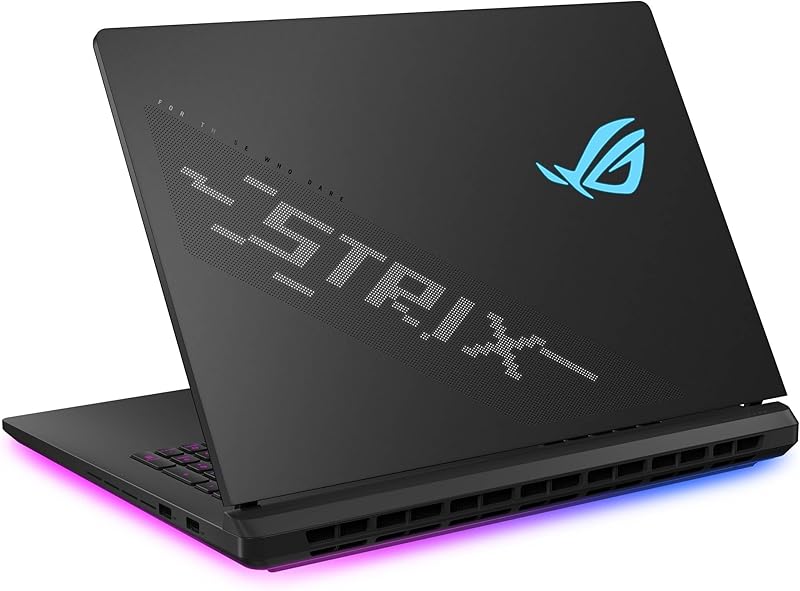
ASUS ROG Strix SCAR 18 for Elite Desktop Replacement Supremacy


ASUS ROG Strix SCAR 18 (2025) Gaming Laptop, 18” 4 photos from the Amazon listing
Engineered without compromise, the ASUS ROG Strix SCAR 18 sits as the absolute performance flagship within the 18-inch market segment. It combines the 24-core Intel Core Ultra 9 275HX processor with an elite NVIDIA GeForce RTX 5090 Laptop GPU executing at an uncapped 175W maximum TGP. The platform is pre-configured with 32GB of high-speed DDR5-5600MHz RAM and a massive 2TB PCIe Gen 4 SSD offering sequential read and write throughput up to 7,000MB/s. Advanced users can service and upgrade RAM, SSD modules, and cooling fan assemblies using an integrated slide latch on the chassis bottom without needing screwdrivers.
Display performance is defined by an 18-inch ROG Nebula HDR panel using Mini-LED backlighting with over 2,000 discrete local dimming zones. The 2.5K (2560 x 1600) 16:10 display reaches a blistering 240Hz refresh rate, 3ms response time, dual anti-reflective (ACR) layers, and 100% DCI-P3 cinematic color space coverage. Thermal stability under sustained 175W graphics loads is achieved through an end-to-end vapor chamber, a sandwiched heatsink array, three internal fans, and factory-applied Conductonaut Extreme liquid metal. Aesthetic elements include a customizable AniMe Vision LED matrix on the lid, a full-surround 360° RGB light bar, and hardware stealth mode toggle switches.
This model is built specifically for simulation enthusiasts, visual effects artists, and competitive gamers targeting uncompromised 4K/1440p ray-traced framerates. Those analyzing extreme performance in an asus 5090 laptop configuration will find the SCAR 18 unmatched in raw compute, though its 6.3-pound travel weight and high power requirements make it less portable than the TUF alternatives.
ASUS ROG Strix G18 G815 Gaming for High-Resolution Creative Work


ASUS ROG Strix G18 G815 Gaming AI Laptop | 4 photos from the Amazon listing
The ASUS ROG Strix G18 G815 Gaming offers a distinct hardware combination by pairing Intel’s top-tier desktop-grade mobile processor with a mainstream graphics core. It runs the Intel Core Ultra 9 275HX CPU, packing 24 physical cores, 24 threads, a 36MB cache, and up to 5.4 GHz boost frequencies alongside a 13 TOPS Intel AI Boost engine. Rather than pairing this processing horsepower with a high-tier GPU, ASUS integrates an efficient NVIDIA GeForce RTX 5060 Laptop GPU with 8GB of GDDR7 memory. The system is equipped with 32GB of DDR5 memory and a 1TB solid-state drive inside an Eclipse Gray chassis weighing 7.1 pounds.
Despite its mid-tier GPU silicon, the G815 refuses to downgrade display quality, maintaining the full 18-inch 2.5K (2560 x 1600) WQXGA 240Hz ROG Nebula Display. The panel features 500 nits of brightness, a 3ms response time, an anti-glare finish, and 100% DCI-P3 color gamut coverage, making it an extraordinary canvas for color grading and asset creation. Comprehensive connectivity options include a Thunderbolt 4 port with DisplayPort and Power Delivery, a USB-C 3.2 Gen 2 port with G-SYNC, three USB-A 3.2 Gen 2 ports, HDMI 2.1 FRL, 2.5G RJ45 Ethernet, and an integrated 1080p FHD IR webcam. Users who appreciate fluid desktop visuals akin to an asus 240hz monitor setup will benefit from this high-speed internal screen.
This machine is exceptionally well-suited for code compilers, 3D modelers, and broadcast streamers whose workflows demand heavy multi-threaded CPU execution and wide color reproduction, but who do not require the costly thermal dissipation of an RTX 5070 Ti or RTX 5090 graphics card.
ASUS 2025 TUF Gaming A18 18” for Big-Screen Endurance


ASUS 2025 TUF Gaming A18 18” WUXGA 144Hz IPS 4 photos from the Amazon listing
Best for: Everyday gaming with full numpad utility
Pros
- Generous 90Whr 4-cell battery
- Full keyboard with numeric keypad
- Dual USB-C connectivity
Cons
- 300-nit display luminance
- Ships with Windows 11 Home
Rounding out the lineup is the ASUS 2025 TUF Gaming A18 18”, an edition designed to optimize practical input ergonomics and extended offline usability. It leverages the efficient AMD Ryzen 7 260 8-core, 16-thread processor paired with an NVIDIA GeForce RTX 5060 Laptop GPU carrying 8GB of GDDR7 VRAM. Internal memory is configured with 16GB of high-speed DDR5-5600MHz SDRAM, paired with a 1TB PCIe NVMe M.2 SSD. Unlike its professional Strix counterparts running Windows 11 Pro, this model is configured out of the box with Windows 11 Home.
The display consists of an 18-inch WUXGA (1920 x 1200) anti-glare IPS panel operating at 144Hz with G-SYNC support, thin outer bezels, 100% sRGB color rendition, and a baseline brightness rated at 300 nits. The chassis houses a full-sized single-zone RGB backlit keyboard that retains a dedicated numeric keypad, making it practical for data entry and complex hotkey bindings. Network connectivity features Realtek Wi-Fi 6E (2×2) and Bluetooth 5.3, while the physical I/O layout includes two USB-C ports (one with DisplayPort 1.4, one supporting 10Gbps USB 3.2 Gen 2 with Power Delivery and G-Sync), two USB-A 3.2 Gen 2 ports, a legacy USB 2.0 port, and HDMI 2.1. It retains a large 90Whr 4-cell lithium-ion battery inside a 5.73-pound frame.
This notebook represents the ideal selection for casual gamers and remote workers seeking the expansive field of view provided by an 18-inch panel alongside the tactile utility of an integrated numpad. While its 300-nit panel and 144Hz refresh rate do not match the brightness or pixel density of the Nebula-equipped Strix machines, its power balance makes it an exceptionally steady companion for general gaming workloads.
How to Choose the Right ASUS 18-Inch Gaming Laptop
Selecting the ideal machine from an asus 18 inch gaming laptop comparison requires balancing graphics total graphics power against display backlighting technology and processor architectures. Because the 18-inch form factor is inherently intended as a desk-bound powerhouse, component wattages vary significantly across different model tiers.
Display technology marks the most pronounced visual threshold when deciding which asus 18 inch gaming laptop to buy. The flagship ROG Strix SCAR 18 incorporates a true rog nebula hdr display 18 inch panel utilizing Mini-LED backlighting with more than 2,000 dimming zones and 100% DCI-P3 coverage, producing deep black levels and HDR highlights that standard edge-lit panels cannot replicate. In contrast, the ROG Strix G18 configurations use a 500-nit 2.5K IPS-level Nebula panel that maintains the same 240Hz refresh rate and 3ms response time while utilizing standard backlighting. The TUF Gaming A18 units prioritize lower power consumption and higher competitive frame stability with 144Hz WUXGA (1920 x 1200) panels rated between 300 and 500 nits.
Graphics processor tiers and thermal solutions further dictate operational life and performance limits. The asus rog strix scar 18 rtx 5090 utilizes an enormous end-to-end vapor chamber paired with Conductonaut Extreme liquid metal to maintain a sustained 175W TGP ceiling, rendering AAA games at native 1600p with all ray tracing settings maxed out. Stepping down slightly, the asus rog strix g18 rtx 5070 ti provides 12GB of GDDR7 memory, giving creators and gamers a wider VRAM buffer than the entry tier without requiring full 175W cooling. Meanwhile, the asus tuf a18 rtx 5060 configurations cap GPU power at 115W, delivering outstanding efficiency, low chassis temperatures, and optimal performance for 1080p and 1200p competitive titles.
Compute architectures and I/O bus standards represent the final critical decision points across these asus 18 inch laptop specs. The Intel Core Ultra 9 275HX found in the ROG Strix family packs 24 cores and supports high-bandwidth connectivity like Thunderbolt 5 and Thunderbolt 4, alongside 2.5Gbps LAN ports for high-speed network environments. Conversely, the AMD Ryzen 7 260 silicon inside the asus tuf gaming a18 lineup features an 8-core design that draws less baseline power, enabling the TUF machines to run efficiently alongside substantial 90Wh batteries and USB4 interfaces.
FAQ
What is the difference between ROG Nebula and ROG Nebula HDR displays?
Standard ROG Nebula displays use high-grade IPS-level panels delivering 2560 x 1600 resolution, 500 nits of brightness, 240Hz refresh rates, and 100% DCI-P3 color gamut coverage with traditional edge backlighting. In contrast, ROG Nebula HDR displays use Mini-LED backlighting arrays with over 2,000 individual local dimming zones. This Mini-LED technology allows individual zones to dim or turn off completely, yielding far higher contrast ratios, deeper black levels, and superior high dynamic range highlights for cinematic gaming and HDR content creation.
How does the thermal cooling compare between ASUS TUF A18 and ROG Strix laptops?
ASUS equips the ROG Strix series with its Intelligent Cooling ecosystem, which uses a Tri-Fan auxiliary exhaust configuration, full-surround heatsinks, and liquid metal thermal compound on the processor, with the SCAR 18 adding an end-to-end vapor chamber to manage up to 175W graphics draws. The TUF Gaming A18 employs a traditional multi-heatpipe thermal layout engineered to efficiently dissipate up to 115W TGP from its RTX 5060 graphics processor, prioritizing lower overall acoustic noise and structural reliability over extreme thermal headroom.
Can you upgrade the RAM and SSD on ASUS 18-inch laptops without special tools?
The ASUS ROG Strix SCAR 18 and ROG Strix G18 feature a tool-less chassis access design that uses a slide latch mechanism on the bottom plate, allowing users to remove the service panel to access DDR5 memory slots, dual M.2 SSD bays, and cooling fan assemblies without standard screwdrivers. While the ASUS TUF Gaming A18 models also feature expandable DDR5 RAM slots and secondary PCIe NVMe SSD slots, accessing their internals requires standard precision tools to remove the bottom casing screws.
What advantage does Thunderbolt 5 provide on the ROG Strix G18?
Thunderbolt 5 dramatically expands external bandwidth compared to older standards, providing up to 80Gbps of bi-directional data throughput and up to 120Gbps of bandwidth boost for multi-monitor external displays. On the ROG Strix G18, this allows enthusiasts to connect dual high-resolution 4K or 240Hz external monitors, lightning-fast external NVMe RAID enclosures, and external capture cards simultaneously through a single physical interface without saturating PCIe bus bandwidth.
Why do ASUS TUF A18 laptops feature a 1920 by 1200 display resolution?
The 16:10 WUXGA (1920 x 1200) panel on the TUF A18 is matched to the performance envelope of the NVIDIA GeForce RTX 5060 Laptop GPU. Rendering modern game engines at 1200p requires substantially less rasterization compute and VRAM overhead than running at 2560 x 1600, allowing the 8GB GDDR7 GPU to maintain high framerates that fully saturate the panel’s 144Hz refresh rate without thermal throttling or frame drops.
Maintaining these heavy desktop replacements requires consistent dust management to preserve peak thermal performance, though home workspaces often demand heavier cleaning solutions. If your seasonal maintenance routine expands from clearing laptop exhaust vents to tidying up garages and outdoor patios, checking the latest Pressure Washer Verdict will guide you toward durable, high-power equipment. Selecting the right hardware for every job ensures both your digital battle stations and physical workspaces remain clean and reliable.
While these 18-inch ASUS machines push mobile thermal management to its limits, heavy sustained workloads inevitably test the acoustic boundaries of a portable chassis. If your desktop replacement never leaves the desk, reviewing modern AIO Cooler Picks provides a helpful benchmark for the thermal headroom a dedicated liquid-cooled tower offers instead. Evaluating that thermal gap ensures you choose the right balance of raw power, noise levels, and portability.
While these 18-inch chassis manage heat through vapor chambers and liquid metal, users comparing these machines against stationary builds can review dedicated desktop thermal hardware in our latest CPU Cooler Picks. Maintaining lower operating temperatures ensures sustained boost clocks and component longevity during intensive rendering sessions. Weighing these portable thermal trade-offs against dedicated desktop cooling helps determine whether a full-sized gaming laptop truly fits your workstation.
Balancing thermal headroom against high-wattage hardware like the RTX 5090 or Ryzen platforms ultimately comes down to your specific performance targets and workspace needs. If you remain torn between the premium Mini-LED display of the Strix SCAR and the durable efficiency of the TUF line, consulting an interactive Gaming Laptop Advisor can help align these component tiers directly with your target framerates and budget.
Ultimately, choosing between the raw 175W thermal headroom of the ROG lineup and the efficient mobility of the TUF series depends on your specific rendering workloads. Evaluating each machine against your target framerates and acoustic tolerance will help ensure you invest in the right desktop replacement. For a deeper breakdown of real-world silicon performance across these differing wattage tiers, review our comprehensive Graphics Card Verdict before finalizing your hardware purchase.
While these massive 18-inch ASUS machines excel as desktop replacements, their large footprints often lead gamers to set up external peripherals for optimal ergonomics. Checking curated mechanical keyboard roundups like Keebs Picks makes it easy to find tactile, low-latency boards that match the speed of these high-refresh displays. Pairing the right deck with your Strix or TUF rig ensures your physical controls keep pace with such immense hardware power.
While these 18-inch desktop replacements deliver unmatched portable performance, their substantial footprint and heavy chassis do not suit every desk setup. Users who prefer modular workspaces and dedicated external displays may want to compare these behemoths against curated Mini PC Picks to maximize available space. Balancing thermal limits against true mobility needs will help you decide between an oversized machine and a compact desktop alternative.
While an 18-inch desktop replacement offers impressive power, some users may find stationary hardware provides better thermal headroom and component upgradeability. If you decide a custom build better suits your heavy computing demands, reviewing curated Motherboard Picks will help align your chosen processor with the right expansion capabilities. Comparing these modular alternatives ensures you invest in the right form factor before committing to such a hefty portable machine.
Choosing between these large-format machines ultimately depends on how your daily workflows handle sustained throughput alongside heavy thermal loads. For a deeper look at drive speeds and thermal throttling across the secondary M.2 slots in these chassis, our comprehensive NVMe Verdict details real-world transfer metrics. Pairing these storage benchmarks with your targeted GPU wattage ensures the chosen desktop replacement sustains peak performance during demanding sessions.
While these massive 18-inch rigs deliver desktop-grade power, their seven-pound bulk makes them impractical for comfortable mobile downtime. Many enthusiasts balance such heavy setups by offloading casual travel use and digital reading to ultra-portable hardware. Consulting our top eReader Picks offers a strain-free, pocketable solution for unwinding without draining your primary gaming rig battery.


