As Amazon Associates, we earn from qualifying purchases. This means we may receive a small commission at no extra cost to you if you click through and make a purchase.
UGREEN has established a formidable presence in desktop expansion hardware by engineering interfaces that translate raw bus bandwidth into dependable workstation connectivity. Rather than relying on generic USB-C DisplayLink software compression that taxes host processing cycles, the company builds around certified Thunderbolt controller architecture. These docking stations provide native PCIe tunneling, uncompressed DisplayPort streams, and dedicated USB host controllers housed within robust, heat-dissipating aluminum enclosures powered by custom external GaN adapters.
While UGREEN docks share high structural build standards, they diverge significantly across generation interfaces, splitting between established 40Gbps Thunderbolt 4 hubs built for standard dual-monitor office desks and advanced 120Gbps Thunderbolt 5 hardware designed for 8K multi-display pipelines, high-wattage charging, and internal PCIe Gen4 NVMe solid-state storage.
UGREEN Thunderbolt Docking Stations Compared
| Model | Thunderbolt Version & Bandwidth | Display Output Capabilities | Host Power Delivery | Ethernet Specification |
|---|---|---|---|---|
| UGREEN 8-in-1 Thunderbolt 4 Docking Station | Thunderbolt 4 (40Gbps) | Dual 4K@60Hz or Single 8K@30Hz (via TB4) | Up to 85W | 1000Mbps Gigabit |
| UGREEN 13-in-1 Thunderbolt 4 Docking Station | Thunderbolt 4 (40Gbps) | Dual 4K@60Hz or Single 8K@30Hz (DP 1.4 & TB4) | Up to 90W | 2500Mbps (2.5GbE) |
| UGREEN Maxidok Thunderbolt 5 Docking Station (U716) | Thunderbolt 5 (120Gbps) | Dual/Single 8K@60Hz or Triple Independent (DP & TB5) | Up to 140W | 2500Mbps (2.5GbE) |
| UGREEN Maxidok Thunderbolt 5 Docking Station (U712) | Thunderbolt 5 (120Gbps Uni / 80Gbps Bi) | Triple 4K@144Hz or Dual/Single 8K@60Hz (DP 2.1 & TB5) | Up to 100W | 1000Mbps Gigabit |
| UGREEN Maxidok Thunderbolt 5 Docking Station (U715) | Thunderbolt 5 (120Gbps) | Triple 4K@144Hz, Dual 6K@60Hz, Single 8K (TB5 only) | Up to 140W Dynamic | 2500Mbps (2.5GbE) |
| UGREEN 13-in-1 Thunderbolt 4 Docking Station (Revodok Max) | Thunderbolt 4 (40Gbps) | Dual 4K@60Hz or Single 8K@30Hz (DP 1.4 & TB4) | Up to 96W | 1000Mbps Gigabit |
Table from this guide — scroll sideways for the remaining columns.
UGREEN 8-in-1 Thunderbolt 4 Docking Station for Compact Thunderbolt Hubbing

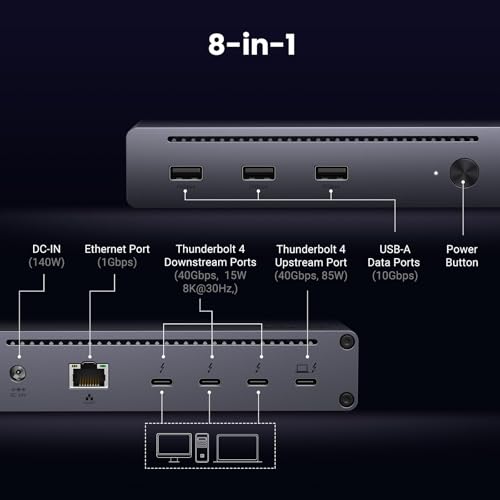


UGREEN 8-in-1 Thunderbolt 4 Docking Station 4 photos from the Amazon listing
Best for: Users needing compact downstream Thunderbolt daisy chaining
Pros
- Three downstream Thunderbolt 4 ports
- Included 140W GaN power adapter
- High-speed 10Gbps USB-A ports
Cons
- Limited to Gigabit Ethernet
- Maximum 85W laptop charging
The UGREEN 8-in-1 Thunderbolt 4 Docking Station serves as a compact desktop hub that prioritizes downstream bus expansion over an abundance of legacy ports. Featuring a central 40Gbps controller, the unit delivers one upstream connection alongside three downstream Thunderbolt 4 ports, each outputting 15W of peripheral power. Additional connectivity includes three 10Gbps USB-A 3.2 Gen 2 ports and a Gigabit RJ45 Ethernet jack, all driven by an included 140W DC power supply that yields up to 85W of direct host charging.
Display streams on this model rely entirely on the downstream Thunderbolt topology. Windows hosts can drive dual 4K monitors at 60Hz or a single 8K display at 30Hz across the Thunderbolt ports. For Apple systems, Macs featuring M1, M2, M3, or M4 Pro and Max processors, as well as legacy Intel hardware, support dual 4K displays at 60Hz. Base-tier Apple M-series chips without Pro or Max designations remain hardware-constrained to a single external display. Because the unit provides no standalone DisplayPort or HDMI jacks, connecting traditional monitors requires native Type-C video inputs or dedicated USB-C video adapter cables.
This model suits users who run multiple downstream Thunderbolt peripherals, such as external RAID enclosures or daisy-chained devices, and want a clean desk layout without unused audio or card-reader sockets. Workstations requiring integrated memory card slots, analog audio inputs, or native DisplayPort connectivity will be better served stepping up to one of the larger 13-in-1 units.
UGREEN 13-in-1 Thunderbolt 4 Docking Station for Multi-Display Workstations
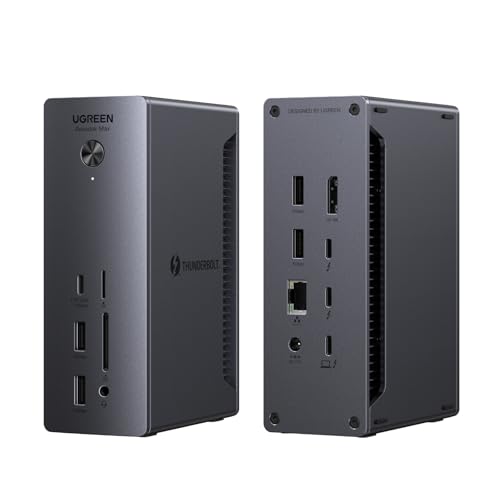


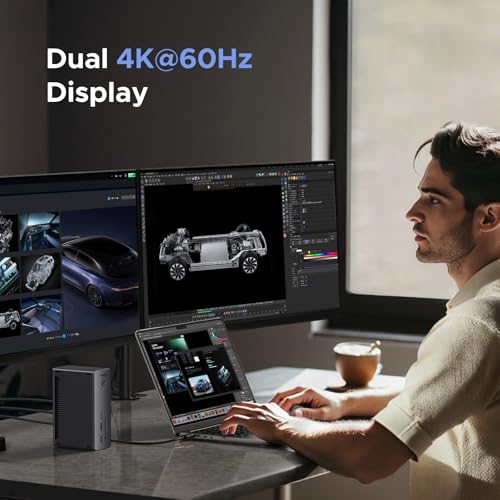
UGREEN 13-in-1 Thunderbolt 4 Docking Station 4 photos from the Amazon listing
Best for: Noise-sensitive desks needing 96W charging and legacy ports
Pros
- Fanless silent passive cooling
- 96W host Power Delivery profile
- Three downstream Thunderbolt 4 ports
Cons
- SD slot limited to UHS-I speeds
- Gigabit rather than 2.5Gbps Ethernet
Best for: Workstations requiring multi-display output and fast networking
Pros
- 5Gbps high-speed Ethernet
- Fast SD and TF 4.0 card readers
- Dedicated DisplayPort 1.4 connector
Cons
- DisplayPort does not support DP++
- Caps host charging at 90W
The UGREEN 13-in-1 Thunderbolt 4 Docking Station, designated in the product line as the Revodok Max 213, expands connectivity for technical desks needing high-speed storage ingestion and wired local network throughput. The dock features two downstream Thunderbolt 4 ports (40Gbps, 15W), a dedicated DisplayPort 1.4 output, a 2.5Gbps high-speed Ethernet port, and dual SD and TF 4.0 card slots capable of 312MB/s bus speeds. Peripheral needs are handled by a 10Gbps USB-C port with 20W Power Delivery, two 10Gbps USB-A ports, two 5Gbps USB-A ports, a 3.5mm audio combo jack, and an included 180W GaN power adapter that routes 90W to the connected laptop.
Video routing on this dock leverages both the DisplayPort 1.4 interface and the downstream Thunderbolt 4 ports. Windows laptops can sustain dual 4K monitors at 60Hz or an 8K panel at 30Hz. Apple Pro and Max platforms drive dual 4K at 60Hz, while standard base M-series chips route to a single monitor. It is critical to note that the built-in DisplayPort does not support DP++ multimode signaling; users routing video to an HDMI display must utilize an active DisplayPort-to-HDMI adapter. Pairing this unit with a certified ugreen thunderbolt cable guarantees signal integrity across dual uncompressed 4K video feeds.
This dock is an ideal match for photographers, video editors, and power users who depend on rapid UHS-II media ingestion and low-latency 2.5GbE local NAS access. If your workstation setup requires internal SSD storage or you are upgrading to a machine equipped with next-generation Thunderbolt 5 ports, the Maxidok series provides the appropriate bus step up.
UGREEN Maxidok Thunderbolt 5 Docking Station for High-Bandwidth NVMe Storage
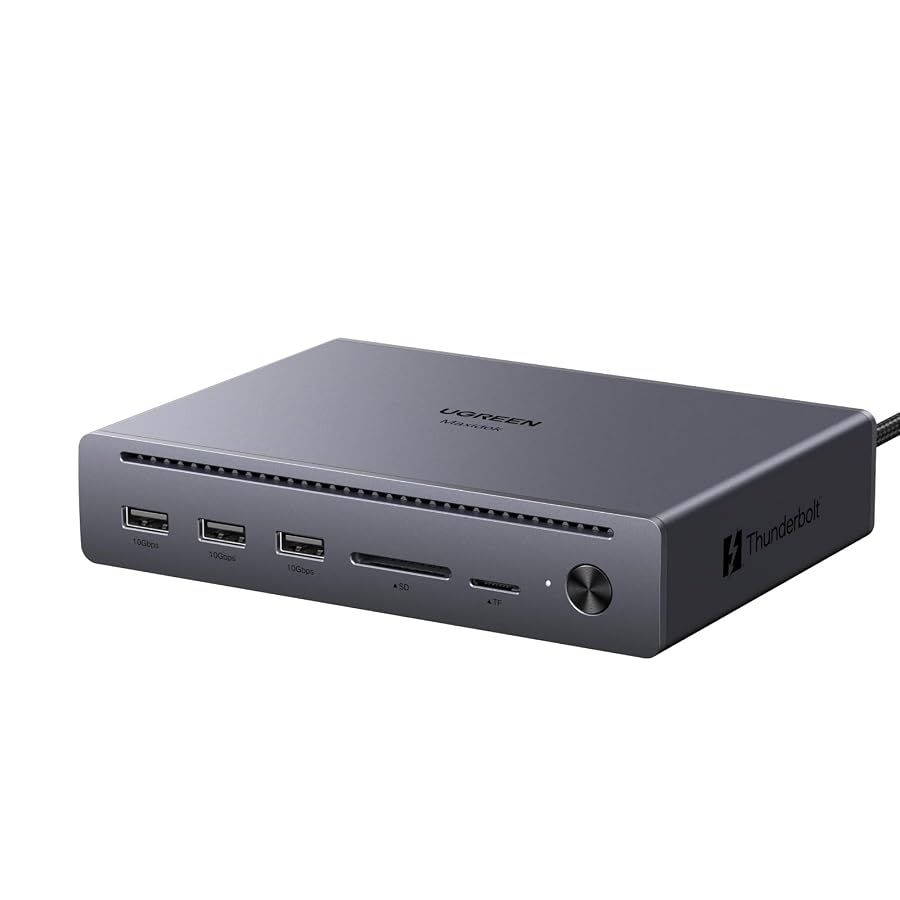


UGREEN Maxidok Thunderbolt 5 Docking Station 4 photos from the Amazon listing
Best for: Modern setups utilizing native Thunderbolt monitor connections
Pros
- Four total Thunderbolt 5 ports
- Dynamic 140W host Power Delivery
- Fast 2.5Gbps wired Ethernet
Cons
- Lacks dedicated DisplayPort or HDMI ports
- Requires macOS 15 for Mac computers
Best for: Silent setups demanding high-refresh 4K and 8K displays
Pros
- Triple 4K at 144Hz support
- Completely silent fanless aluminum chassis
- 100W laptop Power Delivery
Cons
- Equipped with Gigabit rather than 2.5GbE
- DisplayPort lacks passive DP++ support
Best for: Creative pros needing 120Gbps speed and internal storage
Pros
- Built-in 8TB PCIe Gen4 M.2 slot
- Extreme 120Gbps Thunderbolt 5 bandwidth
- High 140W laptop Power Delivery
Cons
- Active internal fan produces minor noise
- DisplayPort does not support DP++
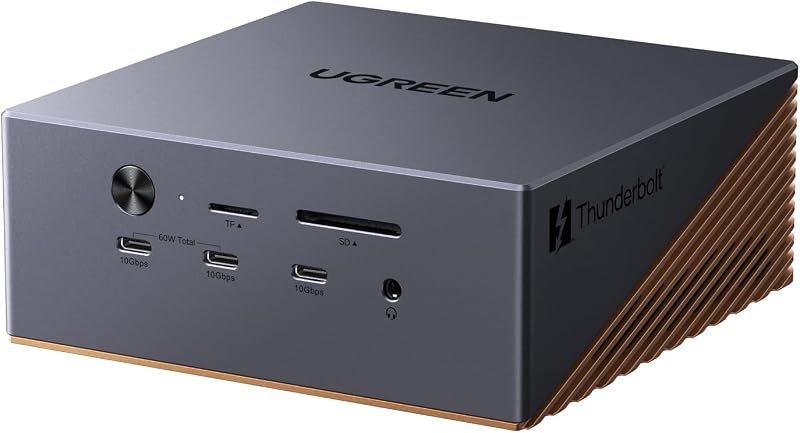
Engineered for maximum desktop throughput, the UGREEN Maxidok Thunderbolt 5 Docking Station (model U716) utilizes an Intel-certified controller delivering up to 120Gbps of total bandwidth. Its signature hardware feature is an integrated internal M.2 NVMe slot supporting PCIe Gen4x4 SSDs in 2230, 2242, 2260, and 2280 form factors up to 8TB capacity. The bay accommodates drives with attached heatsinks measuring up to 12mm high and 24mm wide. The dock provides 17 total ports, including two downstream Thunderbolt 5 ports, a DisplayPort connector, six 10Gbps USB ports (split evenly between USB-A and USB-C, with two Type-C ports sharing 60W charging), three 3.5mm audio ports, SD/TF 4.0 readers, and a 2.5Gbps Ethernet port.
The unit operates from a substantial 240W total system power delivery profile, supplying up to 140W of dynamic host charging to demanding machines like 16-inch laptops while leaving plenty of overhead for connected accessories. For display configurations, the dock supports triple independent monitors on Windows or dual displays on compatible macOS 15+ hosts, reaching single or dual 8K resolutions at 60Hz. Due to the high heat generation of the 120Gbps controller and internal Gen4 NVMe drive, the bronze aluminum unibody integrates an AI-managed cooling system with a 60mm ultra-thin fan. Performance analysts can evaluate how this compares to other brands in our plugable thunderbolt 5 dock breakdown.
This docking station suits enterprise creators, 3D artists, and software developers who require multi-monitor 8K setups and ultra-fast local scratch disk storage without adding external drive enclosures. Users seeking completely silent operation should consider fanless alternatives like the U712 model.
UGREEN Maxidok Thunderbolt 5 Docking Station for Silent Triple-Display Workstations


UGREEN Maxidok Thunderbolt 5 Docking Station, Triple 4K@60Hz, 4xTBT5 4 photos from the Amazon listing
The UGREEN Maxidok Thunderbolt 5 Docking Station (model U712) strips down port clutter to focus on massive video bandwidth and silent operation. Providing 120Gbps unidirectional and 80Gbps bidirectional throughput, this 10-in-1 docking station features two downstream Thunderbolt 5 ports, a DisplayPort 2.1 connector, three 10Gbps USB-A 3.2 Gen 2 ports, SD and TF 3.0 card readers running up to 170MB/s, a Gigabit Ethernet port, and a 3.5mm audio jack. Power is supplied by a 140W DC system delivering up to 100W Power Delivery to the host machine.
Display performance is a major technical highlight of the U712. Utilizing the DisplayPort 2.1 pipeline in tandem with the two downstream Thunderbolt 5 ports, the dock can push triple 4K displays at 144Hz, or drive single and dual 8K panels at 60Hz on supported platforms. Like other DisplayPort implementations in the UGREEN catalog, the port lacks DP++ support, mandating active adapters for HDMI screens. To keep studio environments quiet, the dock omits active cooling fans, relying instead on a heavy 1.6 kg aluminum alloy unibody chassis that functions as a passive heatsink to stabilize temperatures under sustained loads.
This unit is specifically tailored for noise-sensitive production suites, audio engineers, and high-refresh-rate gamers who need 144Hz 4K or 8K displays without ambient fan noise. Workstations that demand 2.5GbE networking or internal SSD expansion should look to the higher-tiered U716 instead.
UGREEN Maxidok Thunderbolt 5 Docking Station for Pure Thunderbolt Topology


UGREEN Maxidok Thunderbolt 5 Docking Station, 8TB M.2 NVMe 4 photos from the Amazon listing
The UGREEN Maxidok Thunderbolt 5 Docking Station (model U715) departs from conventional docking station design by abandoning dedicated legacy DisplayPort and HDMI ports entirely. Instead, the 13-port unit features four total Thunderbolt 5 ports—one upstream and three downstream—capable of pushing up to 120Gbps across the bus. This pure-Thunderbolt architecture is supported by a 2.5Gbps high-speed Ethernet interface, an SD/TF 4.0 UHS-II card reader running at 312MB/s, a 3.5mm audio port, and five USB ports (two 10Gbps USB-A, one 10Gbps USB-C, and two 5Gbps USB-A).
Display distribution occurs strictly across the Thunderbolt interfaces. Host machines running modern operating systems (including macOS 15 and Windows 10 or later) can output to triple 4K monitors at 144Hz, dual 6K displays at 60Hz, or a single 8K monitor by connecting directly to Thunderbolt or native USB-C displays. An included 180W GaN adapter dynamically distributes power, delivering up to 140W of host charging to handle power-intensive mobile workstations. Thermal performance is regulated passively using a dual-layer aluminum chassis coupled with internal thermal silicone pads, allowing either horizontal or vertical desk orientation.
This dock is designed for progressive workstations using native USB-C or Thunderbolt displays, high-speed external NVMe arrays, and 2.5GbE local area networks. Desks that rely on direct DisplayPort connections without adapters should look at the DisplayPort-equipped U712 or Revodok Max models instead.
UGREEN 13-in-1 Thunderbolt 4 Docking Station for Quiet 96W Host Workstations



UGREEN 13-in-1 Thunderbolt 4 Docking Station, Dual 4K@60Hz, 3xTBT4, 4 photos from the Amazon listing
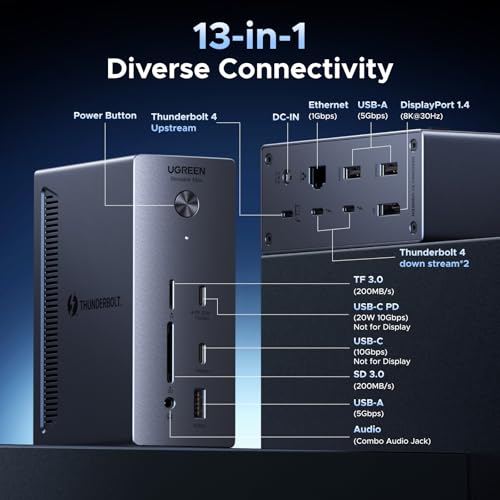
Representing a balanced iteration within the ugreen thunderbolt 5 and Thunderbolt 4 lineups, this version of the UGREEN 13-in-1 Thunderbolt 4 Docking Station carries Revodok Max branding and focuses on silent desktop operation paired with a higher 96W laptop charging ceiling. The dock integrates three 40Gbps Thunderbolt 4 ports (one upstream, two downstream), a DisplayPort 1.4 output, three 5Gbps USB-A ports, two 10Gbps USB-C ports (one delivering 20W Power Delivery), an SD/TF 3.0 card reader rated at 200MB/s, Gigabit Ethernet, and a 3.5mm audio jack, powered by a 180W external adapter.
Display configurations follow established Thunderbolt 4 controller parameters, enabling dual 4K monitors at 60Hz or a single 8K screen at 30Hz when connected to Windows systems or compatible Apple Pro and Max processors. The DisplayPort 1.4 port is strictly standard signaling without DP++ support, so active conversion remains necessary for HDMI screens. The enclosure utilizes an aluminum-front housing with internal heat sinks that eliminate the need for active cooling fans, maintaining completely silent operation during extended rendering or compilation tasks.
This dock suits everyday knowledge workers, software developers, and designers who need more host charging headroom (96W versus the 85W or 90W of sibling models) and silent performance without paying for 120Gbps Thunderbolt 5 speeds. Workstations requiring 2.5Gbps networking or UHS-II card reading should select the Revodok Max 213 model instead.
How to Choose the Right UGREEN Thunderbolt Docking Station
Selecting the correct model across this lineup requires matching interface bandwidth, display configurations, peripheral speeds, and power supply delivery to your host hardware. Evaluating these core parameters ensures your desk setup avoids technical bottlenecks:
- Thunderbolt 4 vs. Thunderbolt 5 Bandwidth: Thunderbolt 4 docks operate at 40Gbps bidirectional bandwidth, which perfectly accommodates dual 4K displays at 60Hz alongside external USB drives. Upgrading to a Thunderbolt 5 dock yields 80Gbps bidirectional throughput and up to 120Gbps for asymmetric display boost, which is mandatory for driving multiple 8K displays, triple 4K screens at 144Hz, or high-bandwidth PCIe Gen4 storage.
- Display Port Topology and Signal Type: Consider whether your monitors require native DisplayPort outputs or Thunderbolt USB-C inputs. The U715 relies entirely on Thunderbolt video tunneling, whereas the U712, U716, and Revodok Max 13-in-1 docks provide dedicated DisplayPort connections. Note that none of the UGREEN DisplayPort outputs support DP++; connecting HDMI displays requires an active adapter.
- Laptop Charging Profiles: Host Power Delivery varies across the lineup from 85W on the 8-in-1 hub up to 140W on the Maxidok U716 and U715 models. Standard 13-inch and 14-inch laptops operate comfortably on 85W to 96W, whereas full-load 16-inch workstation laptops benefit from the 100W or 140W thresholds to prevent battery drain under sustained processing loads.
- Internal Storage Expansion: If eliminating external desktop enclosures is a priority, the Maxidok U716 stands alone with its integrated M.2 NVMe PCIe Gen4x4 slot supporting drives up to 8TB. All other models require external drives connected via USB or downstream Thunderbolt ports.
- Acoustic Profiles: High-bandwidth docks processing heavy power and internal SSD data, such as the U716, utilize active internal fans to prevent thermal throttling. If silent operation in audio recording or quiet office environments is essential, select passively cooled enclosures such as the U712, U715, or Revodok Max 13-in-1.
FAQ
What is the primary operational difference between UGREEN Thunderbolt 4 and Thunderbolt 5 docks?
The primary difference lies in data and display bandwidth. UGREEN Thunderbolt 4 docks provide up to 40Gbps of total throughput, supporting dual 4K displays at 60Hz or a single 8K display at 30Hz. UGREEN Thunderbolt 5 docks utilize next-generation controllers delivering up to 120Gbps of bandwidth, enabling triple 4K displays at 144Hz, dual 8K displays at 60Hz, and faster host Power Delivery up to 140W.
Do UGREEN Thunderbolt docks support dual external displays on base M1, M2, M3, or M4 MacBooks?
No. Standard, base-tier Apple Silicon processors (such as the base M1, M2, or M3) lack the internal hardware display engines necessary to route multiple native displays over a single Thunderbolt connection. On these base Mac models, all UGREEN Thunderbolt docks will output to only a single external monitor, mirroring if a second is connected. Driving dual displays natively requires a Mac with an M-series Pro, Max, or Ultra chip, or an Intel processor.
Can I connect an HDMI monitor directly to the DisplayPort on these docks?
Only if you use an active DisplayPort-to-HDMI adapter or cable. The DisplayPort connectors on UGREEN Thunderbolt docks (including the Revodok Max 213, U716, U712, and Revodok Max 13-in-1) do not support DP++ (DisplayPort Dual-Mode). Passive adapters and passive conversion cables will not transmit a video signal.
Which UGREEN dock includes built-in NVMe solid-state drive storage?
The UGREEN Maxidok Thunderbolt 5 Docking Station (model U716) includes an integrated internal M.2 NVMe PCIe Gen4x4 slot. It accepts M.2 SSDs in sizes ranging from 2230 to 2280 with capacities up to 8TB, accommodating drive heatsinks measuring up to 12mm high and 24mm wide.
Does the cooling fan on the UGREEN Maxidok U716 run continuously?
The Maxidok U716 utilizes an AI-managed cooling system paired with a 60mm ultra-thin fan. The fan regulates temperatures generated by the high-bandwidth 120Gbps Thunderbolt 5 controller, 140W power circuitry, and internal PCIe Gen4 SSD. The listing notes that fan operation is completely normal under active operational workloads.


