As Amazon Associates, we earn from qualifying purchases. This means we may receive a small commission at no extra cost to you if you click through and make a purchase.
UGREEN has established a dominant footprint in personal computer connectivity by engineering peripheral distribution hardware that prioritizes electrical stability and bus integrity. When multiple demanding accessories operate concurrently, passive host-powered splitters frequently suffer from voltage drops, controller resets, and intermittent disconnections. Integrating a dedicated ugreen powered usb hub resolves these systemic issues by offloading electrical current demands from the computer motherboard to an isolated external power circuit, ensuring that power-hungry external storage, streaming hardware, and input devices operate with clean, sustained power rails.
Across the four models analyzed in this technical evaluation, UGREEN bifurcates its hardware engineering between dedicated AC-powered desktop splitters with discrete port control, high-bandwidth USB 3.2 Gen 2 multi-host peripheral switches, and bus-routing USB-C multi-function adapters featuring integrated Power Delivery pass-through.
UGREEN Powered USB Hubs Compared

Best for: High-draw legacy desktop accessories
Pros
- Dedicated 12V/2A DC power adapter
- Four smart charging ports
- Individual port toggle switches
- Durable aluminum enclosure
Cons
- Only USB-A ports
- Fixed 5 Gbps bus ceiling
| Model | Downstream Ports | Bus Bandwidth | External Power Source | Host Connection |
|---|---|---|---|---|
| UGREEN Powered USB Hub 3.0 | 7 USB-A | 5 Gbps | 12V/2A DC Adapter | USB 3.0 Type-A |
| UGREEN 7-in-1 Powered USB C 3.0 | 5 USB-A, 2 USB-C | 5 Gbps | 24W DC Adapter | USB Type-C |
| UGREEN 2-in 7-Out USB 3.2 Switch | 4 USB-A, 3 USB-C | 10 Gbps | External Power Adapter | Dual Host (USB-C/USB-A) |
| UGREEN USB C Hub for Laptop | 2 USB-A, 1 USB-C Data, 1 HDMI, 2 Card Readers | 5 Gbps | 100W USB-C Pass-Through | USB Type-C |
Table from this guide — scroll sideways for the remaining columns.
UGREEN Powered USB Hub 3.0 for Dedicated Desktop Expansion


UGREEN Powered USB Hub 3.0, 7-Ports USB Adapter with 4 photos from the Amazon listing
The UGREEN Powered USB Hub 3.0 is engineered specifically for stationary workstations that require dependable, uncompromised expansion across legacy Type-A peripherals. Fabricated within an aluminum enclosure finished in grey, this hub measures 3.05 inches long, 1.89 inches wide, and 1.18 inches high, with a physical weight of 0.31 kg. Its primary structural asset is an external 12V/2A power supply port paired with an included wall adapter. Delivering up to 24W of external energy, this supply insulates the host operating system from the heavy current spikes common when spinning up external mechanical hard drives or initializing broadcast hardware.
From an architectural standpoint, all 7 downstream connections are high-speed USB 3.0 ports offering a 5 Gbps theoretical data transfer rate. Among these, 4 ports are engineered as smart charging ports that automatically detect the charging protocols of connected equipment to optimize power delivery to smartphones, tablets, earphones, and peripheral accessories like desktop USB fans. Each port incorporates an individual physical toggle switch paired with a dedicated LED operational indicator, allowing hardware engineers and workstation operators to power down idle devices without the mechanical degradation caused by repeated cable cycles. Readers comparing traditional desktop splitters like the atolla usb hub 3.0 powered 7 port will appreciate the integrated aluminum shielding and broad driver-free compatibility across Windows, Linux, UNIX, and macOS systems.
This powered usb 3.0 hub ugreen suits power users managing extensive arrays of Type-A hardware, including studio audio interfaces, external optical drives, and multiple mechanical storage volumes. However, because its physical downstream layout lacks modern Type-C interfaces and depends on a legacy Type-A upstream connection, it yields precedence to newer hybrid hubs for workstations built around modern Type-C laptop ecosystems.
UGREEN 7-in-1 Powered USB C 3.0 for Mixed Peripheral Desktops


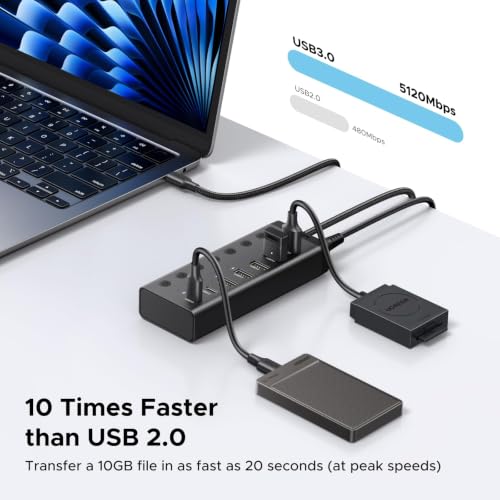

UGREEN 7-in-1 Powered USB C 3.0 4 photos from the Amazon listing
Best for: Modern mixed Type-A and Type-C desktops
Pros
- 24W dedicated external power supply
- Dual USB-C downstream ports
- Individual toggle switches
- Generous 3.3-foot host cable
Cons
- Cannot charge host computer
- Shared 5 Gbps upstream bandwidth
Bridging traditional hardware with modern connectivity, the UGREEN 7-in-1 Powered USB C 3.0 updates the desktop expansion template by adopting a native USB Type-C host interface. Finished in dark gray, this hub links to your computer via a generous 3.3-foot (1-meter) integrated cable designed specifically to route cleanly around monitor arms, laptop risers, and under-desk PC chassis. Its port configuration splits across five downstream USB-A data ports and two downstream USB-C data ports, making it a versatile tool for transitional work environments that manage both modern flash media and legacy accessories.
Power distribution is governed by an included 24W external power adapter, engineered to support multiple concurrent peripherals without dropping bus voltage. Under optimal electrical conditions, a single port can output up to 7.5W, with available wattage dynamically distributed across the layout when several high-draw accessories are active simultaneously. All seven downstream ports share a unified 5 Gbps upstream channel, which allows individual drives to burst at full single-lane SuperSpeed bandwidth while dividing throughput when multiple storage drives transfer files concurrently. As noted in our broader ugreen usb c hub analysis, shoppers must remember that this model’s 24W power input is dedicated exclusively to powering downstream peripherals and does not provide upstream battery charging to the host laptop.
This ugreen 7 port usb hub is the optimal selection for users operating Type-C host systems like the Apple iMac, Microsoft Surface, or Dell XPS who require mixed-connector expansion alongside individual port power management. If your workflow requires bi-directional host computer charging or multi-gigabit throughput for solid-state storage, this 5 Gbps shared-bus design yields to UGREEN’s higher-tier data switches and docking stations.
UGREEN 2-in 7-Out USB 3.2 Switch for Dual-PC Workstations
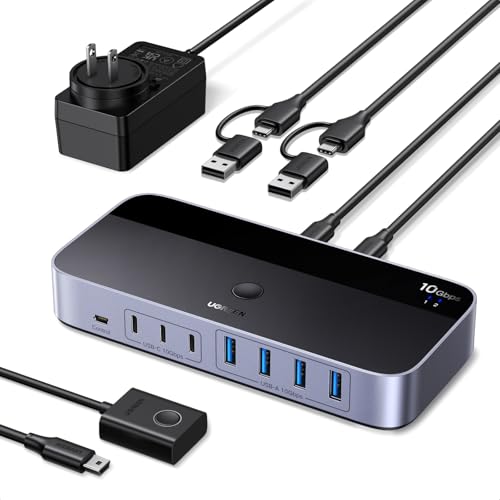


UGREEN 2-in 7-Out USB 3.2 Switch 4 photos from the Amazon listing
Best for: Dual-computer workstations sharing high-speed storage
Pros
- 10 Gbps USB 3.2 Gen 2 throughput
- Two-host pushbutton and remote switching
- Seven total downstream ports
- Included power adapter
Cons
- No display video output
- Primarily built for data transmission
The UGREEN 2-in 7-Out USB 3.2 Switch departs from single-host topologies by incorporating an advanced routing mechanism that allows two separate host computers to share seven downstream peripherals. Clad in a black chassis, this switch provides four USB-A ports and three USB-C ports, creating an expansive sharing surface for mixed peripheral environments. It ships with a dedicated external power adapter and charging cable, ensuring connected 2.5-inch hard drives, high-draw webcams, and flash drives maintain uninterrupted power delivery during host switching sequences without experiencing write corruption or dropped connections.
Data routing represents a major technological leap within this ugreen 10gbps usb switch. Powered by four USB 3.2 Gen 2 ports, the switch achieves theoretical data transfer speeds of up to 10 Gbps, enabling 1 GB file transfers in approximately 1.5 seconds. Included USB-C to USB-A cabling provides out-of-the-box compatibility with mixed host platforms, allowing an ultrabook with USB-C and a desktop workstation with USB-A to access the same peripheral cluster. Host selection occurs via an integrated chassis pushbutton or an included external wired controller, keeping desk routing clean. The product data notes that its USB interfaces are engineered primarily for data transmission rather than specialized low-latency audio transmission, which distinguishes it functionally from an enterprise ugreen hdmi kvm switch that handles video and audio feeds alongside USB routing.
This ugreen 2-in 7-out usb 3.2 switch is tailor-made for technical professionals balancing a dedicated employer-issued laptop alongside a personal desktop computer on a single desk. It cedes priority to traditional docking hubs if your workstation demands video display pass-through, memory card slots, or high-wattage single-cable host laptop charging.
UGREEN USB C Hub for Laptop for Mobile Multi-Port Workflows


UGREEN USB C Hub for Laptop 4 photos from the Amazon listing
Best for: Mobile laptop docking and single-cable charging
Pros
- 100W Power Delivery pass-through
- 4K HDMI external video output
- Integrated SD and MicroSD slots
Cons
- Maximum two 2.5-inch drives supported
- Reserves 5W for internal overhead
Serving mobile productivity rather than stationary desktop topologies, the UGREEN USB C Hub for Laptop (designated under the Revodok 7-in-1 series) concentrates power delivery and media routing into a compact, space-gray aluminum form factor. Unlike hubs powered by dedicated external wall bricks, this unit is an inline multi-port adapter engineered around the USB Power Delivery specification. It accepts up to 100W from an external USB-C power source, utilizing 5W to power its internal controller silicon, card reader interfaces, and video circuitry while passing up to 95W directly upstream to charge the connected host laptop.
The unit’s connectivity suite includes a 4K HDMI video output port, an integrated SD card reader, a MicroSD card slot, one USB-C 5 Gbps data port, and two USB-A 5 Gbps data ports. This versatile interface enables field photographers, video editors, and mobile workers to ingest camera media, output display signals to an external monitor, and transfer data from flash drives simultaneously. To ensure electrical stability on mobile storage arrays, the manufacturer notes that the hub can support a maximum of two 2.5-inch external hard drives concurrently. Compatibility spans across Apple MacBook platforms (including M1 through M5 architectures and MacBook Neo), iPad Pro, iPhone 15 Pro series, Chromebooks, and handheld systems like the Steam Deck and Asus ROG Ally.
This model is the ideal choice for laptop users who require single-cable docking functionality with display output, card ingestion, and host battery charging in a travel-ready shell. It yields to dedicated desktop hubs whenever a user requires more than three downstream USB data ports, individual per-port power toggles, or dedicated multi-drive DC power supplies.
How to Choose the Right UGREEN Powered USB Hub
Selecting the correct model requires evaluating three primary engineering parameters: the external power supply architecture, total bus saturation limits, and physical port assignments.
Power distribution architecture establishes the baseline stability of any desktop layout. Dedicated desktop hubs, such as the UGREEN Powered USB Hub 3.0 with its 12V/2A external adapter and the UGREEN 7-in-1 Powered USB C 3.0 with its 24W adapter, feed current exclusively to downstream peripherals. This isolation prevents peripheral disconnects caused by host logic board throttling, but neither unit supplies battery charging current back to a host computer. Conversely, the UGREEN USB C Hub for Laptop utilizes a pass-through Power Delivery topology that transfers up to 95W directly to your laptop while reserving 5W for internal operations, making it suitable for single-cable mobile desks but less equipped for massive multi-drive peripheral clusters.
Upstream bus bandwidth determines real-world transfer speeds across active storage arrays. Both 7-in-1 5 Gbps hubs share a single SuperSpeed upstream lane across all data ports. If multiple storage devices write simultaneously, transfer speeds split across those active endpoints. If your workflow involves transferring high-bitrate video or sustained file transfers across external solid-state drives, the UGREEN 2-in 7-Out USB 3.2 Switch delivers a 10 Gbps bus ceiling via USB 3.2 Gen 2 controller silicon, doubling available throughput to 1.25 GB/s shared across connected endpoints.
Finally, your physical peripheral ecosystem should dictate the connector layout. Users maintaining vast collections of Type-A accessories benefit most from the purely legacy port cluster on the UGREEN Powered USB Hub 3.0, whose individual toggle switches prevent unnecessary wear on port contacts. Workstations transitioning into modern storage formats will find a balanced solution in the hybrid 5x USB-A and 2x USB-C layout of the UGREEN 7-in-1 Powered USB C 3.0. Users managing multi-system desks should bypass traditional single-host splitters entirely in favor of the dual-host switching capability of the UGREEN 2-in 7-Out USB 3.2 Switch.
FAQ
Can an externally powered UGREEN hub charge my host laptop?
Host charging depends strictly on whether the hub uses dedicated DC peripheral power or USB-C Power Delivery pass-through. The UGREEN Powered USB Hub 3.0 (12V/2A) and the UGREEN 7-in-1 Powered USB C 3.0 (24W) route all electrical current exclusively to connected downstream accessories and do not backfeed charging current to the computer. Only models featuring integrated Power Delivery pass-through, such as the UGREEN USB C Hub for Laptop, can negotiate upstream charging to power your host laptop battery.
What occurs when multiple storage drives saturate a 5 Gbps shared bus?
When multiple external hard drives or flash drives read or write data at the same time on a 5 Gbps shared hub, the host controller dynamically divides the total 5 Gbps bandwidth among the active endpoints. A single drive may achieve near theoretical maximum transfer rates when operating in isolation, but concurrent operations will result in reduced transfer speeds per device as the shared upstream lane reaches maximum capacity.
Why are physical toggle switches included on select UGREEN desktop hubs?
Physical toggle switches allow users to completely isolate and power down specific peripherals without physically disconnecting the cable from the port. This functionality prevents physical wear on the USB connectors, stops idle external hard drives from spinning needlessly, and eliminates background phantom power draw from high-output accessories when they are not in active use.
What is the functional difference between a powered USB hub and a USB switch?
A powered USB hub connects to a single host computer and expands one port into multiple downstream ports. A USB switch, such as the UGREEN 2-in 7-Out USB 3.2 Switch, features two upstream host connections, allowing a shared set of downstream peripherals to toggle control between two separate computers via a physical button or remote switch.
Why does the UGREEN laptop hub reserve 5W from the Power Delivery input?
Multi-port USB-C hubs require electrical current to operate their internal controller chips, HDMI video conversion circuitry, and card reader interfaces. The UGREEN USB C Hub for Laptop reserves 5W from an incoming 100W Power Delivery charger to maintain operational stability across its integrated silicon, passing the remaining 95W directly to the host laptop.


