As Amazon Associates, we earn from qualifying purchases. This means we may receive a small commission at no extra cost to you if you click through and make a purchase.
Kodak has maintained a defining presence in imaging hardware for over a century, transitioning its legacy film emulsions into modern consumer thermal transfer and dry printing systems. In the compact digital printer segment, the brand is best recognized for delivering portable snapshot hardware that pairs directly with smartphones via dedicated mobile applications. Their lineup splits primarily across two core imaging technologies: four-pass dye-sublimation systems that reproduce continuous-tone color through layered thermal ribbon passes, and Zero Ink thermal systems that activate pre-embedded dye crystals directly within the paper substrate.
Choosing the best kodak pocket printer requires understanding fundamental engineering trade-offs, as these four models diverge sharply in their print mechanisms, chassis dimensions, power delivery architectures, and sheet formats ranging from miniature adhesive stickers to full tabletop prints.
Kodak Pocket Printers Compared
| Model | Print Technology | Print Media & Dimensions | Connectivity | Power & Weight |
|---|---|---|---|---|
| KODAK Mini 2 Retro 2×3 Portable | 4PASS Dye Sublimation (CMYK) | 2×3″ Glossy photo paper | Bluetooth | USB Type-C; 255 g |
| KODAK Step Instant Smartphone Photo Printer | Zink Zero Ink | 2×3″ Sticky-back paper | Bluetooth, NFC | Rechargeable Li-Ion (Micro USB); 0.07 kg |
| KODAK Dock Plus 4×6 Photo Printer | 4PASS Dye Sublimation (CMYK) | 4×6″ Glossy photo paper | Bluetooth, Physical Dock | AC Power Outlet; Not listed |
| KODAK Step Wireless Mobile Photo Mini | Zink Zero Ink (CMY) | 2×3″ Sticky-back thermal paper | Bluetooth, NFC | Rechargeable Li-Ion; Under 1 lb (0.9″D x 2.9″W x 4.7″H) |
Table from this guide — scroll sideways for the remaining columns.
KODAK Mini 2 Retro 2×3 Portable for Everyday Pocket Archiving


KODAK Mini 2 Retro 2x3 Portable 4 photos from the Amazon listing
Best for: Pocket scrapbooking with laminated archival prints
Pros
- True 4PASS dye sublimation
- Protective lamination layer
- Modern USB Type-C charging
Cons
- Requires cartridge replacements
- No peel-and-stick backing
The KODAK Mini 2 Retro 2×3 Portable represents the brand’s approach to bringing four-pass dye-sublimation technology into a handheld footprint. Measuring 3 inches deep by 5 inches wide and 1 inch thick, with a total weight of 255 grams, this unit balances true pocketability with the mechanical complexity of an internal ribbon cartridge. Rather than burning color into chemically treated paper, the printer moves the sheet through four distinct passes: applying yellow, magenta, and cyan dye sequentially before finishing with a fourth protective overcoat lamination pass. This process requires approximately 55 seconds per print, operating at an effective speed of 1 page per minute, resulting in an anti-fingerprint, water-resistant, and fade-resistant image.
From an operational standpoint, the unit interfaces directly with compatible iOS and Android smartphones using wireless Bluetooth connectivity managed through the dedicated KODAK Photo Printer application. The bundle configuration provides immediate utility out of the box, containing the printer, four all-in-one ribbon and paper cartridges totaling 38 sheets of credit-card-sized glossy photo paper, a user guide, and a modern USB Type-C charging cable. Much like the experience of developing snapshots from a traditional kodak film camera, the multi-pass physical print cycle allows users to observe each color layer materializing on the media in real time.
This model is built specifically for mobile journal keepers, scrapbookers, and memory keepers who prioritize archival print durability and continuous-tone photographic gradations over sheer speed. While slightly heavier than Zink alternatives due to its motorized multi-pass print engine and cartridge assembly, the Mini 2 Retro yields superior color blending and environmental protection. It concedes ground to larger desktop units in media size, but stands out as the most balanced mobile option in the 4PASS line for users demanding laminated, wallet-sized prints.
KODAK Step Instant Smartphone Photo Printer for Ultra-Light Mobility
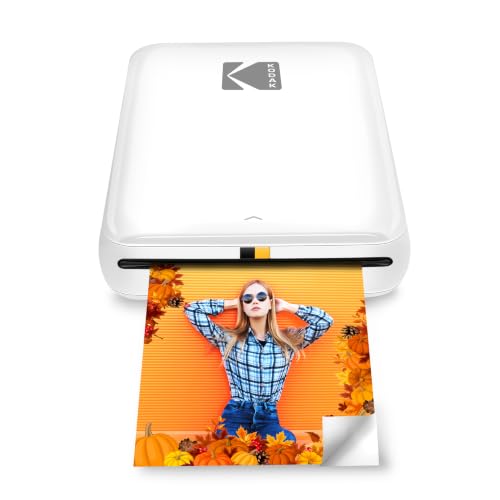


KODAK Step Instant Smartphone Photo Printer 4 photos from the Amazon listing
Best for: Ultra-light travel and adhesive journal photos
Pros
- Ultra-lightweight 70g chassis
- NFC and Bluetooth pairing
- Peel-and-stick adhesive media
Cons
- Micro USB charging interface
- Zink color dynamic range
The KODAK Step Instant Smartphone Photo Printer takes an entirely different architectural path by implementing zero-ink Zink technology. By relying on specialized 2×3-inch paper embedded with heat-activated cyan, magenta, and yellow dye crystals, the device completely eliminates the need for liquid inks, toners, or mechanical ribbon cartridges. This engineering choice results in an exceptionally featherweight chassis weighing just 0.07 kilograms (approximately 70 grams), making it by far the lightest and least mechanically complex device in this comparison.
Connectivity options are robust for mobile workflows, offering both Bluetooth and quick-tap Near Field Communication (NFC) pairing for compatible Android and iOS devices. The KODAK mobile software suite provides full editing controls, enabling users to generate photo collages, apply filters, and insert text or borders before outputting. A built-in lithium-ion rechargeable battery powers the internal thermal print head, delivering up to 25 prints per full charge cycle, with recharge handling managed through an included Micro USB cable. The physical prints feature an integrated peel-off adhesive backing, yielding durable, smudge-proof, tear-resistant, and moisture-resistant photo stickers ready for immediate mounting.
This device is designed for active smartphone creators, students, and travelers who require minimum carry weight and zero maintenance overhead. If you are comparing mobile printing gear alongside standalone snapshot equipment like an integrated kodak print camera, the KODAK Step offers a flexible alternative that turns your existing phone into an on-demand sticker studio. It surrenders the subtle color depth and smooth gradient rendering of dye-sublimation units, but in exchange, it delivers peerless pocket portability and rugged, peel-and-stick utility.
KODAK Dock Plus 4×6 Photo Printer for Permanent Home Stations
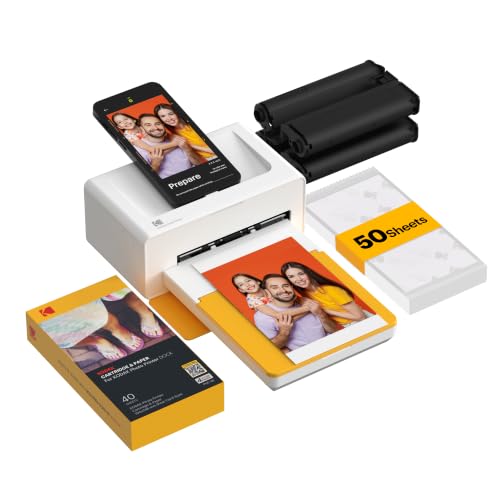


KODAK Dock Plus 4x6 Photo Printer 4 photos from the Amazon listing
Best for: Desktop smartphone charging and desktop 4×6 archiving
Pros
- Standard 4×6 photo format
- Integrated phone charging dock
- Continuous AC power operation
Cons
- Not battery powered
- Larger desktop footprint
The KODAK Dock Plus 4×6 Photo Printer shifts the operational focus entirely away from pocket transport to stable, desktop-bound photo production. Measuring 4.5 inches deep, 8.5 inches wide, and 2 inches high, this tabletop unit is engineered around standard 4×6-inch borderless prints suitable for standard frames and domestic photo albums. Operating strictly via a continuous AC power outlet rather than an internal chemical battery, the Dock Plus provides uninterrupted throughput without the battery degradation or thermal throttling that compact pocket units encounter during large print jobs.
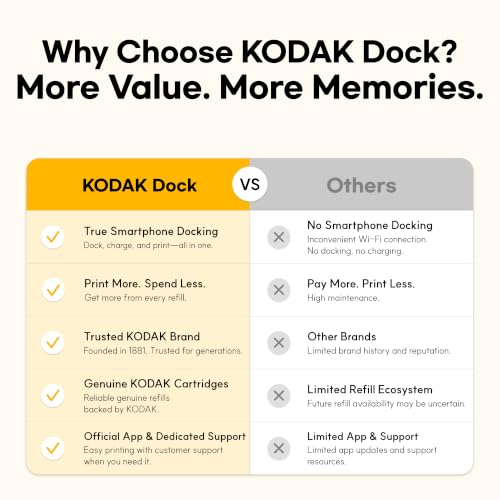
Like its smaller Retro sibling, the Dock Plus harnesses a genuine 4PASS dye-sublimation print engine, transferring yellow, magenta, cyan, and a black/lamination protective layer across a 55-second mechanical sequence. The resulting prints exhibit continuous color tone, high water resistance, and long-term protection against ambient moisture and fingerprint oils. A key physical feature of this model is its integrated docking mechanism: users can physically seat their smartphone on top of the printer for a direct, stable physical connection while simultaneously recharging the phone’s battery during the printing session, though wireless Bluetooth connectivity remains fully supported via the mobile app.
This model is the definitive choice for families, home offices, and memory preservationists who prefer classic 4×6-inch album prints over diminutive pocket formats. It abandons mobile battery operation, meaning it cannot accompany you on day trips or casual outings. However, for users whose primary goal is processing high volumes of phone pictures at home with archival quality, the Dock Plus avoids the media-size limitations and battery constraints inherent to handheld pocket printers.
KODAK Step Wireless Mobile Photo Mini for Casual Sticker Printing


KODAK Step Wireless Mobile Photo Mini 2 photos from the Amazon listing
Best for: On-the-go sticker printing with bundle accessories
Pros
- Zero ink thermal operation
- NFC fast tap connection
- Sticker-backed photo output
Cons
- 25 print battery capacity
- Thermal paper color shift
The KODAK Step Wireless Mobile Photo Mini, offered in this configuration as the Go Bundle, delivers Zink thermal printing in an ultra-slim physical profile measuring 0.9 inches deep, 2.9 inches wide, and 4.7 inches high. Weighing well under a pound, this palm-sized device matches the mechanical simplicity of thermal crystal paper, requiring only the insertion of 2×3-inch sticky-back media packs. Like its Step series counterpart, there are no ribbons to unwind or alignment calibrations to perform; the thermal print head selectively heats the paper to activate full CMY color palettes in under 60 seconds per sheet.
Pairing is straightforward via either Bluetooth or NFC touch-to-connect protocols, linking the printer to the companion smartphone app for cropping, visual adjustments, and sticker creation. Power is supplied by an internal lithium-ion rechargeable battery rated for approximately 25 prints per full charge cycle, giving users sufficient operational headroom for social gatherings, parties, and field crafting sessions. The resulting 2×3-inch thermal prints include an integrated protective surface layer that resists water drops, tearing, and smudging, backed by peel-off adhesive paper that mounts securely onto notebooks, laptop lids, and travel journals.
While the hardware shares core internal specs with the standard Step printer, this package is assembled for users wanting a complete mobile starter kit. When compared against the nostalgic, single-use workflow of a kodak disposable camera with flash, this wireless mini printer provides modern digital curation, allowing you to edit pictures on your phone screen before committing heat to paper. It trades away the superior tonal transitions and protective laminate seal of the 4PASS series in order to maximize speed, convenience, and instant sticker fabrication.
How to Choose the Right Kodak Pocket Printer
Navigating the Kodak pocket printer lineup requires balancing print technology, physical dimensions, media output formats, and power dependencies against your specific workflow requirements. Reviewing the core engineering criteria below will clarify which kodak pocket printer to buy for your personal use case.
- Print Engine Technology (4PASS vs. Zink): The primary technical divide across the catalog centers on kodak 4pass vs zink printer architectures. The 4PASS dye-sublimation system, found in the Mini 2 Retro and Dock Plus, passes the sheet through four distinct ribbon phases (yellow, magenta, cyan, plus an overlaminate shield). This produces smooth tonal transitions, authentic skin tones, and superior resistance to fading and water. Conversely, Zink technology, featured in the Step Instant and Step Wireless Mini, relies on heat-activated dye crystals inside the paper. Zink requires no external ink cartridges, simplifying maintenance and yielding adhesive-backed prints, though dynamic range and color fidelity are generally narrower than dye-sublimation output.
- Dimensions and Portability: If your priority is traveling with minimal bulk, the Zink-based Step series leads the category. The Step Instant weighs a mere 0.07 kg, slipping effortlessly into pockets or daypacks. The Mini 2 Retro, while still compact at 3″ x 5″ x 1″ and 255 g, requires extra clearance for its internal cartridge bay. The Dock Plus measures 4.5″ x 8.5″ x 2″ and is strictly designed for fixed tabletop deployment.
- Power Supply and Duty Cycle: Both Step printers and the Mini 2 Retro rely on onboard rechargeable lithium-ion batteries. The Step models are rated for 25 prints per charge cycle, making them ideal for intermittent social use. The Mini 2 Retro offers modernized USB Type-C charging for field top-offs. In contrast, the Dock Plus bypasses battery wear entirely by plugging into a standard wall outlet, simultaneously acting as an active phone charging station during desktop batch printing.
- Print Media Format and Intended Use: Media requirements should guide your model selection. The Step line prints exclusively on 2×3-inch thermal sticky-back sheets, making it the premier option for scrapbooking, bullet journaling, and laptop decoration. The Mini 2 Retro outputs credit-card-sized 2×3-inch glossy photographic prints designed for wallets and albums. For traditional framing and domestic photo archiving, the Dock Plus provides standard 4×6-inch continuous-tone prints that match laboratory snapshot dimensions.
FAQ
What is the core difference between Kodak 4PASS and Zink printing?
Kodak 4PASS uses thermal dye-sublimation transfer technology. The printer ribbon rolls out yellow, magenta, and cyan color layers onto glossy photo paper, finishing with a clear lamination layer that repels water and fingerprints. Zink (Zero Ink) technology utilizes specialized paper containing embedded dye crystals that activate when exposed to specific heat pulses from the printer’s thermal head. 4PASS offers superior continuous color tones and archival protection, while Zink eliminates the need for separate ink cartridges and features sticky-back paper.
Can I use third-party photo paper in these Kodak pocket printers?
No, you cannot safely swap generic paper across these devices. Kodak 4PASS models require proprietary all-in-one cartridges that integrate the correct ratio of ribbon film to matched glossy paper sheets. Kodak Step Zink printers require 2×3-inch Zink paper specifically calibrated with the proper thermal sensitivity and included blue calibration smart sheet to prevent paper jams and incorrect color profiles.
How long does it take for a photo to print on each model?
Both 4PASS dye-sublimation models, including the Mini 2 Retro and the Dock Plus, complete a full print cycle in approximately 55 seconds as the mechanical transport feeds the paper back and forth across four ribbon passes. The Zink-based Step models process the image in a single continuous pass, typically ejecting a finished 2×3-inch print in under 60 seconds.
Do these printers require a Wi-Fi network connection to operate?
None of these Kodak mobile printers require an external local Wi-Fi router or home internet network to print. The Mini 2 Retro, Step Instant, and Step Wireless Mini establish a direct peer-to-peer connection with your mobile device using Bluetooth or NFC. The Dock Plus allows wireless Bluetooth communication alongside a direct physical dock connection that mounts your smartphone directly to the printer chassis.
Can I print directly from a computer using these printers?
These specific Kodak models are designed primarily as smartphone and tablet companions running through the official KODAK Photo Printer and KODAK Step mobile apps for iOS and Android. They are not engineered as general-purpose desktop office printers, meaning workflow controls, photo framing, filters, and firmware updates are handled through mobile device software.


