As Amazon Associates, we earn from qualifying purchases. This means we may receive a small commission at no extra cost to you if you click through and make a purchase.
Anker has established a prominent footprint in personal computing accessories and power delivery infrastructure, shifting from standard legacy adapters to specialized connectivity hubs and silicon-optimized power stations. For hardware enthusiasts, systems administrators, and detail-oriented workstation builders, evaluating multi-port adapters requires an immediate technical distinction between digital data transfer hubs and dedicated power delivery stations. While passive and bus-powered USB splitters focus strictly on high-bandwidth serial transmission protocols to multiplex peripheral inputs across a single host controller, multi-port power adapters deploy direct-current buck-boost converters and gallium nitride transistors to negotiate rapid charging voltages without carrying any host data packets.
Understanding this multi-port hardware lineup requires contrasting how different form factors route bandwidth and electrical current: the four-port data hub multiplexes a single host data line into four 5Gbps peripheral channels, whereas multi-port charging stations allocate up to 112W or 50W of power across varying combinations of USB-C and USB-A outputs without establishing host communication.
Anker USB Hubs Compared

Best for: Workstations needing simple peripheral data expansion
Pros
- SuperSpeed 5Gbps data transfer rate
- Slim and lightweight 1.28-ounce enclosure
- Heat-resistant durable plastic shell
- Four USB-A expansion ports
Cons
- Not designed to charge devices
- Limited to USB-A connections
| Model | Total Ports | Data Transfer Rate | Total Power Output | Hardware Form Factor |
|---|---|---|---|---|
| Anker USB Hub | 4 Ports (4 USB-A) | 5Gbps (USB 3.0) | Not listed (Not designed to charge) | Ultra-Slim Dongle |
| Anker Desktop Charger | 6 Ports (3 USB-C, 3 USB-A) | Not listed (Charging only) | 112W Max | Corded Desktop Station |
| Anker Zolo USB C Charger Block | 4 Ports (2 USB-C, 2 USB-A) | Not listed (Charging only) | 50W Max | Wall Adapter with Foldable Prongs |
Table from this guide — scroll sideways for the remaining columns.
Anker USB Hub for High-Speed Data Expansion


Anker USB Hub, 4-in-1 USB Splitter, 4 USB-A Ports 4 photos from the Amazon listing
The Anker USB Hub, identified by model number Anker A7516, is a dedicated 4-in-1 bus splitter engineered specifically for computing setups that face an immediate deficit of peripheral inputs. Fabricated from a durable, heat-resistant black plastic enclosure, this compact adapter measures 4.23 inches in length, 1.23 inches in width, and 0.39 inches in height, weighing in at an ultra-light 1.28 ounces. The structural design emphasizes low-profile integration, allowing it to sit adjacent to a workstation notebook or stow cleanly in a travel sleeve. Technicians searching for an anker usb extender to bring legacy Type-A ports forward to a desktop surface will find this unit operates as a direct bridge to a computer’s native system bus.
Operating across the standard USB 3.0 hardware interface, this anker 4-port usb 3.0 data hub provides SuperSpeed bandwidth reaching up to 5 gigabits per second (5Gbps) across all four downstream USB-A channels. This throughput specification allows users to sync large video files, transfer high-resolution photo archives, or operate multiple high-bandwidth USB flash drives simultaneously without encountering the severe transfer throttles common to older USB 2.0 architectures. According to the manufacturer documentation, the package contains the Anker Ultra Slim 4-Port USB 3.0 Data Hub, an instructional welcome guide, customer support access, and an 18-month warranty. The device is confirmed for operation on Mac and desktop computer environments, maintaining plug-and-play operation without requiring external software drivers.
However, workstation planners must be fully aware of the hardware limitations inherent to the anker usb hub 4 port data transfer architecture. The listing explicitly states that this hub is not designed to charge devices. Although cataloged with a secondary feature notation of “Powered” to denote active bus signaling, the downstream ports supply only basic operational current intended for low-draw peripherals such as keyboards, computer mice, wireless transceivers, and thumb drives. It does not contain independent AC step-down transformers, meaning users who attempt to replenish power banks, mobile phones, or portable gaming handhelds will find it ineffective. For installations requiring high-wattage battery replenishment, this model yields immediately to dedicated charging stations.
Anker Desktop Charger for Multi-Device Workstations



Anker Desktop Charger 4 photos from the Amazon listing
Best for: Multi-device desktop workstations needing tidy power
Pros
- 112W high aggregate power capacity
- Six total ports across USB-C and USB-A
- Included silicone desk cable organizer
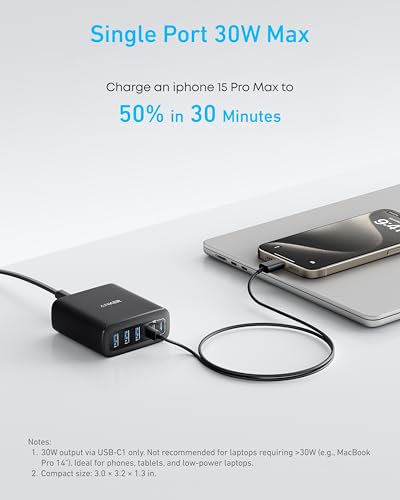
- Dedicated 30W max USB-C1 port
Cons
- No data transfer capabilities
- USB-C charging cables not included
Taking a completely divergent engineering path from data multiplexers, the Anker Desktop Charger is a high-output power hub designed to sit on a desk and eliminate the clutter of independent wall warts. Built as a corded electric unit, it connects to standard electrical infrastructure via a 2-pin Type A North American plug supporting input line voltages from 100 up to 240 volts. The housing measures 3.0 by 3.2 by 1.3 inches (77 by 82 by 33 millimeters) and weighs 10.65 ounces (302 grams), a physical mass equivalent to roughly 1.5 times the weight of an iPhone 14 Pro. Its front panel features a dense 6-in-1 layout split evenly between 3 modern USB-C ports and 3 legacy USB-A ports, delivering an aggregate power ceiling of 112 watts across all active connections.
The electrical output characteristics are governed by internal dynamic power management circuitry capable of delivering a maximum output current of 5.6 amperes with voltage negotiation up to 20 volts. The primary USB-C1 port is rated for a single-port ceiling of up to 30W, which Anker notes is capable of driving a MacBook Air to 50 percent battery capacity in 1 hour and 40 minutes, or taking an iPhone 16 Pro Max from zero to 50 percent in 30 minutes. The single USB-A ports deliver up to 18W max for older accessories. Compatibility is broad across modern mobile architectures, covering the iPhone 16, 15, 14, 13, and 12 series, Samsung Galaxy S23, S22, and S21 families, Galaxy Z Flip5 and Flip4, alongside Google Pixel 7 and 6 Pro devices. Users exploring hardware profiles like an anker 160w charger should note that this 112W unit trades raw single-port laptop wattage for balanced multi-rail desktop distribution.
To preserve workspace organization, Anker supplies this desktop station with a custom silicone cable organizer alongside the core adapter, welcome guide, and standard 18-month warranty. The listing explicitly points out that USB-C charging cables are not included in the retail box. Shoppers must also note that although the technical specifications list “Total USB 2.0 Ports: 6” to describe connector profiles, this desktop charger possesses zero data transmission pathways. It cannot mount hard drives, route webcam streams, or interface with an operating system. Additionally, because the maximum single-port output is limited to 30W on the USB-C1 rail, it cannot sustain demanding 65W or 100W pro-tier laptops, serving instead as an accessory hub for phones, tablets, and ultrabooks.
Anker Zolo USB C Charger Block for Portable Multi-Device Power


Anker Zolo USB C Charger Block 4 photos from the Amazon listing
Best for: Travelers needing compact multi-device wall charging
Pros
- Simultaneous 30W and 20W dual-port output
- Compact build with foldable prongs
- ActiveShield 4.0 24-hour thermal protection
- Supplied as a convenient 2-pack
Cons
- No data transfer functionality
- 50W shared across four ports
The Anker Zolo USB C Charger Block approaches multi-port power delivery from a mobile, wall-mounted perspective. Sold as a retail 2-pack configuration, this anker 4 port charger condenses a 50W aggregate output ceiling into an ultra-compact, travel-ready footprint comparable in size to an AirPods charging case. Fabricated with a black plastic exterior, the unit features built-in foldable AC prongs that pivot directly into the housing, preventing bent pins or snagged fabric when tossed into a field bag. It accepts universal AC input voltages spanning up to 240 volts, delivering direct-current charging across a total of four output jacks: 2 USB-C ports and 2 USB-A ports.
Internally, the anker zolo 4 port relies on an upgraded Gallium Nitride (GaN) semiconductor architecture designed to optimize thermal efficiency while operating at high switching frequencies. This GaN platform allows the adapter to maintain a sustained 50W aggregate capacity with a total output current rating of 5 amperes at up to 20 volts. Power splitting across the dual USB-C ports is uniquely tuned: when both Type-C ports are under simultaneous load, the USB-C1 connector sustains an uncompromised 30W output while the USB-C2 connector delivers an independent 20W stream. This dual-rail allocation allows users to fast-charge a tablet or lightweight notebook on the primary port while simultaneously rapid-charging a modern smartphone on the secondary port without power collapse.
Hardware safety is actively governed by Anker’s proprietary ActiveShield 4.0 system, which executes continuous 24-hour temperature monitoring and voltage regulation to prevent thermal runaway. While desktop users who prioritize a stationary workspace often prefer the longer reach of corded stations, those evaluating an anker wall charger usb c will find the Zolo format ideal for transit environments. However, just like the desktop unit, the Zolo adapter lacks serial data controllers and cannot facilitate data synchronization between connected electronics. Furthermore, splitting 50 watts across four concurrent connections reduces per-port wattage, making it best suited for an ecosystem of smaller mobile gadgets rather than heavy workstation hardware.
How to Choose the Right Anker USB Hub
Resolving which anker usb hub to buy hinges on establishing clear operational requirements between peripheral bus expansion and battery charging infrastructure. Workstation users frequently mistake multi-port AC power supplies for computing hubs due to overlapping port terminology. An anker 4 port usb hub engineered for data—such as the Model A7516—features host controller chips that translate USB 3.0 signaling directly to an operating system, enabling bi-directional packet communication for storage media, input devices, and audio interfaces. Conversely, multi-port power adapters feature buck converters that deliver DC electrical current to recharge batteries without any physical connection to a computer’s logic board. Attempting to synchronize data through a dedicated charger will fail entirely, just as attempting to charge high-draw phones through a bus-powered data splitter will result in negligible current draw.
Evaluating anker multi port adapter specs also requires analyzing physical deployment and cable management constraints. If your workflow is based around a permanent office setup where power strips are hidden behind heavy furniture, a corded desktop station like the 112W unit provides significant ergonomic advantages. Its external power cord extends high-wattage ports directly onto the work surface, and the included silicone organizer prevents connection leads from falling behind desks. On the other hand, remote workers, field technicians, and frequent travelers require compact hardware that minimizes pack weight. In these scenarios, the folding-prong design of the Zolo charger plugs directly into hotel or airport wall sockets, while the ultra-slim A7516 data hub draws negligible power directly from a laptop’s existing USB port without requiring access to an AC wall outlet.
A rigorous anker 4 port comparison must also balance port distribution between emerging USB-C standards and legacy USB-A hardware. While modern smartphones and performance peripherals increasingly ship with Type-C cabling, millions of reliable business tools—ranging from 2.4GHz wireless mouse transceivers and mechanical keyboards to thermal label printers and flash drives—still rely on USB-A connectors. The A7516 hub serves as an effective bridge by converting a single host connection into four independent Type-A ports. When selecting a power station, choosing an adapter with an even split of Type-C and Type-A ports ensures that older charging cables for smartwatches, fitness trackers, and legacy accessories can function alongside modern fast-charging smartphones without forcing users to purchase replacement cables.
Finally, users must examine single-port power ceilings versus total aggregate capacity. High aggregate wattage numbers can be deceptive if internal power-sharing rules throttle individual connections. The 112W Desktop Charger provides ample total overhead for six devices, but its single-port ceiling of 30W on USB-C1 restricts its laptop utility to low-draw machines like the MacBook Air. Similarly, the 50W Zolo wall block guarantees a 30W and 20W split across its dual Type-C channels, which is sufficient for a phone and tablet simultaneously, but will see diminished output rates if all four ports are loaded at once. Matching the specific power intake limits of your hardware to these fixed output rails ensures that your devices charge at their intended rates without overloading the adapter.
FAQ
Can the Anker 4-port USB 3.0 data hub charge smartphones and tablets?
No, the Anker USB Hub (Model A7516) is engineered strictly for high-speed data transfer and peripheral expansion, not for recharging mobile devices. The product documentation explicitly indicates that the hub is not designed to charge devices. While the downstream ports output minimal trickle power sufficient to operate low-draw computer peripherals like mice, keyboards, and USB flash memory drives, the current is inadequate to reliably power or charge smartphones, tablets, or portable batteries. Users needing battery charging should select a dedicated power adapter.
What data transfer speeds does the Anker USB Hub support?
The Anker USB Hub operates on the USB 3.0 specification, providing SuperSpeed data transmission rates reaching up to 5Gbps. This theoretical throughput allows the hub to move files rapidly between high-speed storage media and a host computer, enabling users to transfer an HD video file in seconds. The four USB-A data ports operate concurrently across compatible Mac and desktop operating systems.
Can the Anker Desktop Charger power a laptop computer?
The Anker Desktop Charger can charge compact laptops that require low-wattage inputs, such as a MacBook Air. The manufacturer specifies that 30W maximum charging is limited to the USB-C1 port, which can replenish a MacBook Air battery to 50 percent in approximately 1 hour and 40 minutes. However, larger professional laptops that require 65W, 85W, or 100W power delivery profiles will charge very slowly or may lose charge while running intensive applications under load.
How does the Anker Zolo allocate power when both USB-C ports are in use?
When both USB-C ports on the Anker Zolo USB C Charger Block are utilized simultaneously, the internal power circuitry maintains a dedicated 30W output on the primary USB-C1 port while routing 20W of output to the secondary USB-C2 port. This configuration prevents output throttling on the main line, allowing users to charge a compact laptop or tablet at full 30W speed while concurrently fast-charging a compatible smartphone at 20W.
Does the Anker Desktop Charger support data transfer between connected devices?
No, the Anker Desktop Charger does not support data pass-through, device syncing, or peripheral connectivity. Although the unit contains six USB ports across Type-C and Type-A interfaces, its internal engineering consists entirely of AC-to-DC power delivery circuits. It connects solely to an AC wall outlet and does not feature a host USB connection to communicate with a desktop or laptop computer operating system.
What safety features are included in the Anker Zolo charger?
The Anker Zolo charger features Anker’s ActiveShield 4.0 safety architecture, which provides continuous 24-hour temperature and operational monitoring. This multi-layered protection framework, combined with heat-dissipating Gallium Nitride (GaN) semiconductor architecture, actively inspects thermal thresholds and electrical loads to safeguard connected devices against over-voltage, excessive current, and short circuits during high-output charging cycles.


