As Amazon Associates, we earn from qualifying purchases. This means we may receive a small commission at no extra cost to you if you click through and make a purchase.
Logitech has anchored the personal computing input ecosystem for decades, engineering dedicated gaming controllers that prioritize driver longevity, backward compatibility, and reliable physical architectures. Within the realm of PC peripherals, the brand bridges the gap between conventional arcade gamepads and specialized aerospace simulation cockpits. Whether deploying standard human interface device protocols or leveraging proprietary mapping utilities, selecting a logitech controller pc setup requires analyzing how specific hardware configurations match different gaming applications. Logitech’s engineering portfolio spans from lightweight wired gamepads utilizing responsive tactile switch arrays to heavy-duty flight control systems packed with magnetic non-contact sensors.
While the corded F310 delivers a lightweight, plug-and-play USB connection for standard gaming setups, the wireless F710 introduces untethered 2.4 GHz communication with dual vibration feedback, and the X56 HOTAS separates itself entirely as an enthusiast-grade simulation rig featuring twin throttles, RGB backlighting, and 16-bit Hall-effect directional control.
Logitech PC Controllers Compared
| Model | Device Category | Interface and Connectivity | Input Density and Sensors | Power Source and Mass |
|---|---|---|---|---|
| Logitech G F710 Wireless Gamepad | Gamepad | 2.4 GHz Wireless via USB Nano Receiver | 15 buttons, dual vibration motors | 2 AA batteries, 290 g |
| Logitech G X56 H.O.T.A.S Throttle | HOTAS Flight Joystick and Throttle | Dual USB 2.0 (2 m cable) | 24 buttons, 16-bit Hall-effect sensors, twin throttles | Dual USB bus power, 6.9 pounds |
| Logitech G F310 Wired Gamepad Controller | Gamepad | USB Corded (6-foot cable) | 10 programmable buttons, 8-way floating D-pad | Corded electric USB bus power, 14.4 ounces |
Table from this guide — scroll sideways for the remaining columns.
Logitech G F710 Wireless Gamepad for Cord-Free Precision
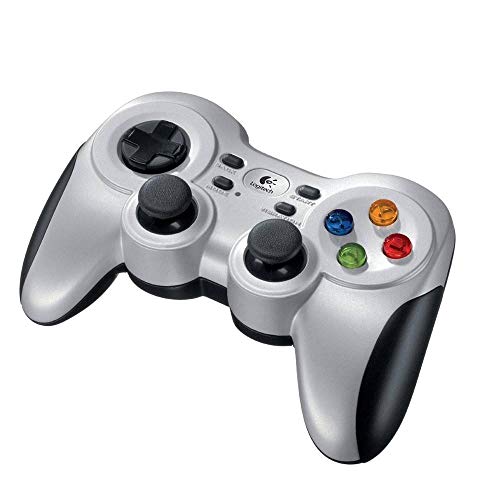


Logitech G F710 Wireless Gamepad 4 photos from the Amazon listing
Best for: Cord-free living room and PC action gaming
Pros
- 4 GHz wireless Nano receiver
- Dual vibration feedback motors
- Profiler software keyboard emulation
- Familiar 15-button console layout
Cons
- Requires two AA batteries
- Heavier than corded models
The Logitech G F710 Wireless Gamepad represents Logitech’s untethered solution for traditional PC gaming layouts, packaging dual-motor vibration feedback into an ergonomic silver and black chassis. Operating over a dedicated 2.4 GHz wireless connection, this logitech wireless pc controller relies on a compact Plug-and-Forget USB Nano-receiver designed to minimize transmission latency, packet loss, and signal dropouts even in environments dense with wireless traffic. Weighing 290 grams with its two AA batteries installed, the unit exhibits a solid, reassuring center of gravity compared to lightweight corded gamepads. The 15-button interface layout provides complete parity with classic console input arrangements, enabling players to execute intricate combinations without adjusting their hand positioning or finger memory. For players pairing their setup with standard desktop components like a keyboard and mouse logitech arrangement, the F710 integrates cleanly through plug-and-play driver recognition.
Internally, the F710 is engineered for versatile backward and forward operating system support, officially validated across Windows 7, 8, 8.1, 10, and 11, alongside ChromeOS devices. Its primary immersion feature is the dual vibration feedback motor array, which delivers dynamic physical rumble during in-game impacts, engine rumbles, and environmental collisions in titles supporting haptic feedback. To overcome the challenges of retro game emulation and legacy software lacking modern controller APIs, Logitech provides dedicated Profiler software. This mapping suite allows users to program the controller to simulate standard keyboard and mouse keystrokes, effectively converting directional pad movements and button clicks into desktop actions. The reliance on standard AA batteries eliminates internal battery degradation, ensuring the controller remains operational over extended multi-year deployments simply by swapping power cells.
This wireless model suits gamers seeking a clutter-free desk or living room media center setup who require standard dual-analog control without running tethered lines to their computer tower. While it offers superior mobility and tactile rumble over its wired counterpart, the added weight of the AA batteries and the necessity of keeping spare cells on hand make it distinct from purely corded peripherals. Shoppers deciding between portable gamepad devices and premium alternatives like a playstation elite controller will appreciate the F710 for its broad legacy compatibility and native Windows driver integration. However, users exclusively playing seated at a desk directly adjacent to their PC tower might find the lighter mass of a tethered alternative more suitable for marathon sessions.
Logitech G X56 H.O.T.A.S Throttle for Space and Flight Simulation


Logitech G X56 H.O.T.A.S Throttle 4 photos from the Amazon listing
Best for: Dedicated space and flight simulation enthusiasts
Pros
- 16-bit Hall-effect magnetic sensors
- Twin throttles with friction adjuster
- Customizable 4-spring resistance system
- Over 189 programmable controls
Cons
- Requires two USB 2.0 ports
- Demands substantial desk space
The Logitech G X56 H.O.T.A.S Throttle is an enthusiast-level simulation control suite designed specifically to fulfill the stringent telemetry demands of modern flight simulators and 6 Degrees of Freedom (6DoF) space exploration titles. Finished in a matte black and gray aesthetic, this dual-unit peripheral set combines a dedicated flight stick and an independent split throttle assembly weighing a combined 6.9 pounds for rock-solid desktop stability. Under the hood of the primary flight stick, Logitech implements 16-bit non-contact Hall-effect sensors across the aileron and elevator axes. By measuring magnetic flux rather than mechanical potentiometer contact, these sensors virtually eliminate physical sensor wear while tracking minute stick deviations with surgical precision. To customize physical resistance, the package features an advanced four-spring mechanism, letting pilots swap internal springs to tailor the centering tension to their exact preference.
Complementing the precision joystick is a twin throttle quadrant equipped with an integrated friction adjuster and a manual throttle lock, enabling pilots to control dual-engine aircraft independently or lock the levers together for single-engine craft. Both the flight stick and throttle units incorporate dedicated mini analog stick control surfaces, granting direct 6DoF translation across pitch, roll, yaw, forward, backward, lateral, and vertical thrust vectors, as well as independent gimballed targeting systems. The peripheral provides 24 physical buttons, which expand to over 189 programmable commands via Logitech’s customization software suite. For pilots navigating in virtual reality environments, button spacing, surface textures, and rocker switch shapes were engineered to allow blind, tactile identification without lifting a headset. Customizable RGB backlighting across both units allows visual integration with existing gaming setups.
As a dedicated logitech flight sim controller, the X56 HOTAS is tailored exclusively for simulation enthusiasts operating complex aerospace software who require granular axis control far beyond what traditional gamepads can register. Gamers who already invest in advanced desk setups, such as those using a logitech stick shift for automotive racing, will recognize the simulation fidelity that independent throttles and physical toggle switches provide. However, this level of control complexity requires two dedicated USB 2.0 ports and considerable desk surface area to accommodate the separate 7.28 by 8.86 by 3.54-inch footprints. It gives way to standard gamepads for casual platformers or twin-stick arcade games, where the compact form factor of a traditional controller remains vastly superior.
Logitech G F310 Wired Gamepad Controller for Direct Plug-and-Play Value


Logitech G F310 Wired Gamepad Controller 2 photos from the Amazon listing
Best for: Tethered desktop gaming and retro emulation
Pros
- Zero-latency direct USB connection
- Responsive floating four-switch D-pad
- Lightweight 14.4-ounce chassis
- Broad compatibility including ChromeOS
Cons
- Lacks vibration feedback motors
- Tethered by six-foot cable
The Logitech G F310 Wired Gamepad Controller serves as Logitech’s dedicated corded solution for traditional PC gameplay, sporting a distinct blue and black color scheme. Weighing 14.4 ounces and powered directly through an integrated six-foot USB cable, this logitech wired gamepad pc removes power management concerns entirely by drawing electric current straight from the PC motherboard bus. Its signature mechanical asset is the proprietary floating directional pad, which rests upon four individual tactile switches rather than a conventional single central pivot point. This mechanical arrangement drastically diminishes diagonal mushiness and accidental input bleed, providing sharp, responsive direction changes essential for fighting games, retro platformers, and arcade side-scrollers. Rubberized side grips integrated into the contoured handles ensure stable hand placement during intense gaming sequences.
On the input front, the F310 houses a 10-button programmable layout paired with an 8-way programmable D-pad and twin analog thumbsticks arranged in a symmetrical layout. Like its wireless sibling, the F310 utilizes Logitech Profiler software to bridge the gap between contemporary titles and legacy games that lack built-in controller drivers, allowing players to map keyboard strokes and mouse movements directly to the gamepad switches. While the F310 does not include the dual vibration feedback motors found in the wireless F710, this omission significantly reduces physical heft, making it effortless to hold for marathon gaming sessions without wrist fatigue. The controller holds broad system verification, maintaining compatibility with desktop Windows PCs, Chromebook-certified devices, and Android TV streaming platforms.
The F310 is the quintessential match for practical PC gamers who prioritize zero latency, zero wireless interference, and zero battery maintenance. It offers instantaneous input transmission via its direct USB tether, making it an exceptional plug-and-play peripheral for desktop workstations, emulation rigs, and tournament fighting games where millisecond input response is vital. While simulation enthusiasts will naturally default to the multi-axis complexity of the X56 HOTAS and living room players may favor the cord-free freedom of the F710, the F310 remains the benchmark baseline gamepad for reliable, distraction-free control.
How to Choose the Right Logitech PC Controller
Executing an objective logitech pc controller comparison requires evaluating your gaming genre library against the input hardware architecture each device provides. Modern PC gaming relies on standardized APIs to interpret controller button presses and joystick deflection, primarily splitting between DirectInput and XInput protocols. In any logitech gamepad directinput xinput evaluation, standard gamepad models like the F310 and F710 deliver essential versatility by handling modern titles alongside retro software. For classic releases lacking native controller APIs, Logitech Profiler software provides custom mapping layers that assign keystrokes directly to physical buttons, guaranteeing that older games remain fully playable.
Connectivity architecture represents the second critical pivot when deciding which logitech controller to buy. The wired F310 utilizes a hardwired six-foot USB cable, drawing electric current straight from the USB bus and eliminating latency variables, signal dropouts, and battery drain. In contrast, the F710 deploys a 2.4 GHz wireless connection via a compact USB Nano receiver. While the F710 liberates the player from desk cable clutter and allows comfortable couch play, it introduces a 290-gram operational weight due to its dual AA batteries and requires keeping fresh power cells on hand. Flight enthusiasts considering the X56 HOTAS face an entirely different physical requirement: it demands two separate USB 2.0 ports and a dedicated desktop footprint to accommodate twin 2-meter cables.
Sensor precision and mechanical actuation mechanisms dictate how each controller performs within its target software environment. The F310 and F710 feature a unique floating D-pad resting on four distinct internal switches. Unlike traditional gamepads that utilize a single center pivot where directional inputs can rock unpredictably, Logitech’s four-switch cluster delivers distinct tactile feedback and precise directional registration. For flight and space simulation, standard thumbsticks fail to provide adequate control resolution. The X56 HOTAS solves this by utilizing 16-bit Hall-effect magnetic non-contact sensors on its primary axes, translating subtle wrist movements into sub-millimeter flight adjustments while avoiding the mechanical potentiometer wear that plagues standard thumbsticks over time.
Finally, your physical workspace and the specific game genres you play must guide the selection. The F310 and F710 excel across platformers, third-person action games, sports titles, and racing games, offering compact form factors that store easily in a desk drawer. Conversely, the X56 HOTAS is a specialized command center purpose-built for space combat simulators, civilian flight training platforms, and virtual reality cockpits. Its dual throttles, multi-axis analog thumbsticks, and spring-tensioned stick provide tactile immersion that a standard twin-stick gamepad cannot replicate, making it the definitive option for dedicated flight sim pilots willing to allocate dedicated desk space.
FAQ
How do Logitech gamepads manage compatibility across older and modern PC games?
Logitech gamepads achieve universal PC game support by accommodating both modern input protocols and legacy software standards. For games that lack native gamepad recognition entirely, Logitech provides downloadable Profiler software. This utility enables users to assign standard keyboard strokes and mouse cursor commands directly to the controller buttons and analog sticks, allowing the gamepad to interface seamlessly with classic retro titles and desktop applications.
What are the primary functional differences between the F310 and F710 gamepads?
The primary functional differences center on connectivity, haptic feedback, and overall mass. The F310 is a corded USB controller weighing 14.4 ounces with a six-foot cable and does not contain vibration feedback hardware. The F710 is an untethered 2.4 GHz wireless controller that includes dual vibration feedback motors, weighs 290 grams, and draws operational power from two AA batteries.
How do the Hall-effect sensors on the X56 HOTAS improve flight simulation accuracy?
The X56 HOTAS utilizes 16-bit Hall-effect sensors across its aileron and elevator axes, which measure changes in magnetic fields rather than relying on physical contact wipers found in traditional potentiometers. This magnetic sensing eliminates friction-based component wear, prevents stick drift over time, and delivers ultra-fine 16-bit positional resolution for sub-millimeter flight vector adjustments.
Can the Logitech X56 HOTAS throttle be split for twin-engine aircraft control?
Yes, the throttle quadrant on the X56 HOTAS features a twin-throttle design equipped with an integrated throttle lock. When flying multi-engine aircraft, the lock can be disengaged to manage port and starboard engine power independently. When operating single-engine aircraft or standard space vessels, the physical lock binds both levers together to operate as a single synchronized throttle unit.
Why does Logitech utilize a floating D-pad on its PC gamepads?
Traditional gamepads typically mount the directional pad on a single central pivot point, which can cause the pad to rock inadvertently and trigger false diagonal inputs. Logitech’s floating D-pad design suspends the directional surface over four independent tactile switches, ensuring that directional presses register cleanly with distinct mechanical feedback and minimal input crossover.


