As Amazon Associates, we earn from qualifying purchases. This means we may receive a small commission at no extra cost to you if you click through and make a purchase.
Lenovo has established a formidable presence in PC peripherals through its performance-oriented Legion and core gaming hardware lineups. Rather than chasing fleeting aesthetic trends, the brand engineers mice around functional chassis stability, consistent sensor performance, and switch durability designed to endure rigorous daily competitive play. Shoppers surveying the catalog will encounter a cohesive industrial design language, but under the hood, each model targets a clearly defined performance bracket and grip philosophy.
While sharing common engineering principles, the models in this lineup diverge sharply in weight class, sensor capabilities, switch architecture, and connectivity—ranging from ultra-dense customizable wired palm-grip anchors to sub-60-gram tournament-grade wireless pointers.
Lenovo Gaming Mice Compared
| Model | Sensor & Tracking | Switch Rating | Weight | Connectivity |
|---|---|---|---|---|
| Lenovo Legion M220 Wireless RGB Gaming | 5,000 DPI, 80 IPS, 30G | 20 Million Clicks | ~95g | Tri-Mode (Bluetooth, 2.4GHz, USB-C) |
| Lenovo M210 RGB Wired Gaming Mouse | 8,000 DPI, 300 IPS, 35G | 20 Million Clicks | 75g | Wired USB |
| Lenovo Legion M410 Wireless RGB Gaming | 16,000 DPI, 400 IPS, 40G | Not listed | 100g | 2.4GHz Wireless, USB-C Wired |
| Lenovo Legion M600s RGB Wireless Gaming | Pixart 3370 (19,000 DPI, 400 IPS) | 80 Million Clicks (Optical) | 69g | Tri-Mode (Bluetooth, 2.4GHz, USB-C) |
| Lenovo Legion M500 RGB Gaming Mouse | 16,000 DPI, 400 IPS, 50G | 50 Million Clicks (Omron) | Not listed (with +10g weight) | Wired USB |
| Lenovo Legion M300s RGB Wired Gaming | 8,000 DPI, 220 IPS | 20 Million Clicks (Omron) | 57g | Wired USB |
Table from this guide — scroll sideways for the remaining columns.
Lenovo Legion M220 Wireless RGB Gaming for Multi-Device Versatility


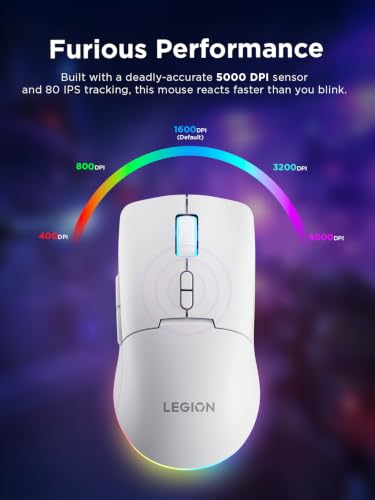

Lenovo Legion M220 Wireless RGB Gaming 4 photos from the Amazon listing
Best for: Multi-device wireless palm grip setups
Pros
- Tri-mode wireless flexibility
- 100-hour battery runtime
- Driverless RGB controls
Cons
- 95g heavier chassis
- 80 IPS tracking limit
The Lenovo Legion M220 Wireless RGB Gaming mouse is engineered as a flexible hybrid peripheral, bridging casual daily computing and dedicated desktop gaming sessions. Built around a versatile tri-mode connectivity architecture, it allows players to transition effortlessly between low-latency 2.4GHz wireless, multi-device Bluetooth, and standard wired USB-C tethering. Finished in a Glacier White chassis, this peripheral sports a symmetrical medium-to-large shell tailored predominantly for palm grip comfort, making it a reliable option for players who alternate between office multitasking and after-hours gaming.
Tracking duties are handled by an optical sensor capable of reaching up to 5,000 DPI, supported by tracking speeds of 80 IPS, 30G acceleration, and a rapid 1000Hz polling rate. Durability is governed by primary mechanical switches rated for a 20-million-click lifecycle across its 7 buttons. Powering the wireless assemblies is an internal 800mAh rechargeable cell that delivers over 100 hours of continuous runtime with RGB lighting turned off, recharging to full capacity in approximately two hours over USB-C. The dynamic two-zone RGB lighting requires zero companion software, relying instead on integrated button and scroll-wheel shortcuts for quick on-the-fly customization.
This model is an exceptional fit for generalists seeking an affordable lenovo wireless gaming mouse that eliminates desk clutter and interfaces easily with multiple systems. However, fast-twitch esports enthusiasts playing high-velocity first-person shooters may find the 80 IPS tracking speed and 95-gram chassis limiting, naturally steering competitive competitors toward lighter, higher-velocity models in the lineup.
Lenovo M210 RGB Wired Gaming Mouse for Value-Driven Precision


Lenovo M210 RGB Wired Gaming Mouse 4 photos from the Amazon listing
Best for: Budget palm grip desktop play
Pros
- 75g lightweight frame
- 300 IPS tracking speed
- 5-level on-the-fly DPI switch
Cons
- Wired-only connection
- PVC braided cable
The Lenovo M210 RGB Wired Gaming Mouse delivers essential competitive fundamentals in an accessible, plug-and-play package. Weighing in at an agile 75 grams, this corded mouse avoids the bulk often seen in entry-level peripherals while providing a symmetrical medium-to-large form factor. Lenovo equips the chassis with textured soft side-grips that give palm-grip users solid physical retention during sweeping arm movements, supported by a generous 1.8-meter ultra-soft PVC braided cable designed to minimize desk drag.
Internally, the M210 steps up performance metrics with an adjustable 8,000 DPI sensor capable of handling 300 IPS tracking speeds and 35G acceleration at a crisp 1000Hz polling rate. A dedicated on-the-fly 5-level DPI switch lets gamers shift cursor velocity across tasks without diving into software control panels. Actuation is reinforced by physical switches rated for 20 million clicks, and the unit boasts 7 programmable buttons to assign macros or critical in-game keybinds. A configurable 3-zone RGB lighting setup allows users to match illumination with their desktop setup.
For players assembling an initial gaming rig or looking for a lean wired backup, the lenovo m210 strikes a balance between weight and tracking speed. It suits budget-conscious palm grippers who want zero wireless latency or charging routines, though users looking for higher DPI boundaries or wire-free mobility will look further up the Legion catalog.
Lenovo Legion M410 Wireless RGB Gaming for Mid-Tier Reflex Performance


Lenovo Legion M410 Wireless RGB Gaming 4 photos from the Amazon listing
Best for: Mid-tier palm grip wireless gaming
Pros
- 16,000 DPI sensor
- NVIDIA Reflex compatible
- Smooth PTFE glide feet
Cons
- 100g total weight
- 53-hour battery reserve
Occupying a crucial middle ground in the catalog, the Lenovo Legion M410 Wireless RGB Gaming mouse combines competitive tracking specs with cord-free freedom. Built around a 100-gram symmetrical medium-large shell, the M410 is tailored to support full-palm ergonomics during marathon gaming campaigns. Lenovo outfits the base with smooth PTFE mouse feet to ensure consistent, low-friction glide dynamics across cloth and hard mousepads alike.
Performance is driven by a high-resolution optical sensor reaching up to 16,000 DPI, matched with an aggressive 400 IPS maximum velocity and 40G acceleration. A 5-level on-the-fly DPI toggle provides instant sensitivity stepping during tactical maneuvers. Competitive players benefit directly from official NVIDIA Reflex compatibility, allowing users to measure and minimize system-wide latency when paired with compatible displays and GPUs. The mouse connects via 2.4GHz wireless or through its included 180cm USB-A to USB-C charging cord, with the built-in 800mAh battery providing up to 53 hours of gameplay with RGB illumination disengaged. Lighting personalization includes 2-zone illumination compatible with Microsoft Dynamic Lighting and Lenovo LADM software.
The lenovo legion m410 is the logical answer for gamers seeking competitive-grade sensor speed and NVIDIA Reflex support in a palm-filling wireless form factor. It gives way to lighter models only for users who find 100 grams too substantial for micro-adjustment aiming styles.
Lenovo Legion M600s RGB Wireless Gaming for Ultralight Esports Speed


Lenovo Legion M600s RGB Wireless Gaming 4 photos from the Amazon listing
Best for: Competitive esports claw grip players
Pros
- 69g ultralight frame
- Pixart 3370 optical sensor
- 80M click optical switches
Cons
- Single colorway
- Requires receiver extension for desk
The Lenovo Legion M600s RGB Wireless Gaming represents the pinnacle of competitive engineering within the brand’s peripheral portfolio. Tipping the scales at a remarkably light 69 grams without resorting to external honeycomb cutouts, this flagship mouse is engineered specifically for competitive claw and fingertip grip players who require effortless cursor acceleration. Its sleek Iron Grey frame is anchored by 100% pure PTFE glide feet, ensuring buttery, zero-drag surface tracking.
At the heart of the M600s lies the esports-proven Pixart 3370 optical sensor, delivering a native 19,000 DPI resolution, 400 IPS tracking, and rapid target acquisition. Mechanical failure is virtually eliminated thanks to optical micro-switches deployed under the primary left and right click plates, rated for an impressive 80-million-click lifespan with ultra-fast light-beam actuation. The mouse offers versatile tri-mode connectivity, operating via low-latency 2.4GHz wireless (complete with a dedicated USB-A receiver and extension adapter), Bluetooth, or wired USB-C. Battery endurance reaches up to 70 hours with lights off, complemented by a rapid-charging system that yields 10 hours of gameplay from a quick 10-minute top-up.
When selecting the best lenovo mouse for gaming at the highest competitive level, the lenovo legion m600s is the premier pick. Serious tournament players pairing this with high-refresh systems like a lenovo gaming laptop get unmatched click speed, true tracking fidelity, and featherweight maneuverability in one package.
Lenovo Legion M500 RGB Gaming Mouse for Tunable Ergonomic Stability


Lenovo Legion M500 RGB Gaming Mouse, Up to 16000 4 photos from the Amazon listing
Best for: Tactical shooters wanting modular weight
Pros
- Removable 10g magnetic weight
- 50M click Omron switches
- 3 onboard memory profiles
Cons
- Fixed USB cable
- Right-hand specific shape
The Lenovo Legion M500 RGB Gaming Mouse takes a decidedly classic approach to competitive hardware, prioritizing ergonomic hand support, mechanical switch feedback, and customizable ballast. Sculpted specifically for right-handed palm-grip players, the M500 features heavily textured side grips designed to keep the hand stable and relaxed across extended gameplay. A distinctive feature is its modular underbelly, which includes a removable 10-gram magnetic weight cartridge that allows users to manually balance center-of-gravity and physical inertia.
Under the hood, the M500 features a precision optical engine tracking up to 16,000 DPI with 50G acceleration and a 400 IPS velocity ceiling, operating at a clean 1000Hz polling rate. Actuation is driven by genuine Omron mechanical microswitches rated for 50 million clicks, providing crisp, tactile button feedback. The peripheral houses 7 fully programmable buttons supported by three onboard memory profiles, allowing users to transport hardware-level macros and lighting profiles across computers without re-installing software. Aesthetics are elevated by three distinct, configurable 16.8-million-color RGB zones across the scroll wheel, palm rest, and rear skirt.
The lenovo legion m500 is ideal for tactical shooter enthusiasts and MMO gamers who favor a grounded, sculpted mouse with tactile resistance and physical heft over modern featherweight shells. It concedes to other Legion models only if you prioritize wireless mobility or ambidextrous fingertip control.
Lenovo Legion M300s RGB Wired Gaming for Agile Competitive Play


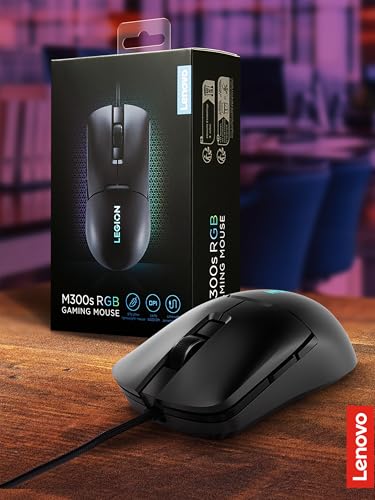

Lenovo Legion M300s RGB Wired Gaming Mouse - 8,000 4 photos from the Amazon listing
Best for: High-speed fingertip twitch gaming
Pros
- 57g featherweight construction
- 100% PTFE glide feet
- NVIDIA Reflex verified
Cons
- Wired tether
- 8,000 DPI ceiling
The Lenovo Legion M300s RGB Wired Gaming mouse is engineered with an uncompromising focus on low mass and rapid handling. Stripping away all unnecessary bulk, the M300s lands at a featherweight 57 grams, making it the lightest pointer in Lenovo’s entire gaming portfolio. Its symmetrical small-to-medium silhouette is meticulously contoured for claw and fingertip grip users who rely on rapid wrist and finger micro-adjustments for flick-shots.
Tracking is managed by a tuned 8,000 DPI optical sensor capable of 220 IPS velocity, managed via 6 programmable buttons and tactile on-the-fly DPI switching. Lenovo incorporates premium Omron mechanical microswitches rated for 20 million actuations, providing crisp tactile feedback without mushiness. The underside features edge-to-edge 100% PTFE mouse feet that eliminate friction on desktop surfaces. To confirm its competitive credentials, the M300s is officially verified for NVIDIA Reflex, enabling low input lag measurements when paired with high-performance displays. A personalized 16.8-million-color RGB Legion logo provides tasteful visual flair without bloating chassis weight.
For players focused on fast-paced arena shooters where every gram of inertial resistance counts, the lenovo legion m300s is an exceptional wired tool. It easily outmaneuvers heavier models in raw speed, though users with larger hands or a strict preference for full palm resting will prefer the larger chassis found on the M410 or M500.
How to Choose the Right Lenovo Gaming Mouse
Selecting the optimal pointer from this lineup comes down to matching sensor capability, physical chassis geometry, switch mechanics, and weight to your specific gaming genre. A thorough lenovo gaming mouse comparison reveals that Lenovo deliberately segments its products into distinct functional categories rather than simple tier upgrades. When upgrading an esports battlestation running alongside lenovo – legion hardware, analyzing hardware specifications ensures your chosen peripheral complements your natural playstyle.
- Chassis Weight and Grip Style: Hand mechanics dictate your comfort and aiming accuracy. Players utilizing a fingertip or aggressive claw grip will benefit dramatically from the featherweight 57-gram M300s or the 69-gram M600s, both of which reduce wrist fatigue during high-speed flicking. Conversely, palm grip players who stabilize their entire hand on the shell should look toward the 95-gram M220, the 100-gram M410, or the ergonomically contoured M500, the latter offering an extra 10-gram magnetic weight for users who prefer grounded tactile stability.
- Sensor Tracking and Acceleration: Casual gaming and standard desktop productivity require modest tracking ceilings, making the 5,000 DPI sensor on the M220 or the 8,000 DPI sensor on the M210 and M300s more than adequate. However, competitive tactical shooters demand maximum IPS (inches per second) ratings to prevent sensor spin-outs during aggressive arm swipes. The M410 and M500 jump to 400 IPS with 16,000 DPI ceilings, while the elite Pixart 3370 sensor on the M600s pushes tracking precision to 19,000 DPI and 400 IPS for flawless tracking integrity.
- Switch Durability and Actuation Tech: Switch engineering directly impacts long-term reliability. The M210, M220, and M300s deploy mechanical switches rated for 20 million clicks, providing dependable tactile actuation. The M500 upgrades to heavy-duty Omron switches certified for 50 million clicks. At the absolute top tier, the M600s integrates advanced optical micro-switches rated for 80 million clicks; because optical switches actuate via light beams rather than physical metal contact plates, they virtually eliminate debounce delays and accidental double-clicking.
- Connectivity and Portability: Determining which lenovo gaming mouse to buy often hinges on wire management. If zero-latency corded simplicity is your goal, the wired M210, M300s, and M500 provide uninterrupted plug-and-play operation. For wire-free gaming, the M410 provides reliable 2.4GHz wireless, while the M220 and M600s incorporate tri-mode functionality (Bluetooth, 2.4GHz, and wired USB-C), letting you toggle between desktop gaming and laptop productivity on the fly. Pairing an agile wireless pointer with high-spec rigs like lenovo legion rtx 5070 builds keeps your playing station immaculate and responsive.
FAQ
Which Lenovo gaming mouse is best for competitive FPS gaming?
The Lenovo Legion M600s RGB Wireless Gaming mouse stands as the premier choice for competitive first-person shooters. Its combination of an ultralight 69-gram chassis, a top-tier Pixart 3370 optical sensor tracking at 400 IPS and 19,000 DPI, 80-million-click optical switches, and official NVIDIA Reflex verification gives competitive players the fastest possible sensor response and click latency without cord drag.
Are Lenovo Legion gaming mice compatible with Mac and Linux?
Yes, Lenovo gaming mice operate on standard USB human interface device (HID) protocols, ensuring primary tracking, scroll functions, and standard button clicks work across Windows, macOS, and Linux. Specific models like the M600s and M410 explicitly list cross-platform operating system compatibility in their technical specifications. However, specialized configuration suites like Lenovo LADM or Microsoft Dynamic Lighting features are primarily optimized for Windows environments.
What are the benefits of NVIDIA Reflex compatibility in Lenovo mice?
Mice such as the Legion M600s, M410, and M300s feature official NVIDIA Reflex compatibility. When connected to a Reflex-compatible display and graphics card, the system can measure end-to-end input lag—from the exact millisecond you click the physical switch to the moment the muzzle flash renders on screen. This helps competitive gamers diagnose latency bottlenecks and configure their hardware for the lowest input latency possible.
Do Lenovo wireless gaming mice require software to adjust RGB lighting?
Not all models require companion software. The Lenovo Legion M220 features onboard driverless RGB control, allowing users to cycle lighting effects directly through button and scroll wheel combinations. Other models, such as the Legion M410, support native Windows features like Microsoft Dynamic Lighting alongside Lenovo’s LADM software, while the M500 stores up to three lighting and macro profiles directly in onboard hardware memory.
Can I adjust the physical weight of a Lenovo gaming mouse?
Among Lenovo’s current lineup, the Lenovo Legion M500 RGB Gaming Mouse uniquely features a modular weight tuning system. It includes an integrated, removable 10-gram magnetic weight cartridge located in its base, enabling gamers to toggle between a standard chassis weight and a weighted, high-inertia setup to suit specific aiming preferences.


