As Amazon Associates, we earn from qualifying purchases. This means we may receive a small commission at no extra cost to you if you click through and make a purchase.
Corsair has established a dominant hardware footprint in custom PC cooling and addressable chassis illumination, developing proprietary digital communication protocols alongside standard header interfaces to synchronize fan speeds and complex lighting effects. In modern performance computing, integrating a corsair argb hub requires an exacting technical appraisal of motherboard communication paths, pulse-width modulation signaling boundaries, and addressable illumination channel capacities. Modern chassis configurations frequently demand a synthesis of legacy four-pin PWM and three-pin ARGB connections with advanced digital serial buses, all while coordinating multiple hardware telemetry streams through the Corsair iCUE software suite. Choosing the correct interface hardware dictates whether a cooling setup maintains granular, stable control or suffers from data signaling bottlenecks, excessive cable mass, and exhausted motherboard USB headers.
Across the manufacturer’s specialized catalog, these three hardware units fulfill distinct roles across system topologies: the hybrid controller bridges conventional PWM fans into digital architectures, the dedicated system hub powers high-density single-cable component loops, and the internal four-port expansion hub supplies the necessary motherboard USB signaling channels required to drive multiple smart controllers simultaneously. Navigating which corsair rgb hub to buy depends entirely on whether your build relies on standard daisy-chained headers, proprietary bus networks, or expanded internal 9-pin USB 2.0 communication ports to maintain unified cooling telemetry.
Corsair RGB Hubs Compared
| Model | Primary Interface & Channels | Maximum Device Capacity | Dimensions & Weight | Mounting & Power Delivery |
|---|---|---|---|---|
| CORSAIR Commander Duo iCUE Link RGB | 2 ARGB channels, 2 PWM channels, 1 iCUE LINK bridge interface | Up to 12 daisy-chained PWM ARGB fans (6 per channel) | 3.62 x 2.08 x 0.74 inches; 1.86 ounces | Magnetic enclosure; input power not listed |
| CORSAIR iCUE Link System Hub | 2 iCUE LINK digital bus distribution ports | Up to 24 iCUE LINK devices (up to 7 per port listed in description) | 2.05 x 2.05 x 0.71 inches; 3.17 ounces | Magnetic attachment; input power not listed |
| Corsair Internal 4-Port USB 2.0 Hub | 4 internal 9-pin USB 2.0 ports (480Mbps aggregate bandwidth) | 4 internal USB 2.0 hardware devices | 1.97 x 3.35 x 0.63 inches; 2.72 ounces | Magnetic housing; dedicated SATA power connection |
Table from this guide — scroll sideways for the remaining columns.
CORSAIR Commander Duo iCUE Link RGB for Hybrid PWM and Digital Builds


CORSAIR Commander Duo iCUE Link RGB 4 photos from the Amazon listing
Best for: Hybrid builds mixing PWM fans with iCUE LINK
Pros
- Controls 12 daisy-chained fans
- Two ARGB and PWM channels
- Two thermal probes included
- Acts as iCUE LINK bridge
Cons
- Cap of 50 LEDs per channel
- Requires System Hub for LINK mode
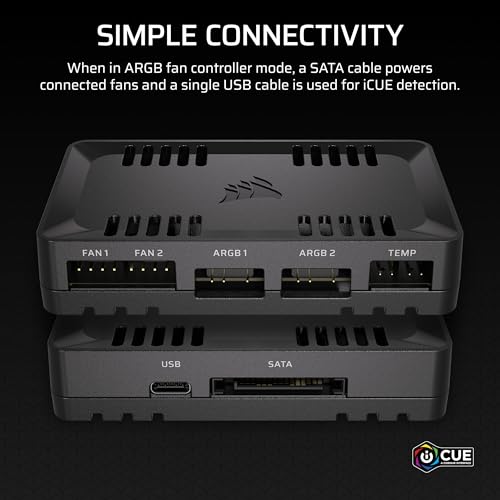
The CORSAIR Commander Duo iCUE Link RGB functions as a dual-role interface engineered to unite standard cooling hardware with next-generation smart ecosystems. Identified under manufacturer model number CL-9011141-WW, this compact controller measures 3.62 by 2.08 by 0.74 inches and weighs 1.86 ounces. Operating as an intelligent corsair pwm argb controller, it features two distinct functional modes: a standalone dual-channel fan controller capable of powering up to 12 daisy-chained PWM and addressable RGB fans, and an iCUE LINK digital bridge that activates when linked to an external System Hub. This dual-mode design ensures that builders are not forced to discard traditional four-pin PWM cooling hardware when expanding their systems into modern digital control topologies.
From a hardware connectivity standpoint, the Commander Duo divides device management across two dedicated channels, with each physical channel engineered to support up to six daisy-chained fans. This configuration doubles the fan support density found on the preceding Commander Core XT controller, significantly streamlining cable routing behind the motherboard tray. Each ARGB channel supports synchronization for up to 50 individual LEDs, permitting broad illumination arrays across grouped fan frames. Corsair also includes two flexible external temperature sensors in the package. These dedicated probes can be positioned in critical thermal zones—such as adjacent to PCIe expansion slots, power delivery heatsinks, or mechanical drive cages—relaying granular thermal data directly to the iCUE software engine to generate automated, reactive cooling curves.
This controller is optimal for enthusiasts managing complex chassis configurations that mix standard PWM fans with newer digital cooling hardware. By consolidating group fan speed adjustments, automated fan detection, and synchronized lighting effects into a single interface, it provides comprehensive hardware management without requiring proprietary cable standards for every connected fan. However, for builders designing an entirely fresh system based exclusively on Corsair’s proprietary single-cable hardware bus, the Commander Duo yields priority to the more streamlined, higher-capacity iCUE LINK System Hub.
CORSAIR iCUE Link System Hub for High-Density Cable Consolidation



CORSAIR iCUE Link System Hub 4 photos from the Amazon listing
Best for: Single-cable cable reduction in pure LINK setups
Pros
- Supports up to 24 devices
- Single-cable bus architecture
- Automated software hardware detection
- Compact magnetic chassis
Cons
- Lacks standard 4-pin PWM headers
- Requires proprietary LINK hardware
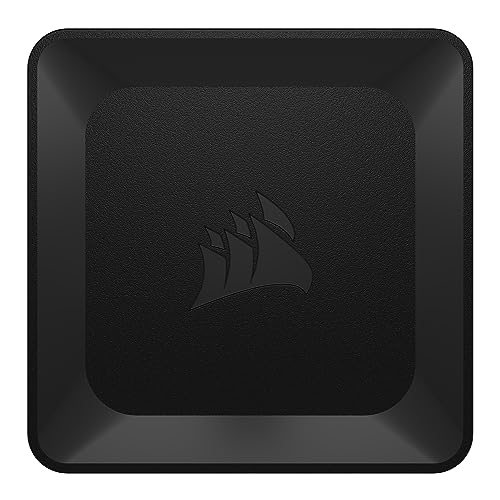
The CORSAIR iCUE Link System Hub represents a radical departure from traditional multi-cable fan wiring, serving as the centralized controller for the company’s single-cable digital architecture. Carrying model number CL-9011116-WW, the device is housed in a compact square enclosure measuring 2.05 by 2.05 by 0.71 inches and weighing 3.17 ounces. Built with an integrated magnetic base, the controller secures directly to steel chassis panels, preserving internal space in high-density builds. Instead of running discrete power, PWM tachometer, and addressable RGB wiring harnesses from every individual fan back to a bulky controller, the System Hub deploys a unified digital bus topology that transmits power, system telemetry, and complex lighting instructions across a single interconnected chain.
The physical hardware interface comprises two primary distribution ports capable of coordinating up to 24 iCUE LINK devices across the system. The product documentation notes that each individual port directly accommodates up to seven devices in sequence, while the overall controller logic manages up to 24 interconnected components, including chassis fans, all-in-one CPU liquid coolers, and custom water-cooling blocks. Connected devices are identified instantly through automated hardware detection within the Corsair iCUE software, which indexes device configurations without requiring manual channel assignment or pin configuration during system initialization.
This controller is engineered specifically for performance-focused builders who prioritize pristine cable management and dense component configurations. By collapsing complex fan wiring into a clean, daisy-chained infrastructure, it dramatically reduces the time and space needed for chassis cable routing. Nevertheless, because the System Hub operates strictly within the proprietary iCUE LINK digital communication protocol and omits traditional four-pin PWM and three-pin ARGB headers, it gives way to the Commander Duo whenever standard off-the-shelf fans or conventional lighting accessories must be integrated into the system.
Corsair Internal 4-Port USB 2.0 Hub for Header Expansion and Controller Connectivity


Corsair Internal 4-Port USB 2.0 Hub 4 photos from the Amazon listing
Best for: Expanding motherboard internal USB 2.0 headers
Pros
- Four internal 9-pin USB ports
- Dedicated SATA power input
- Wide AMD and Intel compatibility
- Magnetic mounting enclosure
Cons
- Shared 480Mbps total bandwidth
- No onboard fan or RGB headers
The Corsair Internal 4-Port USB 2.0 Hub addresses the signaling bottlenecks that frequently arise when coordinating multiple intelligent hardware controllers inside a modern chassis. Housed within a magnetic enclosure measuring 1.97 inches long, 3.35 inches wide, and 0.63 inches high, the unit weighs 2.72 ounces and attaches firmly to any flat steel surface inside the PC frame. Its low-profile design allows it to fit into tight chassis compartments, including compact Mini-ITX cases where clearance between the motherboard tray and outer side panels is severely restricted.
The hardware architecture expands a single internal 9-pin USB 2.0 motherboard header into four independent 9-pin USB 2.0 connections, delivering up to 480Mbps of aggregate data bandwidth. To eliminate the voltage fluctuations and dropped signals common to passive header splitters, this hub incorporates a dedicated SATA power connection that draws regulated current directly from the system power supply. The expansion hub provides universal hardware communication across modern AMD and Intel motherboards, with platform operating system compatibility spanning Windows, Linux, and macOS environments.
This expansion device is vital for configurations where multiple internal USB-driven components—such as smart power supply units, AIO liquid cooler pumps, and dedicated RGB controllers—exceed the limited header count provided by modern motherboards. Rather than risking hardware disconnections or communication lag across unpowered splitters, system builders can route all device telemetry into this stabilized hub. It does not provide direct PWM fan headers or ARGB signal pins, meaning it serves as an infrastructure backbone that complements primary controllers like the Commander Duo and System Hub rather than replacing them.
How to Choose the Right Corsair RGB Hub
Determining the ideal hardware configuration requires analyzing fan connection standards, device density, and internal motherboard signaling capacity. A thorough corsair rgb hub comparison begins with identifying the physical wiring standards utilized by your cooling hardware. If your chassis utilizes conventional four-pin PWM fans alongside standard addressable RGB connections, deploying a hybrid corsair fan controller hub like the Commander Duo is essential. Its dual-channel layout supports up to 12 daisy-chained fans while preserving granular RPM regulation and lighting synchronization across two distinct 50-LED channels.
When weighing a fresh build design, the debate surrounding icue link vs commander duo centers on cable architecture versus backward compatibility. The iCUE LINK System Hub replaces traditional wiring clutter with an advanced serial bus that links up to 24 smart devices over single-cable runs. However, this system requires components built specifically for the LINK bus standard. Builders upgrading pre-existing systems, such as a Corsair Vengeance PC, must inspect their internal cooling hardware to confirm whether their fans utilize standard separate PWM and ARGB harnesses or proprietary single-cable digital connectors before finalizing a controller purchase.
Addressable lighting limits and physical channel counts must also be evaluated carefully. The Commander Duo enforces a strict boundary of 50 individual LEDs per ARGB channel, meaning that high-density RGB fans with elevated diode counts will restrict how many units can be safely driven on a single channel. Conversely, the iCUE LINK System Hub multiplexes data digitally across its two primary bus ports, allowing higher component counts per channel and leveraging automated hardware recognition within the iCUE software interface to streamline setup.
Finally, builders must account for the underlying USB 2.0 communication backbone on their motherboards. Sophisticated cooling controllers, digital power supplies, and liquid coolers rely on motherboard USB headers to transmit real-time telemetry and receive firmware instructions from the operating system. Because standard consumer motherboards rarely supply more than two internal 9-pin USB headers, deploying an internal expansion hub like the Corsair Internal 4-Port USB 2.0 Hub is frequently necessary to maintain device stability and avoid dropped controller detection in software.
FAQ
Can the Commander Duo control standard PWM fans without an iCUE LINK System Hub connected?
Yes. The Commander Duo operates fully as a standalone PWM and ARGB lighting controller. It natively manages up to 12 daisy-chained standard PWM fans across its two physical channels without requiring any external hardware. The iCUE LINK System Hub is only necessary if you intend to utilize the Commander Duo as a digital bridge within an expanded iCUE LINK single-cable network.
How many devices can be connected to each port on the iCUE LINK System Hub?
According to the manufacturer listing specifications, each of the two physical ports on the iCUE LINK System Hub can accommodate up to seven devices directly, while the overall controller architecture supports a total capacity of up to 24 connected devices across the entire ecosystem. This includes compatible case fans, liquid CPU coolers, and custom liquid cooling hardware components.
Why does the Corsair Internal 4-Port USB 2.0 Hub require a SATA power connection?
The Corsair Internal 4-Port USB 2.0 Hub utilizes a dedicated SATA power connection to deliver steady electrical current to all four connected 9-pin internal devices. Standard motherboard USB 2.0 headers provide limited power, which can lead to voltage instability or communication drops when driving multiple smart controllers. Powering the hub via SATA ensures stable data communication and reliable operation across all connected hardware.
Does the Corsair Internal 4-Port USB 2.0 Hub control fan speeds or RGB lighting directly?
No. The Internal 4-Port USB 2.0 Hub functions exclusively as a data communication and power distribution bridge, offering up to 480Mbps of aggregate bandwidth across four 9-pin headers. It does not feature four-pin PWM fan headers or three-pin addressable RGB headers. Primary cooling controllers such as the Commander Duo or iCUE LINK System Hub must be plugged into its ports to handle fan speed regulation and lighting control.
What function do the temperature sensors serve on the Commander Duo?
The Commander Duo includes two flexible temperature sensors that allow builders to monitor thermal conditions in chassis zones that lack built-in motherboard sensors. By placing these probes near drive arrays, graphics card exhausts, or intake paths, real-time temperature data is transmitted directly into the iCUE software, enabling users to create custom, reactive fan curves based on actual chassis airflow conditions.


